
Hardware risk is the time between a server sending a trouble signal and someone acting on it, and that is where uptime is quietly won or lost. A landmark Google study across thousands of servers found that DRAM throws an average of 3,751 correctable errors per DIMM each year. It showed that roughly 8% of DIMMs exhibit errors annually and the signals arrive long before the failure does.
Two hosts running identical hardware get identical warnings. One finds out during a maintenance window; the other during an outage. That gap is the detection stage of hardware lifecycle management, where the signal exists but nobody acts on it. DedicatedCore and DomainRacer monitor every node continuously and pull failing parts before those parts fail.
Hardware Risk: Understanding Common Hardware Failures
Common Hardware Failures
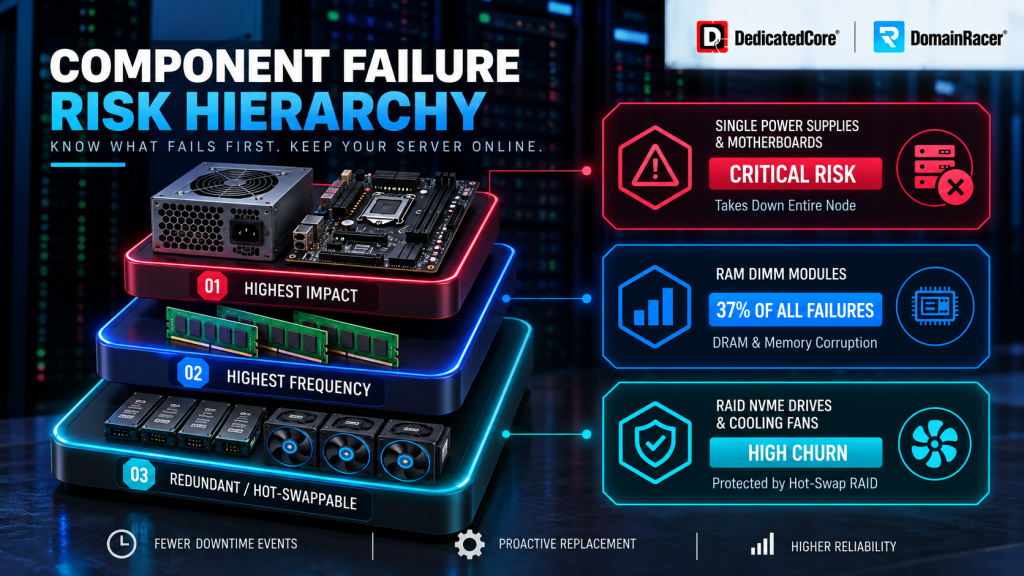
Component degradation does not spread evenly. One broad analysis attributes roughly 37% of all hardware failures to DRAM alone. Which is why memory-error trending sits at the centre of serious monitoring, not at the edge of it.
| Component | Warning signs | Risk if ignored | How we prevent it |
| CPU | Overheating, random crashes, failed boots | System instability, downtime | Thermal monitoring, tested hardware |
| Memory (RAM) | ECC errors, random crashes | Silent data corruption | ECC memory, error-trend alerts |
| Motherboard | POST errors, shutdowns, bulging capacitors | Total server failure | Health checks, on-site spare boards |
| Storage (HDD/SSD) | SMART alerts, slow I/O, rising wear counter | Data loss, downtime | 24/7 SMART, proactive swaps, RAID |
| RAID controller | Degraded array, missing volumes, stalled rebuilds | Whole array unreachable | Current firmware, tested backups |
| Power supply | Random reboots, won’t power on, burnt smell | Surge damage to other parts | Redundant dual PSUs |
| Network card | Dropped links, intermittent connectivity | Service unreachable | Redundant networking, link monitoring |
| Cooling | High temps, fan noise, dust buildup | Overheating, shortened part life | Climate-controlled facility |
Heat needs its own line here. ASHRAE data shows that running servers at 25°C instead of 20°C raises yearly failure rates from about 4% to as high as 43%. Same hardware, much higher risk, decided only by the room temperature.
We rank parts by single point of failure, not by how often they break. A hot-swappable drive fails more often but costs you nothing. A single PSU or boot drive fails rarely and takes the whole node with it, so those get the tightest watch.
10 Hardware Risk Warning Signs Your Server Hardware Is Failing
A healthy server and a dying one look identical from the front of the rack. The difference sits in logs and sensor readings — the places nobody checks until recovery is already underway.
These are the ten signals our engineers alert on:
- Frequent unexpected reboots — usually a power or motherboard fault.
- Slow disk performance — reads and writes that used to be quick start to drag.
- SMART storage alerts — drives track their own health and warn you when it slips.
- Rising ECC memory errors — RAM beginning to corrupt data.
- High operating temperatures — steady heat wears every part in the case.
- Strange fan or drive noises — grinding or clicking means a moving part is going.
- RAID warning messages — the array has lost redundancy and cannot survive a second hit.
- Random crashes with no software cause — usually bad memory or a dying board.
- Intermittent network connectivity — links that come and go point at a failing NIC.
- Hardware errors in the event log — the small entries that tie the whole picture together.
One signal is noise. Several together is a pattern, and a pattern is your last calm window before the hardware picks the timing.
Ask your current host which of these ten they alert on. Most watch three or four.
Hardware Risk Management: The DedicatedCore / DomainRacer Advantage
Every host says they monitor. What differs is what they watch and when you find out.
| What decides your risk | Typical budget host | Average managed host | DedicatedCore / DomainRacer |
| Drive health | You notice, or you don’t | Basic SMART alerts | 24/7 SMART plus wear-trend tracking |
| Memory errors | Untracked | Reactive after a crash | ECC trend alerts before corruption |
| Thermals | Facility-level only | Per-rack readings | Per-node sensors and IPMI baselines |
| RAID arrays | Your responsibility | Alert on degradation | Alert, scheduled scrub, tested rebuild |
| Firmware currency | Your responsibility | On request | Controlled, tested cadence |
| Failing part replaced | After it dies | After it dies | Before it dies, in a quiet window |
| How you find out | An outage | An outage | A maintenance email |
The last row is the whole product. Budget hosts and most managed hosts both replace parts after failure — the difference is only how fast. We replace before, which is why most of the parts we swap never cost a client a minute.
There is a human factor too. Uptime Institute attributes 70–80% of outages partly to people, and 85% of those to skipped procedures. Automated thresholds fire on data instead of memory, which is exactly why we run them.
Critical Dedicated Server Components and Hardware Risk Prediction
Motherboard Failure Symptoms
The board is the layer everything else depends on. When it goes, the CPU, RAM, and drives are all fine and all useless.
- POST errors or no video output on boot.
- Random shutdowns with no thermal or power cause.
- Bulging or leaking capacitors — visible on inspection and terminal.
- Ports or slots dying one by one as traces degrade.
Your data stays safe in a board failure because the drives are not touched. What decides your downtime is whether a matching board is already in the same building. That is the difference between one afternoon and 24 hours dark, and exactly what our hardware replacement SLA commits to in writing.
RAID Controller Failure
A dead controller is worse than a dead drive. Every healthy disk behind it becomes unreachable at once.
- Array shows degraded with no failed member.
- Volumes disappear from the OS entirely.
- Rebuilds stall or restart in a loop.
- Write performance collapses as cache backup fails.
Rebuilds are their own hazard. The strain of rebuilding a degraded array can push a tired second drive over the edge, which is how single failures become total ones.
PSU Failure in Bare Metal
Power supplies fail quietly and take neighbours with them. A degrading PSU delivers dirty voltage long before it stops.
- Random reboots under load, with clean thermals.
- Server won’t power on after a normal shutdown.
- Burnt smell or audible buzzing from the rear of the chassis.
A single PSU is a single point of failure. Redundant dual supplies turn a dead unit into a hot-swap nobody notices — which is why we build them in rather than sell them as an upgrade.
Predicting SSD Failure Before It Happens
SSDs wear with every write. Each has a budget — terabytes written, or TBW — and reliability slides once you cross it.
The good news is that flash warns you first:
- SMART wear counter climbing toward its ceiling.
- Reallocated sector count rising month over month.
- Write latency creeping up while reads stay normal.
We change parts on our schedule, not the drive’s. When a wear counter goes past the limit on Monday, we plan a swap for Friday instead of waiting for a failure, which always happens during a transaction.
Hardware Risk Behind Downtime, Revenue Loss, and Business Disruption
An aging server is a business problem wearing technical clothes. None of it appears on a bill marked “old hardware” — it just bleeds quietly until something breaks.
- Lost revenue —over 90% of enterprises lose more than $300,000 for a single hour offline, according to ITIC.
- Damaged trust —a sluggish site sends customers to a competitor, and slow service rarely gets a second chance.
- Security and compliance exposure — IBM puts the average 2024 breach at $4.88 million and 258 days to contain — and unsupported gear fails PCI and HIPAA requirements outright.
- Rising running costs — Old chips waste power and demand more hands-on maintenance, so your Total Cost of Ownership (TCO) climbs while output falls.
- Capped growth—a box that cannot scale limits the traffic you can handle and the customers you can serve.
For businesses running time-sensitive workloads, the hosting environment also matters alongside hardware reliability. Traders can consider DedicatedCore Forex VPS when they need a dedicated environment for their trading applications.
End-of-Life Hardware Risks and the Business Impact of EOSL Servers
Two terms decide your exposure. End-of-Life (EOL) is when the manufacturer stops building a product. End-of-Service-Life (EOSL) is when they stop supporting it.
Past EOSL, you are on your own:
- Spare parts get scarce and expensive, and some models simply stop existing.
- Firmware and security updates end permanently.
- Any new vulnerability stays open forever, because no patch is coming.
We stock refurbished and recertified spare parts for older platforms that are no longer supported. This way, you can upgrade to new systems when it suits you, not when the vendor decides. When a failed drive leaves the floor, it goes out under chain of custody with full data sanitization. If your workload no longer requires dedicated hardware, consider DedicatedCore VPS hosting as an alternative infrastructure option.
Building a Defense Against Hardware Failure: DedicatedCore’s Four-Layer Model
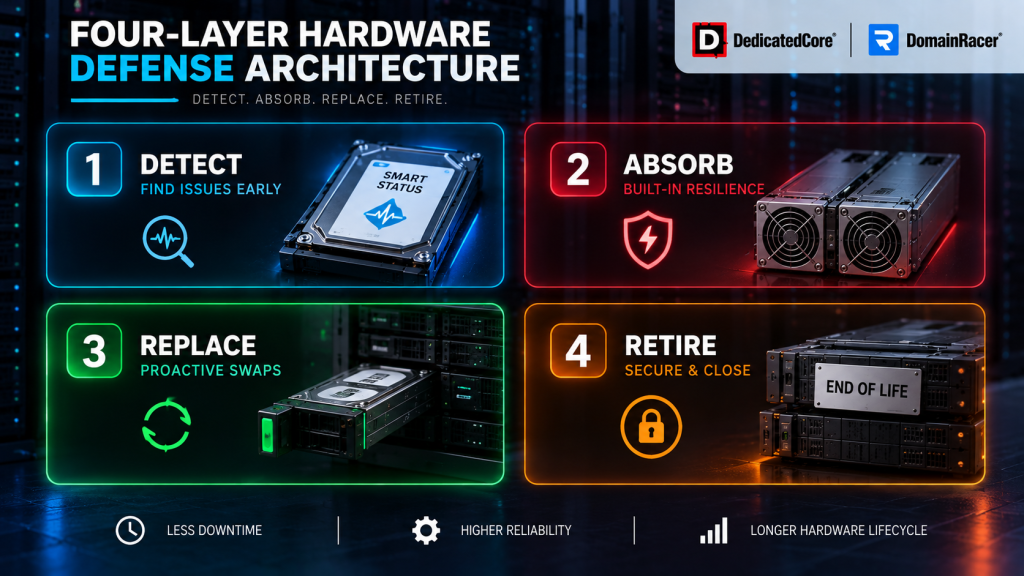
You cannot stop hardware from getting older. You can stop older hardware from causing an outage, and that needs four layers working together instead of one tool doing it all.
DedicatedCore’s Four-Layer Hardware Risk Detection Model
- Detect — SMART on every drive for ECC error trends across all DIMMs, IPMI, and BMC, even when the OS is down. Perform thorough event log checks to catch the small signs that may signal a major failure ahead
- Absorb — RAID helps you survive one dead drive. Dual power supplies allow quick swaps for failed units. Redundant networking keeps a dying NIC from affecting users
- Replace — on-site spares and technicians on all three shifts so a flagged part becomes a planned swap instead of an emergency
- Retire — refresh the platform before the wear curve gets steep rather than after it proves itself
McKinsey research shows predictive programs cut maintenance costs by 18–25% and reduce unplanned downtime by up to half. The deeper routine behind layers one and two is covered in our data center preventive maintenance framework.
Real-World Hardware Risk Case Studies: From Failure to Prevention
Case Study 1 — The five-year-old server nobody was watching.
A mid-size online store used an old five-year-old server through two busy seasons with no issues. The system had warned about a bad drive for weeks, but no one checked. On Black Friday, the drive failed; the fix broke a second drive, and the website went down for nine hours.
Our Solution: The store moved to a managed DedicatedCore plan with RAID redundancy, dual power, and 24/7 SMART monitoring. We replace wear-out parts before they fully break.
The result: At a modest $10,000 an hour, that single outage cost more than a decade of good hosting. Every drive swap since has happened in a scheduled window, with the storefront online.
Case Study 2 — The SaaS firm that never had the outage.
A small SaaS company chose a DomainRacer dedicated plan from day one with RAID dual PSUs and automated backups built in rather than added later.
Our solution: We flagged the SSD wear counter weeks before it hit its limit. The support team scheduled the swap in a quiet window, turning a possible failure into routine maintenance.
The Result: The SSD was replaced with no downtime, no data loss, and no customer disruption, keeping 99.99% service availability. The hardware followed its normal life, but the business never felt the failure as a real problem.
DomainRacer’s Expert Answers to Common Hardware Risk Questions
Which dedicated server hardware failure is the most common?
Storage and memory are the main problems. A server holds several drives that run nonstop. DRAM alone causes around 37% of all hardware failures. But the most common is not the most dangerous. A hot-swappable drive fails often and costs you nothing when redundancy is in place.
We rank parts by a single point of failure instead. A single power supply or boot drive rarely fails, but when it does, it brings down the whole node. So, we monitor these closely and keep extra stock on hand.
Can hardware failure cause permanent data loss?
Mostly yes, more often than people expect. A single drive with no redundancy wipes out data the moment it dies, and silent corruption can rot files over months before anyone notices.
The defence has to be layered. RAID makes one dead drive survivable, and tested backups cover the day the array itself gives out. We build both in from the start rather than adding them after a scare.
How old is too old for a production server?
Enterprise servers average around 5.4 years in service, but that is a starting point for the conversation, not the answer.
What we really pay attention to is the trend line. If repair frequency keeps rising each quarter, performance drops below its baseline. Parts become harder to find, and support dates expire. When all these factors worsen together, the platform edges toward failure, regardless of its age. Once it’s past EOSL, it’s too old, full stop. No amount of monitoring can fix that, since there’s no firmware being signed for it anymore. The financial side of that decision is covered in our guide on when to replace a server.
Detection Is Where Uptime Actually Starts
Hardware risk is the first clock in hardware lifecycle management, and it sets every one after it. Catch a failing drive early, and it is a scheduled swap. Miss it, and it becomes a replacement SLA problem, then a data-loss problem, then a decommissioning you never budgeted for. Nearly four out of five serious outages were preventable at exactly this stage.
Tell DedicatedCore and DomainRacer how old your servers are, when support ends, and what monitoring you use now. If you are looking to move workloads away from aging hardware, consider DomainRacer VPS hosting as another infrastructure option. Our free check will show which machines are most likely to fail soon, what problems your current host is missing, and what it would cost if each one breaks first.

