

A Geekbench 6 comparison published by VPSBenchmarks in 2024 found that budget 4-vCPU hosting plans scored roughly 700–770 on single-core tests. That is about a quarter of what a current-generation dedicated-core plan scores. For server and VPS buyers, that gap matters because many workloads depend on single-thread speed. A faster clock on one core does more for execution speed than four slow cores working together.
Most buyers pick the plan with the most cores and RAM for the price. That is the wrong filter. Understanding what sits behind a “4 vCPU” label is the difference between a server that holds up under peak load and one that stutters at the worst moment. DedicatedCore and DomainRacer publish the CPU model, clock speed, and isolation method on every plan so buyers can verify before they commit.
Physical CPU Cores vs vCPU: What VPS Buyers Need to Know
The number next to “CPU” on a hosting plan can mean two very different things.
- Physical core — a real processing unit on the chip. One core handles one thread at full clock speed without sharing
- vCPU (virtual CPU) — a slice of a physical core assigned by the hypervisor. Multiple vCPUs can map to the same physical core, and each one gets a fraction of that core’s time
- Hyper-threading — Intel’s method of splitting one physical core into two logical threads. It helps with parallel workloads but does not double single-thread speed. AMD calls their version SMT
- The labelling problem — “4 vCPU” on a plan can mean two very different things. It can mean four dedicated physical cores, or four time-sliced shares of one overcommitted core.
We plan to use KVM with dedicated physical cores — no overcommit, no time-slicing. We publish the CPU model and allocation method on every plan and walk through core-to-workload matching in our resource sizing guides so buyers can verify before they commit.
Dedicated CPU vs Shared CPU: How VPS Allocation Affects Performance
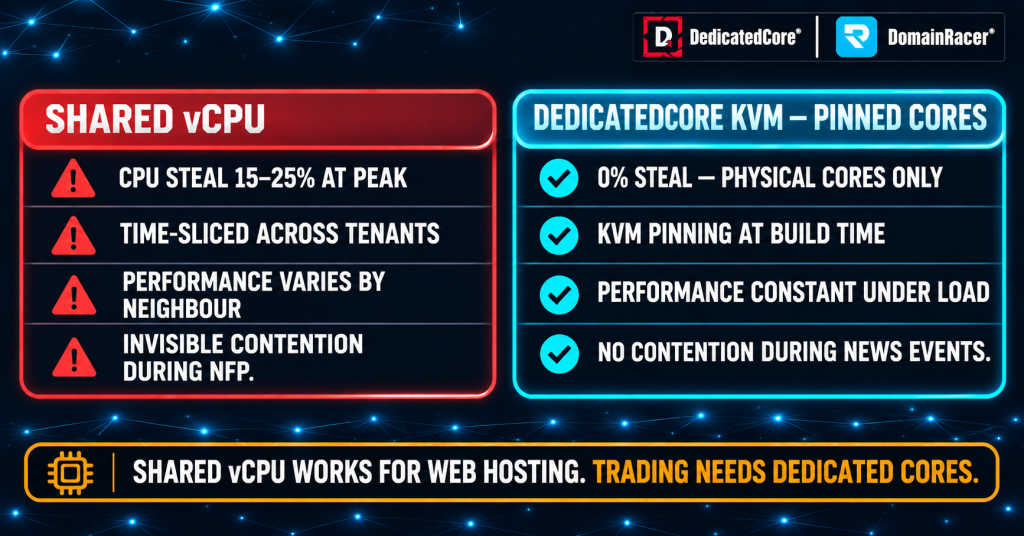
Shared vCPUs can face contention during peak demand, while dedicated pinned cores provide more consistent CPU access for trading workloads.
The way a provider allocates cores decides how the VPS performs under load. Cores shared across customers drop at peak times, while reserved cores hold steady
- Shared (burstable) vCPU — the provider assigns one physical core to multiple customers. At a 4:1 ratio, four VPS instances share one core. At 8:1 or 10:1, slowdowns become noticeable during peak usage
- Dedicated cores — the provider reserves physical cores for one customer. No other tenant can consume cycles from those cores, regardless of what runs on the same host
- The noisy-neighbour problem — on shared CPU, another tenant’s backup job can steal cycles from your VPS. The hypervisor divides time fairly, but “fairly” means your workload waits while others finish
- CPU steal time — the percentage of time your VPS waited for the hypervisor to give it access to the physical core. Above 5% steal, tick processing delays become measurable
- Why trading workloads cluster — web servers spike at random times, so sharing works. Trading EAs all spike together during NFP and FOMC. Every shared tenant needs the CPU at the same moment
We run a maximum 1:1 CPU allocation with KVM isolation. We tell every customer the exact ratio before they buy. The difference between shared and dedicated surfaces during peak load when every tenant demands CPU at once. We document how steal time translates into inconsistent latency through our jitter guide so traders can measure the effect on their own server.
2015 vs 2024 Server CPUs: The Performance Gap Beyond GHz
Clock speed alone does not tell the full story. Each CPU generation improves how much work gets done per clock cycle.
- Instructions per clock (IPC) — a 3.5 GHz chip from 2024 processes 40–60% more work per cycle than a 3.5 GHz chip from 2017. The architecture handles instructions more efficiently
- Cache size and speed — newer CPUs have larger L3 caches that keep data closer to the core. This cuts memory fetch delays
- Memory support — DDR5 delivers higher bandwidth and lower latency than DDR4. This matters for workloads that read large data buffers
- Power efficiency — modern chips sustain boost clocks longer without throttling. A 5.0 GHz turbo actually holds at 5.0 GHz under sustained load instead of dropping to 3.8 GHz
- The budget-plan trap — a plan advertising “4 cores, NVMe, 8 GB RAM” at a low price often runs on older hardware. Fast storage does not fix a slow CPU. Once the application loads into memory, processing speed depends on the CPU
We use current-generation Intel and AMD processors with DDR5 across all plans. We refresh hardware on a documented cycle so no customer ends up on aging silicon. We tested how generation gaps affect advertised latency claims through our 0.2 ms latency exposed analysis so the distance between marketing and measurement is visible.
Noisy Neighbours and CPU Contention: The Impact on Trading EAs
On a shared host, the trader’s performance depends on what other tenants are doing at the same moment.
- Contention during peaks — high-traffic events spike demand 5–10× in seconds. Every tenant on the shared host demands CPU at once. The hypervisor queues them, and the queued workload runs slower
- Invisible throttling — you cannot see other tenants’ workloads. A sudden slowdown has no visible cause in Task Manager because the bottleneck sits on the host machine, not inside your VPS
- Burstable vs sustained — some plans allow short CPU bursts above the baseline but throttle back after a few seconds. An EA that runs continuously during a volatile session hits the throttle ceiling
- How to detect sharing — run a CPU benchmark at different times across several days. If scores vary by more than 15–20%, the cores are shared. Consistent scores within 5% suggest dedicated allocation
We publish the CPU model and allocation method upfront. We record real migrations where shared CPU caused failures during peak load through our failure case studies collection so buyers can see the before-and-after numbers.
Single-Thread vs Multi-Thread CPU Performance: Choosing the Right VPS
Different trading tasks use the CPU in different ways. The right plan depends on which tasks run simultaneously.
- Single-thread tasks — the live work of an EA sits in this group. It covers live execution, tick processing, order sending, and indicator calculation on the active chart.
- Multi-thread tasks — these jobs spread across cores instead of queueing on one. The group starts with MT5 Strategy Tester optimisation on the list. Several terminals running side by side and backtesting across pairs belong here too. Analytics scripts running alongside live workloads also benefit from extra cores
- The sizing rule — one high-clock core for the primary workload. Add one core for each extra terminal or parallel agent. Three terminals on three brokers need at least three cores
- Over-provisioning waste — a trader running two EAs on one terminal does not need eight cores. The EAs share one MetaTrader process and run sequentially on its tick thread
We size plans so every core runs at full clock speed regardless of the tier. We walk each customer through the core-count decision based on their workload mix through our how-to-choose framework so the plan matches the terminal count and trading style.
CPU Clock Speed vs Core Count: What Makes a Forex EA Faster
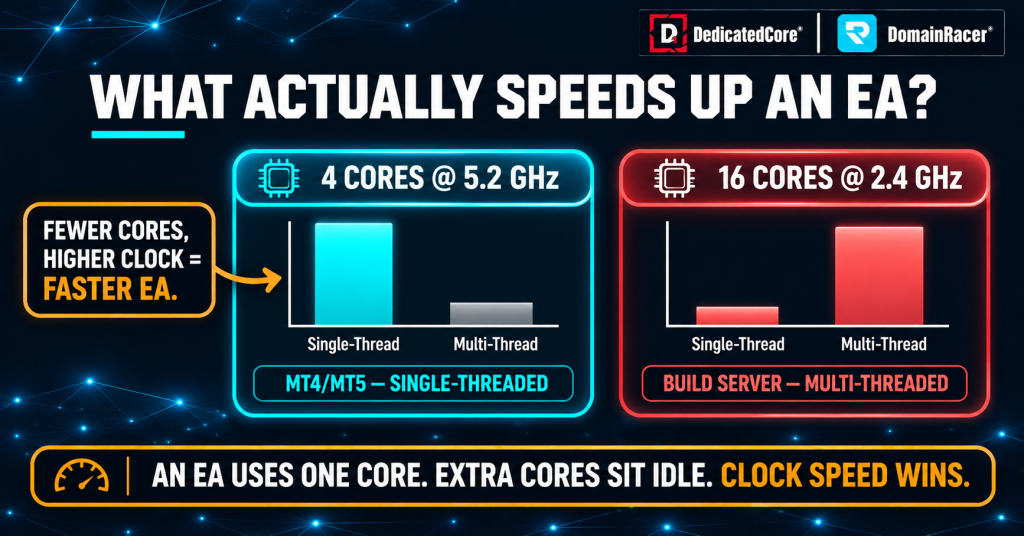
Forex Expert Advisors often benefit more from higher single-core clock speed than extra cores.
Trade execution is sequential. The EA receives a tick, reads the price, calculates the signal, and sends the order. Each step depends on the previous one, so it runs on a single thread.
- Single-thread performance — set by the clock speed and IPC of one core. A 5.0 GHz core processes a task faster than a 2.4 GHz core, regardless of how many cores sit beside it
- Where core count helps — MT5 Strategy Tester runs one agent per core. More cores shorten overnight parameter sweeps. Running multiple terminals in parallel also benefits from extra cores
- Where core count doesn’t help — live execution of a single EA on one terminal. Adding cores does not speed up the tick-to-order chain because it runs on one thread. A 2-core plan at 5.0 GHz beats a 4-core plan at 2.4 GHz
- What to ask the provider — the CPU model name, not just the core count. Search that model on Geekbench 6 single-core to compare. Above 2,500 is current-generation. Below 1,000 is likely from 2015 or earlier
We run 4.5–5.7 GHz CPUs across all tiers. Clock speed comes first, and core count scales with the workload. We document the platform settings that cut per-tick processing time in our MT4 and MT5 optimization guides so every configuration choice ties back to measured latency.
DedicatedCore CPU Performance Standards: Measurement and Verification
Most providers list a core count and move on. DedicatedCore and DomainRacer report the specs that affect execution.
- CPU model published — the exact processor name is listed on every plan so the trader can look up independent benchmarks
- Clock speed stated as sustained boost — the advertised 4.5–5.7 GHz holds under load. It does not throttle after a few seconds
- KVM isolation verified — each VPS runs on KVM with pinned cores. Confirm with cat /proc/cpuinfo or Task Manager → Performance → CPU
- No overcommit policy — 1:1 allocation means the cores on your plan are physical cores reserved for your VPS. No other tenant borrows cycles
- Benchmark transparency — run Geekbench 6 or Cinebench on your VPS and compare against the published model’s scores. Results should match within 5%
DedicatedCore and DomainRacer back every plan with a 30-day trial so customers can benchmark under live conditions. We test the full execution path — from tick arrival to order confirmation — through our performance measurement methodology so every published number is repeatable.
Comparing VPS Providers Across CPU Allocation and Clock Speed
The label says “4 cores.” What sits behind it varies widely.
| What to check | Typical budget host | Average managed host | DedicatedCore / DomainRacer |
| CPU model | Not disclosed | Generation mentioned | Exact model published per plan |
| Clock speed | 2.0–3.0 GHz | 3.0–4.0 GHz | 4.5–5.7 GHz sustained boost |
| Allocation | Shared, 4:1–10:1 overcommit | Soft dedicated limits | KVM with pinned dedicated cores |
| CPU generation | Often 2015–2019 era | 2020–2022 | Current-generation with DDR5 |
| Steal time | 5–30% during peaks | 2–10% | Under 1% |
| Benchmark access | Not permitted | Permitted but not published | Encouraged, model benchmarks verifiable |
| Trial period | No trial | 7-day trial | 30-day trial with money-back guarantee |
A provider that won’t name the CPU model is hiding the performance you need to evaluate before committing.
CPU Selection in Practice: Two Real-World Performance Case Studies
We document real migrations so buyers can see the before-and-after numbers. These cases come from our own onboarding records of real customer moves. Each customer in them moved from shared hosting to dedicated infrastructure.
Case Study 1 — A scalper losing edge to shared CPU during news events.
A scalping EA on a budget 4-vCPU plan slipped 1.2 pips during NFP and FOMC. Task Manager showed 100% CPU while the EA used only 12%. Other tenants consumed the rest.
Our solution: We moved the trader to a 2-core DedicatedCore plan at 5.2 GHz with dedicated physical cores. Tick processing dropped from 8–15 ms to under 0.4 ms.
The result: Slippage fell from 1.2 pips to under 0.2 pips. CPU steal dropped from 18% to zero. We document how slippage connects to per-core speed through our slippage guide so traders can calculate the cost of shared CPU in their own trading.
Case Study 2 — A hosting reseller misled by a 16-vCPU label into buying the wrong server.
A reseller migrated 40 cPanel accounts to a “16-vCPU” VPS advertised at 3.8 GHz. Page loads averaged 4.2 seconds. The provider listed 16 vCPUs but ran an older Xeon with hyperthreading — each vCPU was half a physical core on a 2016-era chip with low IPC. Single-thread performance scored 38% below a current-generation 4-core processor.
Our solution: We moved the reseller to an 8-core DedicatedCore server. It runs a current-generation CPU at 5.0 GHz with full physical cores. Half the core count on paper, but each core completed 2.6× more instructions per cycle.
The result: Average page load dropped from 4.2 seconds to 1.1 seconds. PHP worker throughput rose 190%. The reseller cut their core count in half and got faster results because IPC and clock speed decided the workload, not the number on the invoice. We explain how to read past vCPU labels through our CPU performance methodology so buyers can benchmark before they commit.
DedicatedCore’s Expert Guide to VPS CPU Claims and Performance
We hear these questions from buyers every week. The answers come from what we see on live customer setups.
Is a 4-vCPU plan always faster than a 2-core plan?
Not necessarily. We see 4-vCPU shared plans lose to 2-core dedicated plans on single-thread speed every time we benchmark them. A shared plan splits time-sliced fractions of overcommitted cores. A dedicated plan gives full physical cores at 5.0 GHz with consistent results under load. The core count matters only after per-core speed and allocation method are settled.
We recommend running Geekbench 6 on both plans and comparing the single-core scores. If the 2-core plan scores higher per core, it processes ticks faster. We include a weekly CPU benchmark check in our health checklist so per-core performance is tracked over time.
How can a trader tell if the CPU is shared or dedicated?
We tell traders to run a CPU benchmark three times — during quiet hours, peak overlap, and a major news event. If scores stay within 5% across all three, the cores are dedicated. A drop of 20% or more during busy periods means the hypervisor is dividing time with other tenants. CPU steal above 5% in Task Manager, or top, confirms sharing.
We also advise asking the provider for the allocation ratio directly. If they say “burstable” or dodge the question, the plan is shared. A provider confident in dedicated allocation names the CPU model and invites benchmarking. We walk through how to read CPU steal and diagnose contention in our common issues guide so traders can verify allocation themselves.
Does a newer CPU generation matter if the clock speed is the same?
Absolutely. We see 40–60% IPC gains between a 3.5 GHz chip from 2017 and a 3.5 GHz chip from 2024. These gains come from architectural improvements, larger caches, and faster memory. Two chips at the same clock speed deliver very different benchmark scores. We always check the generation alongside the frequency when selecting hardware.
We use the CPU model name to confirm the generation. Intel 13th- and 14th-gen Core and AMD Ryzen 7000- and 9000-series are current. Anything older than 10th Gen Intel or Ryzen 3000 falls behind on single-thread IPC. We test which OS version pairs best with each hardware generation through our Windows Server comparison so the platform stack is matched end to end.
Demand CPU Transparency. Test Before You Buy.
A VPS plan that lists “4 cores, 8 GB RAM, NVMe” says nothing about whether the cores are dedicated, shared, fast, or slow. The CPU model, generation, clock speed, and allocation method decide real-world performance. Budget hosting on recycled hardware with no documented upgrade schedule means the silicon gets slower every year while the price stays the same.
DedicatedCore VPS and DomainRacer VPS Hosting publish the CPU model, sustained clock speed, and dedicated allocation on every plan. Current-generation cores at 4.5–5.7 GHz with KVM isolation and zero overcommit. Start with a 30-day trial backed by a money-back guarantee and run your own benchmarks.
