
Light travels through fiber at roughly 200,000 kilometers per second, which puts London to New York at about 28 milliseconds each way at best. Every latency figure you have ever quoted sits above that floor, and the gap between the floor and your actual fill is what nobody explains.
A provider advertises 0.4ms, and your ping shows the same result. But your scalping EA still fills three pips away from the price it wanted. Providers often mix four different measurements, but only one determines your fill. DedicatedCore and DomainRacer show all four measurements because one number is not enough.
The Four Forex Network Metrics Traders Need to Understand
Most latency arguments are two people using the same word for different things. We split every measurement into four, because each one is produced by a different part of the path and each one fails differently.
- Ping — how long an ICMP packet takes to reach a host and come back. The easiest number to produce and the least connected to trading.
- Network latency — round-trip time to a specific endpoint over the protocol your terminal actually uses. Depends entirely on which endpoint.
- Jitter — how much that round-trip time varies between samples. Stability, not speed.
- Execution latency — everything that happens after your order arrives at the broker. Outside your provider’s control and usually the largest number of the four.
Skip the distinction, and you buy the wrong thing. Traders regularly move to a provider with a better ping and see no change in fills, because ping was never the constraint.
Ask your provider which of these four their advertised number refers to. If the answer is simply “latency,” they have not really answered the question.
Forex VPS Latency Measurement and Provider Comparison
Every host quotes a latency figure. The difference is whether the number survives a question.
| What decides the number | Typical budget host | Average managed host | DedicatedCore / DomainRacer |
| What is measured | ICMP ping | ICMP to datacentre gateway | TCP connect to broker trading server |
| Endpoint disclosed | No | Vaguely | Named broker server |
| Statistic published | Best result seen | Average | p50, p95, p99 |
| Sampling | One test, once | Occasional | Continuous, session-aware |
| Jitter published | Never | No | Yes |
| Packet loss published | Never | No | Yes |
| Reproducible by you | No | Partly | Test IP provided |
| What you are left with | A marketing number | An estimate | A number you can check |
That last row is the whole product. A figure nobody can reproduce is a claim, not a measurement, and the full method behind ours is in our forex VPS proximity and network methodology.
Forex VPS Ping Measurement and Its Role in Trading Performance
Ping sends an ICMP echo request and times the reply. It is the default because it is free, instant, and works everywhere.
It also falters for three reasons.
- Routers deprioritise ICMP. Network equipment processes ICMP in software, so it works on a best-effort basis. This means ping results can be higher than actual traffic during heavy load or lower when the device is idle.
- It reaches the wrong place. Most ping tests hit a data centre gateway or a provider’s test IP, not the broker’s trading server. Those can be in different buildings.
- It ignores the protocol. Your terminal opens a TCP connection and keeps it alive. ICMP tests none of that behaviour.
Ping is useful for one thing: confirming a host is reachable. We use it as a secondary signal only, because a number that routers treat as optional is not a number to price a strategy on.
Forex VPS Network Latency and the Impact of Endpoint Proximity
Network latency is round-trip time to a specific destination, and the destination is the whole argument.
A VPS in Slough can show 0.3ms to a gateway in the same building and 12ms to the broker’s actual trading server in Frankfurt. Both numbers are true. Only one of them affects your order.
- Measure to the broker’s trading server, not a data centre gateway or a website.
- Use TCP connect, because that is what your terminal does.
- Record the route, since two providers in the same facility can take different paths out.
- Re-measure after route changes, which can occur suddenly. Also, re-measure after any scheduled maintenance.
We define the endpoint as the broker’s trading server and publish it. A provider quoting latency without naming what they measured to has given you a number with no denominator.
Forex VPS Trade Path from Terminal to Broker Matching Engine
Your order crosses seven stages, and a Forex VPS provider controls three of them.
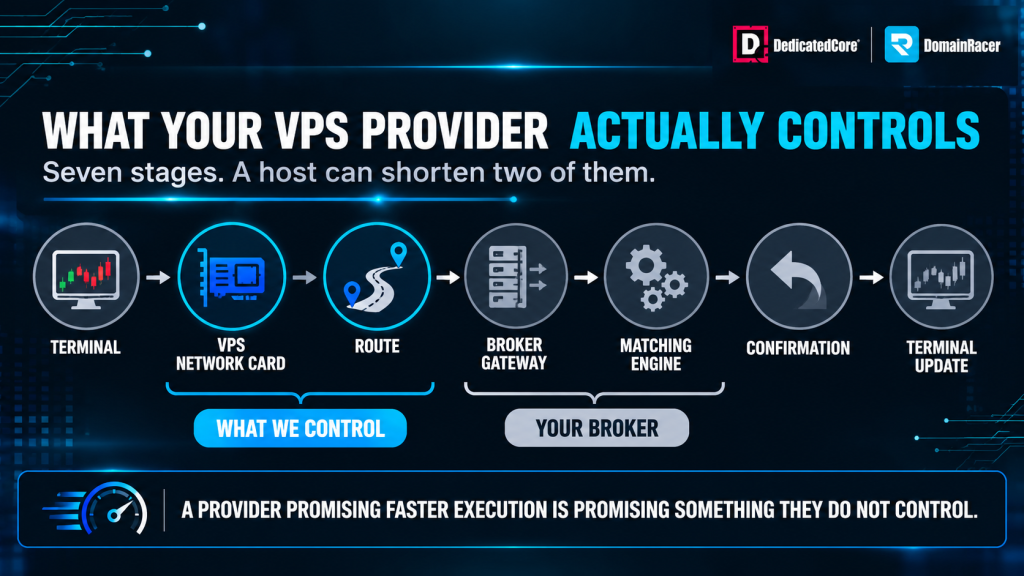
A VPS provider can shorten the network path, but cannot control the broker’s execution.
- Terminal — MT4, MT5, cTrader or NinjaTrader constructs the order.
- VPS network card — the packet leaves your virtual machine.
- Route — carriers and peering points between your VPS and the broker.
- Broker gateway — the edge of the broker’s network.
- Matching engine — where the order actually fills.
- Confirmation — the reply travels back.
- Terminal update — your platform shows the fill.
Stages two and three are mainly determined by proximity and network routing. Stages four and five are controlled by the broker, so your hosting choice cannot change them. Stage one happens on your own server, where CPU contention and core allocation can affect how quickly the order is processed.
This is why a provider promising faster execution needs to be careful about what it claims. We can shorten the network path and keep it stable, but what happens inside the broker’s matching engine is outside the hosting provider’s control. For traders who want to choose a VPS based on their broker’s location and trading requirements, DedicatedCore Forex VPS provides that flexibility.
Forex VPS Jitter and Its Impact on Scalping Stability
Jitter is the variation in round-trip time across samples, and for algorithmic trading it matters more than the average.
A stable 3ms is better than a 1ms that occasionally spikes to 40ms. Your MT4 or MT5 terminal is not built around an average. It is built around an expectation, and jitter is the gap between what it expects and what it gets.
- Scalpers feel it first, because a strategy holding positions for seconds has no time to absorb a delayed fill.
- Grid and martingale strategies compound it, since one late entry shifts every subsequent level.
- News events amplify it, as queuing at congested peering points widens the spread of results.
We publish jitter alongside latency because the two describe different failures. Most hosts publish neither, and a low advertised figure with unmeasured jitter tells you nothing about how your EA will behave at 08:00 London time. If your strategy depends on consistent network performance rather than simply the lowest advertised ping, DomainRacer Forex VPS is an option worth considering when choosing your trading server.
Forex VPS Packet Loss and Requotes During Trade Execution
Packet loss is the quiet one. Traders blame the broker for requotes when the cause sits in the network path.
When a packet carrying an order is lost, TCP retransmits it. A lost packet can cause a timeout and round-trip delay. This might add hundreds of milliseconds to one order, while other orders finish on time.
- Requotes cluster rather than spreading evenly, because loss happens in bursts.
- Missed ticks look like a broker feed problem but often are not.
- Even 0.1% loss matters for a strategy sending frequent small orders.
We monitor packet loss continuously and treat a sustained rise as a route problem to investigate, not a statistic to average away. A volumetric attack on the path produces the same symptom. Ask your provider what their packet loss was last week. Most cannot tell you, because nobody recorded it.
Forex VPS Latency Measurement: Minimum, Average, p95, and p99
The same path yields five different figures based on the measure you choose, and hosts select the one that looks best.
| Statistic | What it shows | What it hides | Why it gets published |
| Minimum | The best single sample ever recorded | Everything that went wrong | It is the smallest number available |
| Average | The centre of the distribution | Spikes, which is where losses live | It sounds rigorous |
| p50 (median) | The typical experience | The tail | Honest, but incomplete alone |
| p95 | What one order in twenty sees | The worst 5% | Useful, rarely published |
| p99 | What one order in a hundred sees | Very little | It is the least flattering |
The minimum is the most misleading number in the industry and the most commonly advertised. It describes a moment, not a service.
We publish p50, p95, and p99, and never the minimum. A strategy placing two hundred orders a day meets the p99 twice daily, so that is the number that shapes your results.
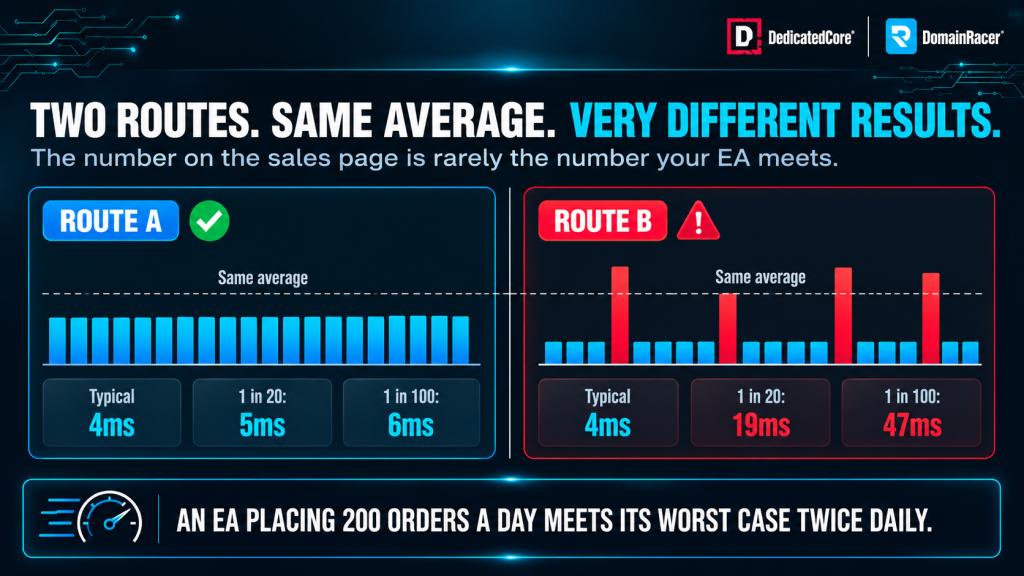
The same average latency can hide very different p95 and p99 results for a Forex EA.
DedicatedCore Method for Measuring Forex VPS Latency
You can check every claim in this article yourself, and it takes about ten minutes.
- Round-trip time to the broker — use a TCP connect test against the broker’s trading server address and port, not a ping to a website.
- Jitter — run the same test continuously for an hour and record the spread between fastest and slowest.
- Packet loss — a sustained ping over an hour reports loss percentage, which is one job ICMP is fine for.
- Route — run a traceroute and note the hop count and the networks in the path.
- Repeat at session open, because a quiet-period result tells you nothing about London or the NY4 overlap window.
Run all five before you commit to a provider, and again after any reported network change. A host that will not give you a test IP has told you the answer.
Latency Measurement Outcomes Through Our Real-World Examples
Case Study 1 — A good average hiding a bad tail.
A scalping EA ran on a VPS whose average round-trip time sat safely inside the trader’s limit yet still showed steady entry-price drift.
Our Solution: We measured without gaps instead of at set intervals and broke the data into percentiles. The average looked good. The worst one percent sat several times higher, and all the drift lived in that thin tail gathered around the session open.
Lesson: Averages hide the orders that cost you. The trader had been comparing providers on a number that never described the trades that lost money.
Case Study 2 — Requotes that were not the broker’s fault.
A trader got a bunch of requotes inside two minutes while a planned news release ran and was ready to switch brokers.
Our solution: We checked packet loss across the same window and found a burst on one upstream path. The orders that were requested lined up with the retransmissions. Rerouting resolved it.
Lesson: Requotes are a symptom, not a diagnosis. Without packet loss data for the exact window, the trader would have moved brokers and kept the problem.
Both cases turned on measurement that was already running. Neither could have been diagnosed from a number taken after the fact.
DomainRacer’s Expert Answers to Forex VPS Latency Questions
Is a lower ping always better for trading?
Not reliably, and this is the most expensive assumption in Forex VPS shopping. Ping measures ICMP to whatever host you aimed at, and routers treat ICMP as optional traffic. A provider can show a lower ping while your actual orders travel a longer path to the broker.
What counts is the TCP round-trip time to the broker’s trading server taken without gaps, along with the jitter and any packet loss. A steady 4ms that barely jumps will beat a 1ms that spikes at every session open. We track and show all three because any single number by itself can be made to look fine.
Why does my execution feel slow when my latency is low?
Because network delay and execution delay are two separate figures, and the second is almost always bigger. Your low number only shows how quickly the order arrives at the broker’s gateway. Everything after that—waiting in queues, the matching engine, and the liquidity provider—depends on the broker’s setup, not ours.
Another common cause lives on the VPS itself. A machine low on RAM or fighting for CPU time can add lag before the packet even leaves, which can look like network delay from the trader’s side. An older network card can cause similar problems under pressure, but that is a hardware issue, not a routing issue. If your fills feel slow while the measured round-trip time looks fine, check the server’s available resources before switching hosts. If the delay comes from the server rather than the network route, DedicatedCore Windows VPS gives traders a Windows-based environment where resources match their trading setup.
What latency should I actually be aiming for?
We start with the strategy rather than a target number. A scalping or high-frequency EA needs low RTT and, more importantly, tight jitter. A swing strategy that holds positions for hours won’t be affected by events happening in milliseconds. Spending to get closer to those events is just wasting money.
The useful question is not how low your latency is but how consistent, and how close your VPS sits to the broker you actually trade with. Proximity to LD4 or LD5 is worth nothing if your broker’s servers are in New York. Location comes before every other decision, which is covered in our Equinix LD4 and LD5 proximity guide.
Measure the Number That Decides Your Fill
Ping is the easiest number to produce and the least connected to your results. Jitter decides how your EA behaves at session open, and packet loss explains the requotes you blamed on your broker. Only one of the four gets advertised, and it is the one that flatters.
So the decision is simple. Host with a provider who names the endpoint, publishes percentiles, and hands you a test IP. DedicatedCore and DomainRacer measure TCP round-trip time to named broker servers and publish p50, p95, and p99. The full measurement method sits in its own document so you can check every step yourself. You can try either service with a 30-day trial and no setup fees. Measure the number that determines your fill.

