
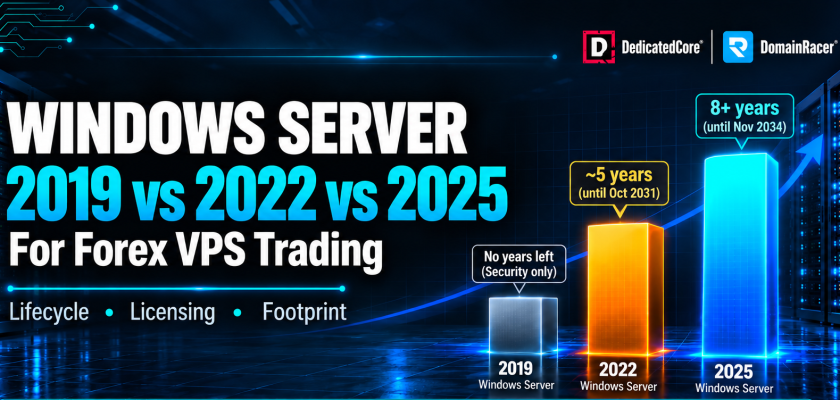
Windows Server 2025 vs 2022 vs 2019 for Forex VPS is not simply a choice between operating system versions. Support lifecycle, EA compatibility, RAM usage, update control, and licensing can all affect your trading setup. Windows Server 2022 reaches the end of mainstream support on 13 October 2026. The security update that month is the last one it gets under mainstream servicing. After which it moves to extended support with security-only patches through 14 October 2031.
That date matters less than most providers will tell you, and more than most traders realise. It does not mean your Forex VPS stops working, and it does not mean migrating this quarter. DedicatedCore and DomainRacer treat the version as a servicing decision rather than a deadline. The choice you make now sets how many years of full support you get before the next migration arrives.
Windows Server Version Support Lifecycle for Forex VPS Hosting
Microsoft runs two support phases, and providers routinely blur the lines between them to create urgency.
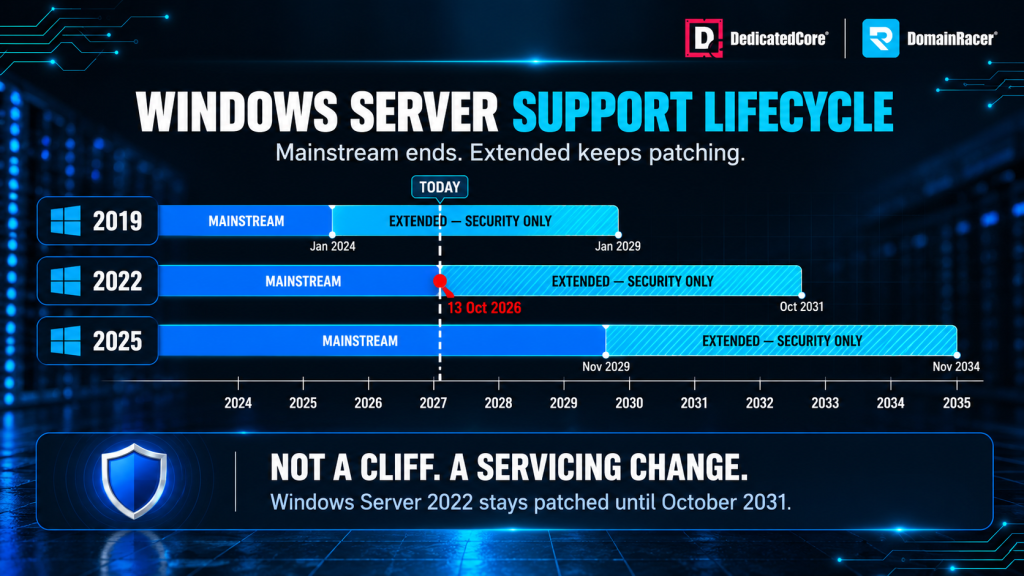
Windows Server 2019, 2022, and 2025 support lifecycle comparison
Mainstream support covers security updates, feature updates, and non-security fixes. Microsoft will still take a bug report and act on it.
Extended support gives you security updates only, at no extra cost: no new features, no design changes, no non-security fixes. The operating system stays patched and stays supported.
End of life is when extended support ends. That is the date that actually matters for a production trading server.
| Version | Mainstream ends | Extended ends | Full servicing left |
| Windows Server 2019 | 9 January 2024 | 9 January 2029 | None, security only |
| Windows Server 2022 | 13 October 2026 | 14 October 2031 | Weeks |
| Windows Server 2025 | 13 November 2029 | 14 November 2034 | Over 3 years |
Windows Server 2022 in extended support stays a safe platform for MT4 or MT5 through 2031. A host telling you it becomes insecure in October is selling a migration you may not need. What you lose is the servicing relationship, not the patches.
Ask your provider which versions they still image, and when they last refreshed the template. A host running a 2019 image as default in late 2026 has not touched their build process in three years.
DedicatedCore Methodology for Selecting Windows Server Versions
Most hosts pick a version once and image it for years. We run the choice as four checks, in order, because the answer changes with the strategy.
- Servicing runway — how many years of full support the version has left, measured against how long the strategy will run.
- EA compatibility — check if Expert Advisors use DLLs, bridges, or external licenses that new security settings may block.
- Resource footprint — this refers to what the image consumes before MetaTrader opens. It also considers whether the plan has enough headroom for the session to begin.
- Update control — whether reboots can be confined to a window outside market hours.
Skip the second check, and you find out at the London open. Skip the fourth, and the server reboots itself during New York.
Ask your provider which of these they ran before handing you an image. Most ran none, because the image was built once and never revisited.
Windows Server Versions Compared for Forex VPS Providers
Every host offers a Windows version. The difference is whether anyone measured what it costs you.
| What decides your choice | Typical budget host | Average managed host | DedicatedCore / DomainRacer |
| Versions offered | Whatever image is oldest | 2019 and 2022 | 2019, 2022 and 2025 |
| Image freshness | Built once, never rebuilt | Patched quarterly | Rebuilt from current media |
| Idle footprint published | Never measured | Not disclosed | Measured and published |
| Licensing model | Unclear, often unlicensed | SPLA, unexplained | SPLA, explained on the order page |
| RDS SAL guidance | None | On request | Flagged before you buy |
| Update control | Forced, unscheduled | Default schedule | Configurable maintenance window |
| Migration support | You rebuild it yourself | Paid service | Assisted, with a rollback path |
| What you are left with | An unpatched terminal | A working server | A server that fits your session |
That update control row is the one traders feel. A forced reboot during the London open costs more than any licensing difference in this table. For traders who want these Windows settings managed as part of a trading-focused VPS environment, DedicatedCore Forex VPS provides a setup built around Forex workloads.
The Windows Factors That Actually Matter for Forex VPS
Most comparisons list features that traders do not need. Four things matter most for a Forex VPS.
- Idle footprint. Newer versions run more services by default, eating RAM before MetaTrader opens on a 4GB plan, which is the margin between comfortable and swapping.
- Network stack. 2022 and 2025 include TCP improvements aimed at sustained throughput, not the small frequent packets a trading terminal sends. Do not expect a latency win from a version upgrade.
- Security defaults. Each version turns on more by default. That is good for the server and occasionally hostile to an Expert Advisor.
- Update behaviour. How aggressively the OS reboots itself, and how much control you have over when.
- RDP responsiveness. Windows 2022 and 2025 use improved AVC/H.264 compression over Remote Desktop. On unstable connections, this makes chart scrolling smoother on multi-monitor setups than 2019.
- Long-run stability. All three versions run for weeks without intervention when updates are controlled. Instability on a trading server is almost always a reboot policy, not the operating system.
Notice what is not on the list. No Windows version reduces network latency to your broker. Latency depends on routing and proximity, as explained in our forex VPS latency methodology.
Windows Server 2025 Credential Guard and DLL-Based EA Compatibility
Windows Server 2025 has one main compatibility risk for algorithmic trading setups. All three versions run MetaTrader 4, MetaTrader 5, cTrader, and NinjaTrader without changes. Platform support is not a major difference between them.
- Credential Guard is on by default in Windows Server 2025 on supported hardware. It isolates credentials with virtualisation-based security.
- It can block unsigned DLL loading, which most Expert Advisors never touch because they are self-contained MQL.
- EAs calling external DLLs are the exception — licensing checks, data feeds, or a bridge to another platform can fail to load.
- The error message will not tell you why, which is what makes this expensive to diagnose mid-session.
We test DLL-dependent EAs on 2025 before recommending it for algorithmic trading. If your EA uses a DLL, say so at provisioning, and we image accordingly. Most hosts hand you a 2025 template and let you discover this at the London open.
DedicatedCore Benchmark Results for Windows Server and MT5 Workloads
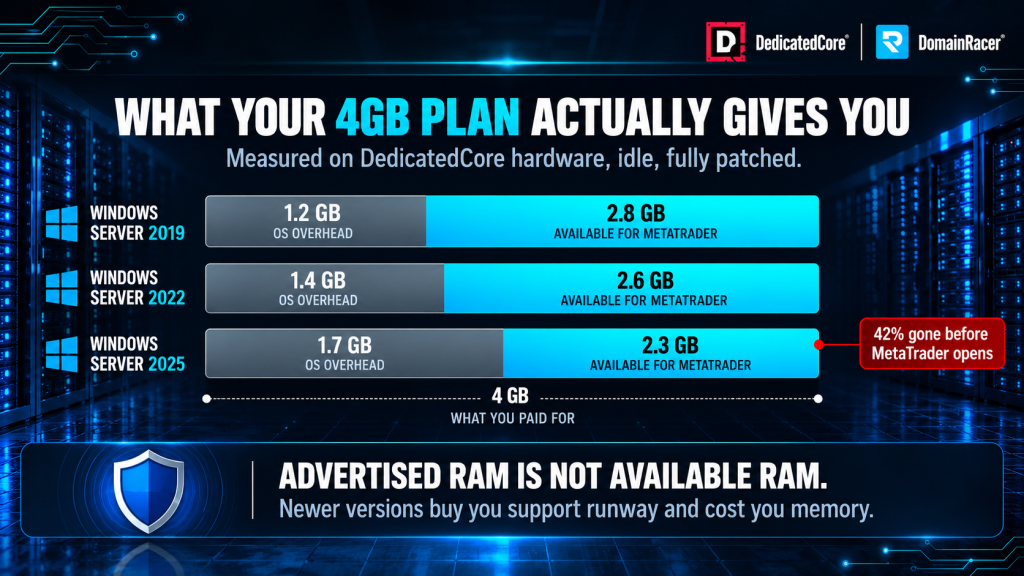
4GB plan RAM usage comparison across Windows Server versions
We tested clean default copies of Windows Server 2019, 2022, and 2025 on DedicatedCore high-frequency servers. The test checks idle system load against a busy trading setup with 10 MT5 charts and 10 EAs running.
| Operating System | Idle OS RAM Footprint | Base OS CPU Overhead | MT5 (10 EAs) Working Set | Boot-to-Trading Readiness |
| Windows Server 2019 | ~1.2 GB | 1.1% | ~2.4 GB | ~22 seconds |
| Windows Server 2022 | ~1.4 GB | 1.4% | ~2.7 GB | ~18 seconds |
| Windows Server 2025 | ~1.7 GB | 1.8% | ~3.1 GB | ~15 seconds |
Note: Windows Server 2025 starts quicker, yet its larger base memory use takes almost 42% of a normal 4GB plan before MetaTrader even opens.
Windows Server Idle Footprint and RAM Requirements for MT5 Trading
Idle overhead is the only version difference you see on your invoice, but most providers do not publish it. Our numbers are measured on our own hardware, so they apply only to our nodes. The footprint depends on the build, installed roles, and hypervisor. Use these numbers as a guide, then check your own instance.
- Measure your own server, not a spec sheet. Open Task Manager on a fresh instance before installing anything and record committed memory.
- Measure again with terminals running. MT5 with ten EAs on ten charts uses a different amount than the same EAs on two.
- Size for the session open, not for idle. The moment your EA needs memory is the moment everything else does too.
For traders who need more control over the VPS environment and resources behind their trading setup, our VPS hosting provides an independent hosting option.
Ask your provider what their image consumes at idle. Most cannot answer because nobody has measured it. Those numbers only hold if the node underneath is healthy, which is a hardware risk question rather than an operating system one. The full sizing method is in our Forex VPS resource sizing guide.
Windows Server Licensing for Forex VPS: Editions, Cores, SPLA and RDS SALs
Licensing confuses more traders than any other part of a VPS purchase, and most of it is decided before you arrive.
- Windows Server is licensed per physical core, not per VM. Microsoft requires a minimum of 16 cores per server, sold in two-core packs, which is why licensing is a host-level cost rather than a per-customer one.
- Standard edition covers two virtual machines per fully licensed server. Fine for a small office, impractical for a host running dozens.
- Datacenter edition covers unlimited virtual machines on the licensed host, which is what most VPS providers license. You get a Windows instance without anyone buying an edition for you specifically.
- SPLA is how hosts pay for it. Providers license under Microsoft’s Service Provider Licence Agreement and include the cost in your plan. Retail licences do not permit hosted use.
- RDS SALs are what can affect you. Two simultaneous administrative sessions are included. A third person needs Remote Desktop Services Subscriber Access Licences, charged per user.
So the edition question is not yours to answer, and a host asking you to choose between Standard and Datacenter for a single VPS has misunderstood how the licensing works. What matters is that the instance is properly licensed and patchable. A provider pricing Windows far below market has either absorbed the cost or is skipping it, and an unlicensed copy stops patching when you need it most.
DomainRacer Windows Server Version Selection for Trading Setups
- Running MT4 or MT5 with standard EAs and want the longest runway — Windows Server 2025. Full servicing until November 2029.
- Running DLL-dependent EAs or a broker bridge — Windows Server 2022 until you have tested 2025 with your specific EA. Security patches run to 2031.
- Already stable on 2022 and mid-strategy — stay put. Migrating a working trading server early is an unforced risk, and extended support is real support.
- Still on 2019 — move. Mainstream support ended in January 2024, and extended support ends in January 2029.
- Python or API-based strategy, no MetaTrader — Linux, and put the licensing savings into CPU.
Whichever version you land on, migrate outside market hours. The mistake we see most often is a weekday migration, scheduled then because that is when support was available.
Windows Server Version Outcomes Through Our Real-World Examples
We regularly see these issues in real trading environments. Based on our experience managing Forex VPS setups, the following case studies show what went wrong, how we addressed it, and what traders can learn from each situation.
Case Study 1 — A forced reboot that closed nothing.
Customer: A scalping trader running three MT4 terminals on a Windows Server 2019 VPS with default update settings.
What happened: Windows applied a cumulative update and rebooted during the London-New York overlap. The terminals did not relaunch, so open positions ran unmanaged until the trader noticed.
Our solution: We set a maintenance window outside market hours, enabled terminal auto-start on boot, and deferred updates to a schedule the trader controls
Lesson: This is a configuration failure, not a version failure. Every Windows version does this if nobody sets the window. Defaults are set for an office environment, not a trading floor. So, we schedule OS updates the same way we schedule preventive maintenance: during hours that won’t cost you money.
Case Study 2 — A 4GB plan that was never 4GB.
Customer: A trader running eight EAs across two MT5 terminals on a 4GB Windows Server 2022 plan. They experienced lag and occasionally missed ticks at session open.
Our solution: We measured actual footprint rather than guessing. The OS took a substantial share before MetaTrader launched, and MT5 with eight EAs consumed most of what remained. The server was swapping to disk under load.
Lesson: Advertised RAM is not available RAM. We size based on the measured idle footprint and add headroom for session opening. Your EA needs memory the most when everything else does too.
Both cases were configuration problems rather than version problems. The version on your order form matters far less than the maintenance window and the sizing behind it.
DedicatedCore’s Expert Answers to Windows Server Forex VPS Questions
We are often asked the following questions by Forex traders. Based on our experience and expertise managing Forex VPS environments, here are our answers to the most common questions.
Should I run Windows or Linux for my Forex VPS?
We recommend Windows for almost every trader. MT4 and MT5 have no native Linux build, so running them needs Wine, which puts a compatibility layer between your EA and the market. Broker bridges, plugins, and most EA licensing systems are Windows binaries. cTrader and NinjaTrader also only work on Windows.
Linux earns its place in one case: a Python strategy running against a broker REST or FIX API, with no MetaTrader terminal in the path. A host selling only Linux will tell you Wine is fine, and it is fine until an update breaks it at 08:00 London time.
Does my Windows Server version affect execution speed?
People ask us this constantly, and the answer is: barely. Trade execution speed depends on network routing, how close you are to your broker’s servers, and the broker’s matching engine. A newer Windows build does not shorten the path from your VPS to an LD4 or NY4 gateway.
Where the version matters is indirectly. A heavier idle footprint uses more RAM, leaving less for terminals. Also, a swapping server slows everything down, including order dispatch. That is a sizing problem wearing a version costume. Network events function similarly. When a trading platform faces a volumetric flood, it loses execution speed, regardless of the Windows version. This is why our DDoS filtering runs always-on instead of waiting for a ticket.
Should I upgrade before October 2026?
We tell most customers no, and any host creating urgency around that date is selling a migration. Windows Server 2022 will receive security updates until October 2031. That’s longer than most traders stick with an unchanged strategy.
Upgrade when you have a reason. A new deployment should start in 2025 for the longer runway. A stable server running scalping or algorithmic strategies moves once you have tested your EAs and can cut over on a weekend. Migrating during a live week to meet a date on Microsoft’s calendar turns a non-event into an incident.
Pick the Version That Outlasts Your Strategy
The October 2026 date is a servicing change, not a cliff. Treating it as an emergency is how a working trading server becomes a broken one on a Tuesday morning. Windows Server 2025 gives the longest runway, 2022 stays patched until 2031, and 2019 is the only version with a real deadline. What decides your outcome is measured footprint and a maintenance window you control.
So the decision in front of you is simple. Host with a provider who publishes what the OS consumes, lets you set your own update window, and tells you which version your EAs were tested on. DedicatedCore and DomainRacer image all three versions from current media and flag DLL and RDS issues before you buy, with a 30-day trial and no setup fees. Pick the version that outlasts your strategy, because the worst time to migrate is the week you’re forced to.

