
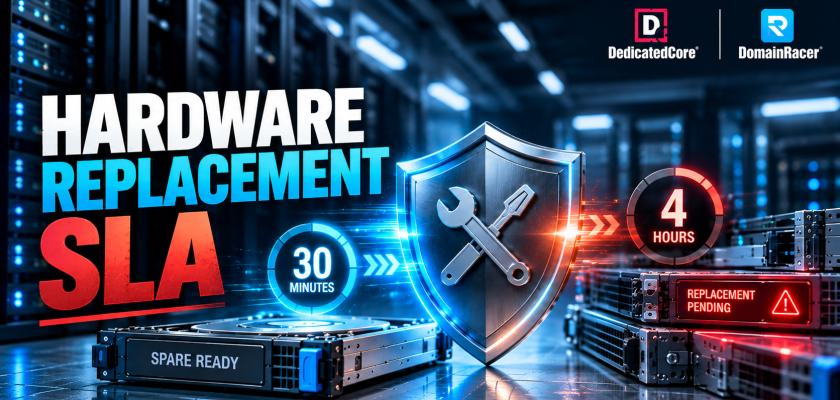
A Hardware Replacement SLA is the promise that decides how fast a dead part is back in service — and it matters more than any spec on the quote. Uptime Institute found 54% of operators lost over $100,000 to their last major outage, and one in five lost over $1 million. Hardware failures cause nearly half of all data center outages, and downtime runs near $5,600 per minute. A faster CPU never fixes a dead drive; only faster recovery does.
That recovery speed is the repair stage of hardware lifecycle management, and it lives in one clause most buyers skip past. This guide covers both SLA tiers, the spare parts inventory behind them, motherboard failure, and the SEO and revenue cost of slow repair. DedicatedCore and DomainRacer start counting time as soon as they see a fault. They keep spare parts at every location and have workers on duty 24*7.
Hardware Replacement SLA: Why It Matters More Than CPU Specs
A Hardware Replacement SLA is a time promise on the physical parts of your bare-metal server — drives, RAM, PSUs, motherboards, NICs, and fans.
Most providers advertise a short window but start the clock only after you open a ticket, by which point your outage is already an hour old. Ours starts at fault detection, the moment monitoring flags it — often worth more than the SLA tier itself.
Every spec drops to zero the moment a drive or board dies. A 64-core server that is down performs worse than a 4-core server that is up.
- Cores, RAM, storage — how fast you run on a good day.
- Hardware Replacement SLA — whether you run at all on a bad one.
Faster silicon costs a host nothing to advertise, because the vendor supplies it. On-site spares, three shifts of technicians, and a fault-detection clock add up monthly, whether they fail or not. That’s why you should include them in your Total Cost of Ownership (TCO), not just the sticker price. For businesses comparing server hardware and recovery commitments, explore our dedicated server plans.
30-Minute vs 4-Hour SLA: DedicatedCore’s Proven Framework for Right Hardware Replacement SLA
This is where the controversy begins. There are two popular SLAs: the 30-minute SLA and the 4-hour SLA. Both are good, but the difference between the two is substantial.
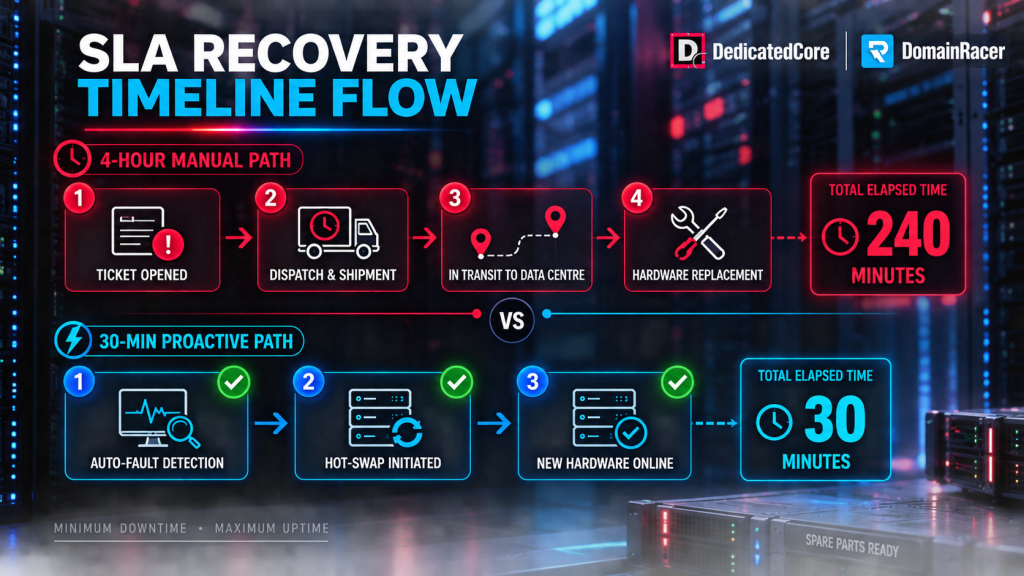
30-Minute vs 4-Hour SLA
- 30-minute SLA — spares on the same rack row. Our technician walks over and swaps. Runs on deep local stock and staff every shift.
- 4-hour SLA — the part comes from a nearby or regional shelf, standard hours. Survivable for low-traffic sites.
The math picks it. At $5,600 per minute, the 210 minutes within a 4-hour window amount to over $1 million on a busy platform.
| Factor | 30-Minute SLA | 4-Hour SLA |
| Response speed | Work starts in ~5 minutes | Up to 240 minutes to begin |
| Resolution window | Most fixes under 1 hour | Half to a full business day |
| Spare parts location | On-site, same rack row | Nearby or regional supplier |
| Staffing | Technicians on all shifts, 24/7 | Standard hours; after-hours lags |
| Downtime risk | Very low; often zero outage | Moderate; brief outages possible |
| Data corruption risk | Minimal; bad parts pulled fast | Rises the longer a drive runs |
| Best fit | E-commerce, SaaS, payments | Blogs, portfolios, internal tools |
| Typical cost | Higher fee, guaranteed speed | Lower fee, more delay tolerance |
Our rule is simple: if you target 99.99% uptime, you have only about 53 minutes of downtime available per year. If one hardware failure could consume most of that allowance, the 30-minute SLA is worth considering. If downtime costs less and your availability requirements are lower, the 4-hour tier may be sufficient.
Three things push clients to the faster tier more than traffic volume:
- Revenue concentration. A retailer earning 40% of annual revenue in Q4 buys the tier for those weeks, not the average.
- Transaction state. In payments and trading, preserving transaction state matters more than raw speed; a paused operation can cost more than a slow response.
- Workload continuity. Some workloads depend on staying available without interruption. Especially trading workloads, where consistent server performance and connectivity matter. Businesses running these workloads can consider DedicatedCore Forex VPS as a purpose-built hosting option.
A budget host sells the 30-minute tier to everyone because it bills higher. We match the tier to the outage cost, which means sometimes the honest answer is the cheaper one.
Hardware Replacement SLA Compared Across Providers
Every host claims fast replacement. The difference is what sits behind the claim.
| What decides recovery | Typical budget host | Average managed host | DedicatedCore / DomainRacer |
| SLA wording | Vague or absent | Standard template | Plain English, published |
| Clock starts | Your support ticket | Ticket acknowledgement | Fault detection by monitoring |
| Spare parts | Ordered on demand | Regional warehouse | On-site, SKU-specific, every facility |
| Overnight staffing | None; queued to morning | On-call rotation | Technicians on all three shifts |
| Covered parts | Drives only | Drives, RAM, PSU | Full roster, motherboards included |
| Motherboard failure | 24+ hours dark | Next business day | Same-day swap from local stock |
| Typical MTTR | Hours to days | 4+ hours | Under 1 hour on the 30-minute tier |
Why MTTR Matters. Mean Time to Repair (MTTR) shows how fast a hosting provider finds, replaces, checks, and restores service after a hardware failure.
Budget hosts sell the promise and skip the inventory and staffing that make it real. Both cost money to hold. Holding them is the entire product — and it is the only line that shows up during your outage.
Spare Parts Inventory: The Base of Every Hardware Replacement SLA
An SLA is a physical promise; a 30-min pledge is worthless if the part is days away. On-site stock eliminates shipping and customs delays, which can reduce repair times by up to 70% compared to ordering on demand. For more details, check out our guide to datacenter spare parts and inventory management.
Our Enterprise Spare Parts Strategy:
- Class A — costly, low-volume boards and CPUs, tight reserve
- Class B — moderate-cost items. Examples include RAID controllers, network interface cards (NICs), and memory modules. We stock these based on how often users use them and their past failure rates.
- Class C — high-churn drives, PSUs, fans, stocked deepest because they fail most.
- Reserve Depth — Keep 2–5% extra spares for active servers. Increase this as older hardware starts wearing out
Enterprise clients can reserve an isolated spare pool with your exact SKUs, fully ring-fenced and never shared. Custom builds receive precise matching parts, not substitutes.
Two commitments matter more than stock depth alone:
- Legacy support — We maintain inventory for EOSL platforms where vendors no longer supply parts, so you migrate on your timeline.
- Tested spares — We bench-test and firmware-match every unit (new or recertified) before deployment.
We also keep your broken part under strict control, wipe all data to meet GDPR, HIPAA, and PCI-DSS rules, and give a destruction certificate if you ask. Healthy units are refurbished and returned to stock, a discipline we cover in full in our server decommissioning guide.
The Impact of Motherboard Failure on Hardware Replacement SLA
The worst fault in the rack. The board dies, nothing works — CPU, RAM, and drives all sit useless because the layer connecting them is gone.
- The whole server may stop working. This can disrupt the CPU, RAM, storage, and network connections
- The restoration process is rather complicated. Replacing one storage device is different from restarting a server after a motherboard change. This is because you need to discharge and reinstall several components.
- Spare stock determines the wait. A matching board on site turns a full day into one afternoon. Without local spares, you are dark 24 hours or more.
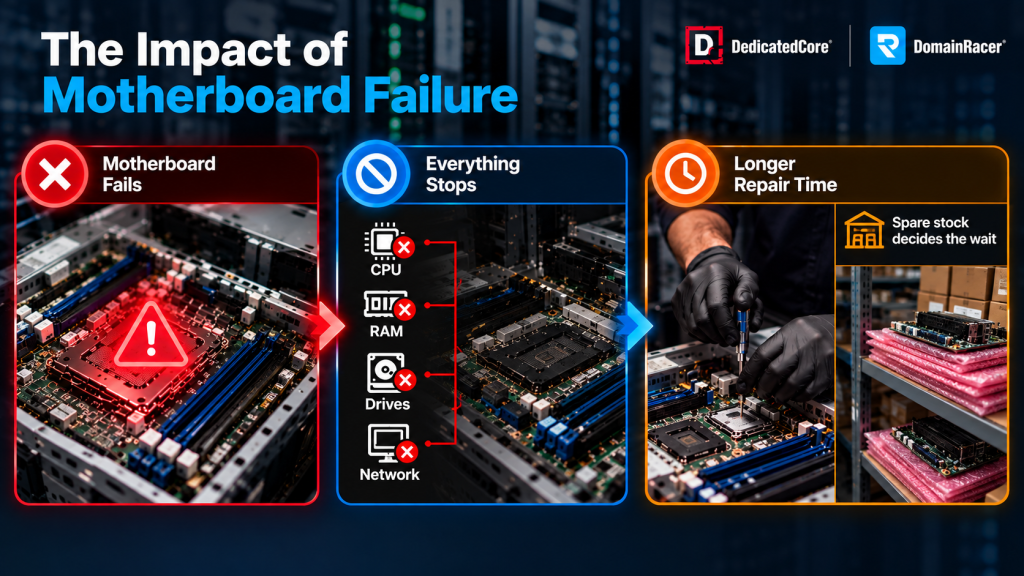
The Impact of Motherboard Failure on Hardware Replacement SLA
We stock matching boards in every facility. Budget hosts gamble on this failure being rare. It is — and it is also the one that ends businesses. Boards are only one of the common dedicated server hardware failures we hold stock against.
The Business Impact of Hardware Replacement SLA Delays
The SEO Cost of Hardware Replacement Delays
Yes, and most owners never connect the two. Google recommends maintaining server reliability. If there are repeated 5xx errors, it can reduce crawling efficiency. This, in turn, may delay the indexing of important pages.
- Crawl errors pile up. Your server returns 5xx during an outage, Googlebot logs each one, and your crawl budget shrinks. Fresh content indexes later.
- Core Web Vitals slip. A failing drive runs slow before it dies. LCP passes the 2.5-second target, INP sags, CLS rises — all three feed rankings directly.
- Recovery lags the repair. Google needs days or weeks to trust you again after the swap.
A one-second delay also cuts conversions by around 7%. Every hour we shave off recovery is a ranking hit you never take.
The Cost of Delaying Server Replacement
The meter starts at fault confirmation and runs in two directions.
- Lost revenue. A store earning $1,000 an hour loses that full sum over a four-hour outage. Repeated small outages erase a year of margin.
- Data risk and lost trust. Component degradation does not pause while you wait. A failing drive left running corrupts files before it is swapped, and about 60% of shoppers never return to a site that was down when they needed it.
Every extra minute multiplies both. It is the same math behind catching the warning signs of failing server hardware early, before a fault ever reaches your SLA clock.
Delay has a second form, too: holding aging hardware that has not failed yet. Knowing when to replace a server is a separate calculation from replacing a broken part fast, and we run both clocks for you.
DedicatedCore’s Curated Checklist for Choosing the Right Hardware Replacement SLA
Test any provider, including us. Vague answers mean the promise is marketing.
- Exact response and resolution times? 30-minute and 4-hour tiers, both published, both with defined resolution windows.
- On-site spares, and how deep? SKU-specific pools in every facility at 2–5% of active nodes, ABC-ranked.
- What is covered and excluded? Full roster including motherboards, exclusions named in plain English.
- When does the clock start? At fault detection by our monitoring, not your ticket.
- What if you miss the window? Defined remedies in the contract. A promise without a penalty is a slogan.
Around 65% of buyers say clear SLA answers decided their choice. We answer in specifics because the inventory and staffing behind them already exist.
Real Business Outcomes Powered by Our Hardware Replacement SLAs
Case Study 1 — A failing SSD during peak traffic.
A mid-sized fashion retailer was three days into Black Friday when its dashboard threw a SMART warning. The first drive in the RAID array showed reallocated sectors, causing page loads to become unpredictable. The team promptly filed a critical ticket to DedicatedCore at 5:12 p.m. to address the issue.
Our solution: Our technician confirmed the fault and pulled a matching spare SSD from the on-site cage. The array was hot-swappable, so we completed the swap with the storefront fully online.
The result: One hour of minor checkout latency during the rebuild, and nothing else. Finance calculated a four-hour outage at that peak would have cost nearly $18,000 in abandoned carts.
Case Study 2 — A dead motherboard on Monday morning.
A SaaS firm with 300 clients lost its primary server just past 7 a.m. No ping, no console output, and a power reset that did nothing. That pointed straight at the board.
Our solution: DomainRacer confirmed the motherboard had failed while drives and RAM tested clean. A matching board sat in the same data center, so our technician moved the CPU, memory, and drives across by hand.
The result: The platform returned the same morning with every client’s data intact and no OS rebuild. A fault that flattens most hosts for a full day became a routine same-morning recovery.
DomainRacer’s Expert Answers to Common Hardware Replacement SLA Questions
Is a hardware warranty enough, or do I need a Hardware Replacement SLA?
Buyers confuse these until an outage teaches them. A warranty is the manufacturer’s promise about the part — replaced eventually, on their schedule, after you ship the dead one back and wait.
An SLA is about your time, and it is ours to honor. We guarantee your server runs again inside a fixed window using spares we already hold. A drive with a five-year warranty never leaves you offline for a week on our watch.
Does a Hardware Replacement SLA guarantee zero downtime?
No clause can promise zero downtime. The right setup can reduce downtime to minutes. With hot-swappable parts and redundant power, we can replace many parts while your service stays online.
When a full outage is unavoidable, such as a dead board, our on-site spares and 24/7 staff can reduce the fix to the same day instead of taking several days. The goal is the shortest predictable downtime.
Is the 30-minute tier worth paying for if my site is small?
Often not, and we will tell you so. If a few hours offline costs little, the 4-hour tier plus proactive data center preventive maintenance is the smarter spend. We would rather keep you for years than oversize you once.
The line moves when revenue depends on uptime. If one peak-hour outage costs more than the tier upgrade costs annually, the faster tier pays for itself on the first incident it prevents.
Evaluate Recovery Before You Evaluate Performance
Every bare metal will eventually experience hardware failure. The real difference between hosting providers is not the hardware they sell. It’s how quickly they bring your business back when something breaks. A clear Hardware Replacement SLA with spare parts on site and skilled engineers cuts downtime and protects your money.
Share your traffic patterns and business requirements with the DedicatedCore and DomainRacer team. If your workload does not require bare-metal hardware, explore DomainRacer VPS hosting as another infrastructure option. We’ll calculate your downtime exposure, recommend the right Hardware Replacement SLA, and show you the enterprise spare parts strategy that keeps your infrastructure online.

