
Most DDoS attacks are over before anyone opens a ticket. Industry data now puts 78% of attacks ending within five minutes, up from 44% a year earlier, with 37% finishing within two. The largest attack ever disclosed reached 31.4 Tbps and lasted 35 seconds.
That timeline breaks every response plan built around human judgement. DedicatedCore and DomainRacer run the first sixty minutes as a written sequence, because nobody makes good decisions inventing a process at 3 AM. This guide is that sequence, along with the eight templates we use, ready for you to copy.
The DDoS Incident Response Timeline: What Happens in Each of the First Sixty Minutes
Most incident response plans exist as a document nobody has read, written by someone who was not on call. Ours runs as timed blocks instead, and each one has an owner and an exit condition. If you miss the exit condition for one step, the next step starts without enough information. Without confirmation, you may filter the wrong traffic and turn a small issue into a real outage.
Ask your current host to show you their runbook. If the answer is a support process rather than a document with timings in it, you already know how your first hour goes.
DDoS Incident Response Standards Compared Across Hosting Providers
Every host on the market has a response. The difference is whether it starts before you notice.
| What decides the first hour | Typical budget host | Average managed host | DedicatedCore / DomainRacer |
| What starts the response | Your support ticket | A monitoring alert | Automated edge filtering |
| Time to first action | Hours | 30–60 minutes | Under 30 seconds |
| Written runbook | None | Internal notes | Timed SOP with owners |
| Incident commander | Nobody named | Duty engineer | Named role, with backup |
| Upstream notification | Not possible | On request | Pre-arranged, tested |
| Customer updates | Silence | Ticket reply | Status page inside 15 minutes |
| Templates ready | None | Ad hoc | Eight, written in advance |
| Post-incident report | None | Verbal | Written, within 48 hours |
That first row decides everything below it. Against an attack lasting 35 seconds, any process starting with a human being finishes after the outage.
The DDoS Incident Response Timeline: What Happens in Each of the First Sixty Minutes
We built the sequence below because the first sixty minutes decide the cost of everything after them. Each block carries an owner and an exit condition, so nobody moves forward on an assumption. Miss one exit condition and the next block starts blind, since classification without confirmation means filtering the wrong thing and turning a marginal event into a real outage. Most hosts run this as a support process instead, which is why their first ten minutes go on finding out what they should already have known.
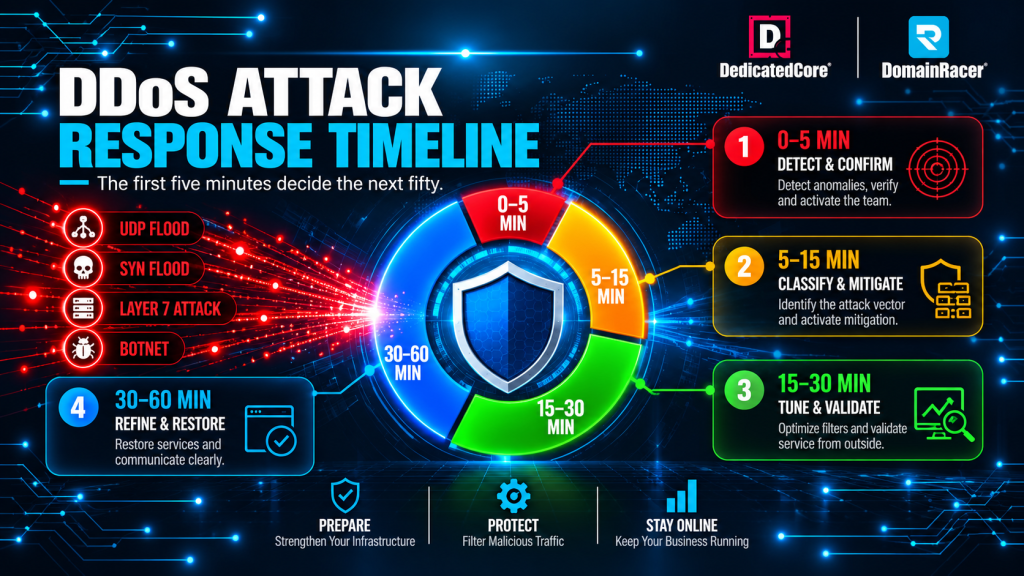
Four stages of DDoS incident response, from attack detection and mitigation to service validation and recovery.
Minutes 0 to 5: DDoS Attack Detection and Incident Team Activation
The clock starts when traffic moves away from the baseline, not when the first complaint arrives. This difference can help keep an incident contained.
DDoS Attack Detection and Verification in the First Five Minutes
The clock starts at deviation from baseline, not at the first complaint. That distinction is the whole difference between a five-minute incident and a fifty-minute one.
- Detect. Automated systems flag traffic that is outside the 30-day hourly profile. Bandwidth, packet rate, connections, and response time are monitored separately because each can fail on its own.
- Verify. Confirm the signal is real and not a monitoring fault. One probe failing is not an incident; the same deviation across several vantage points is.
- Confirm. Check whether it is an attack or a real traffic surge. Look at conversion, geography, user agents, and referrers together.
- Activate. Page the incident commander and open the incident channel.
The commands that settle the confirmation step are covered in the detection guide.
We can take time to confirm because always-on filtering is already handling the traffic. A host that must act without enough information cannot afford to be careful.
DDoS Incident Team Activation and Response Role Assignment
Four roles cover every DDoS incident, and one person can hold two of them on a small team.
- Incident commander — makes the call, owns the timeline, and is our designated authority for a null route.
- Network lead — runs filtering, scrubbing, and upstream contact.
- Application lead — watches response time, workers, and database health.
- Communications lead — owns the status page and customer messaging.
Name these people in advance, along with a backup for each. The most common failure we see in incidents inherited from other providers is not a technical one. It is fifteen minutes lost while somebody works out who is allowed to decide.
Minutes 5 to 15: DDoS Attack Classification and Mitigation Activation
Mitigation is already running by now, so this block is about aiming it correctly. Classify wrongly here and every action in the next thirty minutes works against the wrong problem.
DDoS Attack Classification and Vector Identification Under Pressure
Different attacks stop at different layers, so wrong classification can lead to over-filtering.
- Bandwidth saturated, packet rate moderate — volumetric amplification at Layer 3/4. Local rules are already useless, so escalate upstream.
- High packet rate, bandwidth flat — small-packet flood measured in Mpps. Check interface errors for a hardware ceiling.
- Conntrack near limit, SYN_RECV high — protocol attack. SYN cookies and raised limits.
- Response time climbing, network normal — Layer 7. Find the endpoint in access logs.
Write the classification into the incident channel with a timestamp. Everything after this depends on it being right. A wrong call recorded early is easier to catch than one nobody wrote down. Each vector and its counter-control is set out in the prevention guide.
DDoS Mitigation Activation and Upstream Provider Notification
- Enable mitigation matched to the classification. Volumetric traffic goes upstream to scrubbing, protocol attacks get state-level controls, and Layer 7 gets rate limits with WAF rules.
- Notify upstream. Contact details, account numbers, and community strings belong in the runbook, not in someone’s inbox.
- Start the mitigation log. Every rule, every timestamp, every person. Post-incident analysis is fiction without it.
Ours activates without this step, because filtering is already in the traffic path. On-demand providers spend these ten minutes on BGP convergence and phone calls. The attack does not spend them waiting.
Customer Status Publication Within Fifteen Minutes of a DDoS Attack
Host the status page somewhere other than the infrastructure under attack. Publishing outage notices on servers that are down is common and entirely avoidable.
- Publish before classification is complete. Say what is affected, that you are working on it, and when the next update lands.
- Do not guess at the cause. Early attributions are usually wrong and get quoted back to you.
- Do not promise a fix time. You do not control the attacker’s schedule.
Silence reads as incompetence, and the details can always follow. Nobody should be drafting that message under pressure. The wording is written in advance and sits in the templates below.
Minutes 15 to 30: DDoS Filtering Optimisation and Service Validation
The question changes here from whether mitigation works to what it costs. Filtering that stops the attack while blocking your customers is not a win, and this is where most providers stop measuring.
DDoS Traffic Filtering Optimisation and False Positive Control
By now mitigation is running, and the question changes from whether it works to what it costs.
- Narrow the rules. Start wide to stop the bleeding, then tighten toward the actual signature.
- Measure the false positive rate. Real traffic dying alongside the attack is a cost, not a rounding error.
- Watch conversion, not traffic graphs. The graph looks excellent when you are blocking everyone.
- Log every adjustment with a timestamp and an owner.
For trading platforms, even a brief disruption can interrupt access to trading terminals and time-sensitive workflows. That makes infrastructure readiness and DDoS mitigation important parts of hosting selection. DedicatedCore Forex VPS provides a relevant option for traders evaluating their hosting environment, while protection against network attacks should be assessed separately through the provider’s mitigation capabilities and response process.
DDoS Mitigation Effectiveness Monitoring and Capacity Scaling
Four numbers tell you whether to hold or escalate.
- Attack traffic dropped versus passed — is the filter catching the actual vector?
- Application response time — the number that says whether customers are being served.
- Conversion or transaction rate — the only proof the business is working.
- Signature drift — multi-vector attacks change shape, and your filter has to follow.
If the first number is good but the second is not, you are filtering the wrong layer. Re-check the classification before scaling mitigation. A botnet spread across thousands of addresses will not stop with source blocking. Your Effective AHR shows whether scaling is possible. If the limit is the hardware, raising it becomes an upgrade decision. Businesses planning for higher packet-processing demands can compare DedicatedCore dedicated servers against their hardware capacity, performance, and network protection requirements.
DDoS Attack Service Validation From Outside Your Network
Internal checks pass while external users still fail, so validation has to run from outside.
- Test from several regions, not one monitoring node.
- Check application function, not just connectivity. A server answering pings with a drained database pool has not recovered.
- Verify the critical path — login, checkout, API, whatever the business actually runs on.
- Re-check against baseline, using the same signals covered in the detection guide.
Most hosts declare an incident contained when their own graphs look clean. We declare it contained when a transaction completes from three regions.
Minutes 30 to 60: DDoS Mitigation Refinement and Service Restoration
The attack has stopped, plateaued, or shifted, and each one needs a different answer. Application recovery lags network recovery, so this block is mostly about the parts of your stack that are still broken.
DDoS Mitigation Fine-Tuning and Filter Rule Refinement
The attack has either stopped, plateaued, or shifted. Each one needs a different response.
- Stopped — hold mitigation for at least thirty minutes. Attackers watch how fast you drop defenses.
- Plateaued — tighten rules toward the exact signature and release everything else.
- Shifted — re-classify from the top. A multi-vector attack that changes layers is a new incident wearing the old one’s clothes.
Set a reversion time on every emergency rule as you create it. Rules left in place for weeks quietly suppress real traffic. Nobody notices, because the graphs look normal.
Application Verification and Service Restoration After a DDoS Attack
Network recovery and application recovery are different events, and the second one lags the first.
- Restart exhausted workers rather than waiting for them to clear.
- Check the database connection pool and clear stuck sessions.
- Flush caches that filled with error responses during the attack.
- Verify queues drained rather than silently dropping jobs.
We restore services in dependency order. The database and core systems come back first, followed by the full application. Opening the front end too early can cause the outage again.
Customer Communication Through the First Hour of a DDoS Incident
Update the status page every fifteen minutes, even when nothing has changed. A holding message with no new information still beats an empty page.
- Update every fifteen minutes, even when nothing has changed.
- Move from investigating to mitigating only when it is true. Customers forgive an outage more readily than a wrong update.
- Send the follow-up report within 48 hours, while the incident still matters to them.
The follow-up report is what decides whether they renew. Most hosts go quiet the moment traffic normalises, which is exactly when the customer is deciding what this cost them.
After the First Hour: DDoS Recovery, Root Cause Analysis, and Closure
Traffic is normal, and nobody is watching, which is exactly when the next incident gets set up. This is the work that turns a survived attack into a closed one, and most hosts skip it entirely.
DDoS Attack Service Validation and Performance Verification
Traffic returning to normal is not recovery, because attacks stop and restart.
- Remove mitigation gradually, in reverse order of severity, watching for the attack to resume.
- Compare performance against baseline, not against the attack. Response times often settle above where they started.
- Inspect the hardware. High packet rates can cause interface errors and link problems, which are a hardware risk signal worth logging.
A card that survived in a degraded state is a scheduled failure, not a solved problem. How fast it gets swapped comes down to whether the part is already on the shelf.
DDoS Attack Root Cause Analysis and Mitigation Debt Accounting
Root cause analysis asks why the attack succeeded, not what the attack was. The vector is rarely the interesting answer.
The interesting answers usually sound like this. The origin address sat exposed in an old DNS record. Detection took nineteen minutes because the alert went to a channel nobody watches. The scrubbing tunnel was configured but never tested.
Every one of those is Mitigation Debt coming due, and every one is fixable in advance. The prevention guide covers the work that closes them permanently. We keep the review blameless, because if people fear it, you get half the story.
DDoS Incident Closure and Response Documentation
An incident that produces no documentation gets repeated in full, usually by a different person making the same call.
- Record the timeline with real timestamps, including detection lag and time-to-mitigate.
- Record what did not work, which is more useful than what did.
- Assign every finding an owner and a date.
- Update the runbook while memory is still accurate.
We close an incident only when the report is written. Most hosts close it when the traffic stops, which is why the same failure appears in their next incident.
Ready-to-Use DDoS Incident Response Templates
Eight documents cover the whole incident lifecycle. Copy them, add your own names and numbers, and store them somewhere reachable when your own infrastructure is down.
| Template | What it contains | When it is used |
| Incident Response Plan | Phase timings, exit conditions, named roles with backups, null-route authority | Read before an incident, opened at minute zero |
| Escalation Workflow | Who to contact at what severity, upstream account numbers, BGP community strings | Minute 2 onward |
| Customer Notification Templates | Four pre-written messages: acknowledgment, mitigating, restored, post-incident | First one inside 15 minutes |
| Internal Communication SOP | Which channel carries the incident, what gets posted, who speaks to whom | Throughout |
| Executive Report Template | Impact, duration, cost, and what changes. One page, no jargon | Within 48 hours |
| Root Cause Analysis Template | Why the attack succeeded, with a Mitigation Debt section for deferred controls | Recovery phase |
| Lessons Learned Document | What worked, what did not, each item with an owner and a date | Recovery phase |
| Post-Incident Checklist | Mitigation removed, baseline refreshed, hardware inspected, report issued | Before closure |
The Incident Response Plan is one page on purpose, because nobody reads five during an incident. We hand all eight to customers rather than keeping them internal, since a host that treats its runbook as a trade secret usually does not have one.
DDoS Incident Response Through Our Real-World Examples
We regularly encounter situations where early detection and coordinated mitigation prevent DDoS attacks from disrupting customer services. The following case studies show how incident response decisions can limit impact and help prevent repeat attacks.
Case Study 1 — A confirmed attack that never reached the customer.
A DedicatedCore client took a volumetric flood during business hours. Automated filtering engaged at the network edge before any human was paged.
Our Solution: The incident commander was notified after mitigation was already active. Classification, upstream notification, and the first status update all completed within twelve minutes. No manual escalation was needed.
The Result: The customer learned about the attack from our post-incident report. Their own monitoring never registered a service impact.
Case Study 2 — A shifted vector caught in the second phase.
A DomainRacer customer was hit with what looked like a straightforward SYN flood. Fifteen minutes in, application response time started climbing while network metrics improved.
Our Solution: We reclassified from the top rather than scaling the existing filter. The protocol attack had been a cover for a Layer 7 flood against the login endpoint. That needed session-keyed rate limiting, not state controls.
The Result: The second vector was contained in under ten minutes. Scaling the original mitigation would have absorbed budget while the real attack continued.
Both incidents turned on the same discipline. A written sequence with exit conditions catches a shifted vector, and improvisation does not.
DedicatedCore’s Expert Answers to DDoS Incident Response Questions
We are often asked how quickly a hosting provider should respond when a DDoS attack occurs. Based on our experience with DDoS detection and mitigation, we explain what response times matter, which actions should happen first, and how to measure an effective response.
How fast should my host actually respond to an attack?
We measure time-to-mitigate from the traffic change, not the support ticket. With 78% of attacks ending within five minutes, waiting for a support conversation can be too late. The key question is whether mitigation can start automatically.
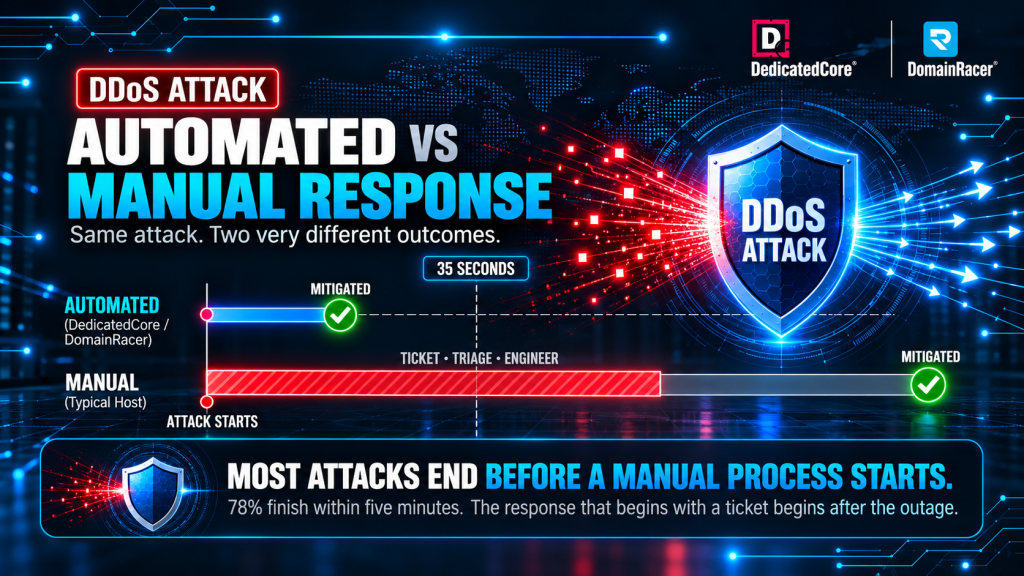
Automated DDoS mitigation can respond faster than manual processes that require tickets, triage, and engineering intervention.
Ours runs always-on, so filtering is in the traffic path before anything arrives. The human work starts after mitigation is already active, which changes what the first five minutes are for. Instead of scrambling to stop the attack, the team spends that time classifying it correctly. Correct classification is what keeps the second phase on track.
Do I need my own incident response plan if my host has one?
We think yes, and the split is worth being clear about. Network-layer response is ours and should never wait on you noticing. Application-layer symptoms live inside your stack. Worker exhaustion and database saturation are visible to you and often invisible to us.
Your plan needs three things: a decision maker, a status page hosted away from your infrastructure, and ready customer messages. The templates above cover all three. Many outages get worse because no one knows who can make the decision.
What should I expect after the attack is over?
We issue a written report within 48 hours. It covers the timeline, the vector, the mitigation applied, and what changes afterward. That last part matters most, because an incident that produces no change is an incident scheduled to repeat.
You should also expect your host to inspect the hardware. High packet rates leave error counters and degraded interfaces behind. A card that survived in poor condition fails properly a few weeks later. Most hosts never look, which is why the follow-up failure arrives as a surprise to everyone except the equipment.
The First Five Minutes Decide the Next Fifty
An incident response plan is worthless as a document and valuable only as a rehearsal. Delays in the first step can slow classification, filtering, and communication. Many short attacks end before a manual process reaches the second step. This SOP completes the process covered in the case study collection, the detection guide, and the prevention guide.
Pick a provider that responds quickly, shares its runbook, and offers ready-to-use templates. Don’t settle for one that makes you wait for a support ticket. DedicatedCore and DomainRacer provide always-on mitigation in Tier IV facilities, with a written SOP, a named incident commander, a 30-day trial, and no setup fees. Rehearse the process while the network is quiet, because the first five minutes matter most.

