
The CPU, RAM, and disk numbers on a plan page come from a sheet that shows an empty box with nothing on it. Rather than size a plan from an empty server’s specifications, traders can use a whole-server capacity worksheet to estimate resources for their actual workload. According to Microsoft’s official recommendations, Windows Server must have a minimum of 512 MB of RAM. Nevertheless, the same recommendations indicate that the virtual machine with exactly this amount of RAM will fail to complete its installation.
A plan that looks fine on a quiet server can stumble the minute a big news release lands. Once RAM runs dry, Windows pages to disk, and your fast memory reads crawl at disk speed. That slowdown hits all at once, never gradually. We at DedicatedCore and DomainRacer pick sizes from real use, then add headroom on top of that. Most hosts skip both steps and hope the spec sheet is close enough.
Forex VPS Sizing Based on Trading Workload and Requirements
Most hosts publish tiers and let you guess. We work the other way, starting from the workload and adding margin.
- Count the terminals and EAs you run at peak, not on an average day.
- Measure the operating system first, because that share is gone before MetaTrader opens.
- Add per-chart and per-EA costs that scale with indicators and history depth.
- Apply a headroom margin sized for the session open rather than for idle.
Two of these four factors are often overlooked. If you ignore operating system usage, a 4GB plan can behave like a 2GB plan. If you ignore headroom, everything may run fine until an important release increases the workload.
Most people choose a plan based on its price, not its actual needs. This works until the workload grows and the plan reaches its limit. Before choosing a plan on price alone, traders can consult a workload-based purchase roadmap that weighs performance, infrastructure, and support checks.
Forex VPS Resource Sizing Compared Across Providers
Every host publishes plan tiers. The difference is whether the numbers came from measurement.
| What decides your plan | Typical budget host | Average managed host | DedicatedCore / DomainRacer |
| Sizing basis | MetaQuotes minimum | Rough tier guesswork | Measured footprint plus headroom |
| OS overhead counted | No | Not disclosed | Measured and stated |
| Per-EA cost published | Never | No | Yes |
| Headroom margin | None | Implicit | Explicit, sized for session open |
| Disk type | Shared SSD, unstated | SSD | NVMe, IOPS disclosed |
| Log and history growth | Your problem | Your problem | Flagged at provisioning |
| Upgrade path | Rebuild and migrate | Paid migration | Live resize where possible |
| What you are left with | A plan that installs | A plan that usually runs | A plan that holds at peak |
That first row is the whole product. A plan sized against a minimum requirement is sized against the wrong number, and you find out during the one hour a year it matters. Whether the node behind it holds up is a hardware risk question rather than a plan question. For workloads that need greater control over physical resources, a DedicatedCore dedicated server is worth evaluating against the workload’s CPU, memory, and storage demands.
MetaTrader Terminal Resource Requirements on a Forex VPS
Terminal footprint is not a single figure. It is a base cost plus everything you load into it. When chart counts and EA activity change a terminal’s footprint, an MT4 terminal-load worksheet structures the workload and headroom estimate for the MetaTrader setup.
- Base terminal — the platform running with no charts open. Modest, and the only part any minimum specification describes.
- Per chart — each open chart carries its own price history in memory.
- Per indicator can surprise you, since a heavy one with a long lookback can use more memory than the chart it sits on.
- Per EA — a simple EA is cheap. One holding arrays of historical data is not.
- History depth — the max bars setting multiplies every chart’s cost.
The history setting is often overlooked. A terminal with maximum bars on 20 charts uses much more memory than one with a reasonable limit. Most traders keep the default setting without knowing it affects memory usage.
DedicatedCore Method for Measuring CPU, RAM, and Disk Usage on a Forex VPS
You do not need a monitoring stack to answer this.
- Open Task Manager and note committed memory with no terminals open, then check it at full load. The gap between these two numbers is your real trading footprint.
- Watch the disk queue length during a history download or a backtest.
- Check available memory during a session open, not overnight.
- Look at your MQL logs folder size and work out twelve months of growth.
Run this before your next renewal. If peak memory is above 70 percent, you’re one volatile session away from swapping. The symptoms will appear like everything except a sizing problem. When a sizing shortfall resembles a platform or network fault, traders can consult an ordered fault-finding sequence to work through the possible causes.
MT4 vs MT5 CPU, RAM, and Resource Requirements on a Forex VPS
The two platforms do not size the same way, and assuming they do is how a working MT4 plan fails after an MT5 migration.
- MT5 is heavier at rest: more platform, more services, a larger base footprint.
- MT5 handles charts more efficiently once loaded, so the gap narrows as you add them.
- MT5 uses multiple cores in the Strategy Tester, which MT4 cannot, so backtesting sizing differs completely.
- MT4 is 32-bit legacy in most builds, while MetaQuotes ended 32-bit MT5 support in build 3930. Existing 32-bit installs ceased to work on January 1, 2024.
That last point rules out a whole class of cheap plans. A 64-bit Windows Server is not optional for current MT5 builds. A host still imaging 32-bit anything is running templates from before 2024.
Windows Server RAM Overhead Before MetaTrader Opens on a Forex VPS
This number turns the plan you see into a smaller real plan, and yet not many hosts share it.
When your server boots, Windows takes a set amount of memory before your terminal starts. On a 2 GB plan, this share can be most of what you paid for. Even a plan that seems right for MetaTrader on paper might fall short when it runs one terminal.
- Check committed memory on a fresh instance before installing anything.
- Newer Windows builds eat more memory, but they also get patches for more years than old ones. The trade-off is real, and it changes the plan you need.
- Linux is lighter, but only worth it for Python or API strategies with no MetaTrader in the path.
The full version comparison is in our Windows Server version guide for Forex VPS. Most hosts quote a plan size without mentioning that a third of it is already spoken for.
Forex VPS CPU and RAM Sizing by EA and Terminal Count
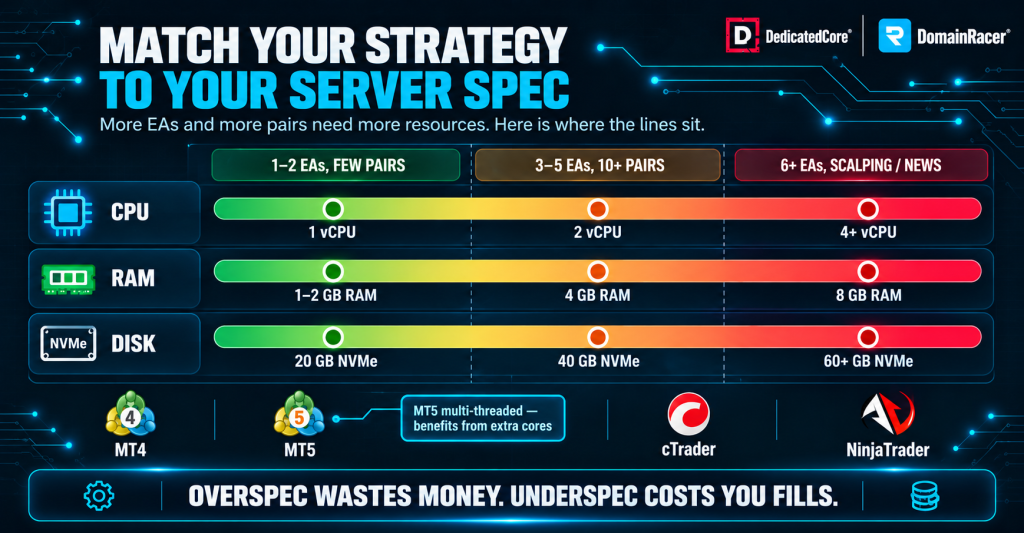
Match Forex VPS CPU, RAM, and NVMe storage to your number of Expert Advisors, trading terminals, and strategy workload.
Match the plan to peak load, not to the average trading day.
| Setup | RAM | vCPU or cores | Disk | Headroom note |
| 1 terminal, 1–3 EAs | 4GB | 2 vCPU | 40GB NVMe | Comfortable for manual and swing |
| 1 terminal, 5–10 EAs | 6–8GB | 2 dedicated cores | 60GB NVMe | Clock speed matters more than count |
| 2–3 terminals, 10+ EAs | 12–16GB | 4 dedicated cores | 100GB NVMe | Each terminal needs its own thread |
| Strategy Tester workstation | 16GB+ | 8+ cores | 150GB+ NVMe | Cores scale here, unlike live trading |
| Python or API strategy | 2–4GB | 2 vCPU | 40GB NVMe | Linux removes the OS overhead |
These are starting points, not guarantees. A single EA holding large arrays can outweigh five simple ones, so measure your own before committing to the next tier up.
Forex VPS Disk, NVMe, and Storage Requirements for MetaTrader Trading Workloads
Disk gets ignored because trading feels like a network workload. It is not, and the writes are constant.
- Downloading tick history is the heaviest single job, and it is worst on a fresh install or a symbol change. A slow disk turns this into a multi-hour wait.
- Log growth is continuous. Every EA action, every connection event, every error.
- The Strategy Tester hammers the disk during optimisation runs.
- Windows updates and page file activity compete with all of the above.
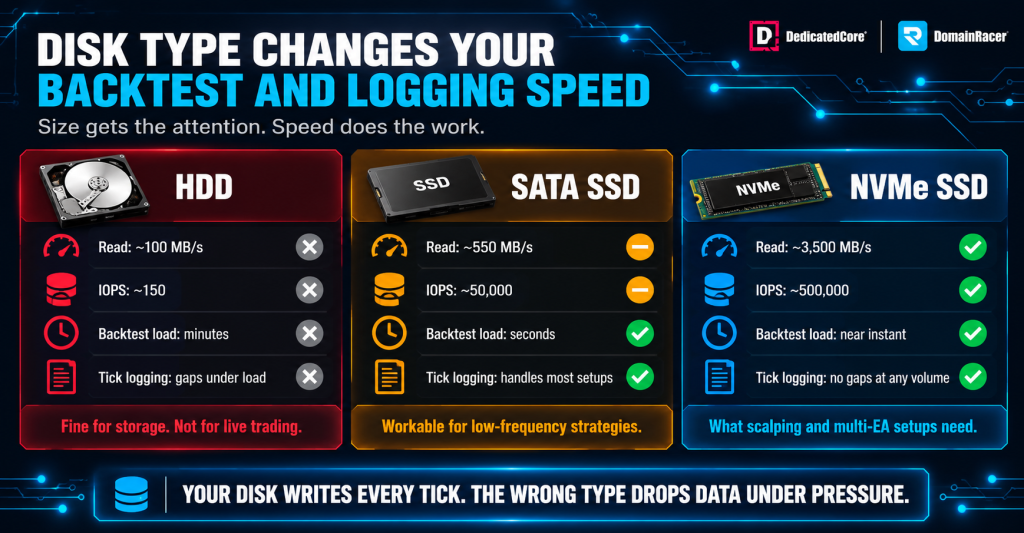
Compare HDD, SATA SSD, and NVMe SSD storage for Forex VPS workloads, including tick-history downloads, backtesting, and MetaTrader log handling.
NVMe is not a luxury here. A saturated disk delays trade execution just like a saturated CPU, producing the same symptoms in the terminal. Twelve months of unmanaged logs can quietly fill a small partition. So, we flag log rotation at provisioning to prevent issues before the disk fills up. Drive health over that period is covered by our preventive maintenance schedule.
Forex VPS Advertised RAM vs Usable Memory for MetaTrader Trading
Three things sit between the number on your invoice and the memory your EA can use.
- The operating system takes its share first, before any terminal opens.
- Windows pages to disk when memory runs short, and a swapping server delays everything, including order dispatch.
- Headroom is not waste. Running at 95 percent utilisation leaves no room for the next tick.
We size for at least 30 percent free memory at peak, because that margin absorbs a news event. A plan running comfortably overnight and swapping during a release was never the right plan, and the trader usually blames the EA.
Adding MetaTrader Terminals vs Separate Servers for Forex VPS Trading
More terminals on one VPS is cheaper. A second VPS is safer. The line between them is worth understanding before you cross it.
- Add a terminal when you have headroom and the strategies are unrelated.
- Add a server when one strategy failing must not touch another.
- Add a server when your strategies need brokers in two places. Proximity belongs to the server, not the terminal. A broker in London and a broker in New York need two servers, whatever your headroom.
- Add a server when a single VPS restart would take down everything at once.
Consolidation saves money right up until one reboot closes every position you had open. Where the second server should sit is a separate question, and how LD4 proximity affects placement answers it for London brokers.
Understanding Forex VPS Uptime Guarantees and Terminal Availability
A 99.99 percent uptime figure sounds precise and usually measures the wrong thing.
- Node availability is what most guarantees cover. The hypervisor was up.
- Terminal availability is what you care about. Your EA was running and connected.
- Under most terms, a reboot does not count as downtime, even if nobody was watching your trades. A planned reboot at session open costs you money the SLA never covers.
- Ask what triggers a credit, because a guarantee with no remedy is a sentence.
Those two figures diverge during exactly the events that cost you money. We treat terminal availability as the number that matters and configure auto-start accordingly. A node that stayed up while your terminal stayed closed has met the SLA and failed the trader. When the failure is physical rather than configuration, replacement speed is what decides how long that gap lasts.
Forex VPS Resource Sizing Results from Our Real-World Trading Examples
We regularly assess how trading workloads perform under real conditions, not just idle resource readings. These case studies show how the number of Expert Advisors, chart activity, and available RAM affect Forex VPS sizing.
Case Study 1 — Twelve EAs on a 4GB plan.
Customer: A trader using twelve EAs on two MT5 terminals with a 4GB plan. They report freezes and missed entries, especially at session open.
Our solution: We measured rather than upgraded. Windows took its share, the terminals took most of the rest, and the server was paging to disk under load. We cut max bars per chart, moved four EAs to a second terminal, and resized to 12GB. Traders managing multiple EAs can assess the trading-focused plan options against their peak RAM usage, terminal count, and required headroom.
The result: Memory peaked around 65 percent during releases instead of hitting the ceiling. The freezes were never a CPU problem.
Case Study 2 — A Python strategy that did not need Windows.
Customer: A developer using a Python strategy with a broker REST API on Windows, but paying for an OS the strategy doesn’t use.
Our solution: We moved the workload to Linux. No MetaTrader terminal sat in the path, so nothing needed Windows, and the idle footprint dropped substantially.
The result: The same strategy ran on a smaller plan with more headroom. The savings went into faster cores rather than a bigger tier.
Both cases were sizing problems that looked like performance problems. Measuring first cost an hour and changed the answer in both directions. After correcting a resource shortfall, traders can follow a step-by-step optimization worksheet that starts from a measured baseline before any tuning changes.
DomainRacer’s Expert Answers for Forex VPS RAM, CPU, and Storage Requirements
We’re often asked how much RAM an MT4 or MT5 trading setup really needs. Based on our experience with Forex VPS workloads, the answer depends on the number of terminals, charts, Expert Advisors, and the memory headroom required during active trading sessions.
How much RAM do I actually need for MT4 or MT5?
We always ask how many terminals and EAs you run at peak first. The lowest spec MetaQuotes lists covers an install, not a trading session. For one terminal with a few EAs, 4 GB is usually enough. For ten EAs across two or three terminals, we quote 12 GB and tell you why. We would not sell you a tier that only looks big enough.
What most hosts leave out is the operating system share, along with the headroom margin. The Windows Server version you run changes that share before MetaTrader even opens. We size for at least 30 percent free memory at peak, since that margin absorbs a news release.
Is NVMe worth paying for on a trading VPS?
We provide NVMe as standard instead of selling it as an upgrade. Trading writes to disk all the time, and a full disk can slow things down as much as a full CPU. Tick history downloads, log writes, and Strategy Tester runs all put a heavy load on the disk.
We dislike this failure most because it creeps in slowly, and that slow creep costs you money. Trades go through late, and charts lag the market, yet nothing in Task Manager points to the disk. Hosts that still sell shared SATA for trading count on you not knowing where to look.
Should I run more terminals or buy a second VPS?
We advise keeping your strategies on one server until their failures need to stay apart. Two strategies that would both be fine after a reboot can share a server without trouble. If one strategy failing must not affect the other, each one should get its own server.
Location is the other reason to split. Proximity belongs to the server, not the terminal. A broker in London and a broker in New York need two servers, whatever your headroom. Our Equinix LD4 and LD5 proximity guide explains which building each one should sit in.
Plan for Peak Trading Sessions, Not Idle Usage
Minimum requirements describe what installs. Every number in this guide describes what survives a release. Windows takes its share before MetaTrader opens, as a version-by-version Windows Server review shows, and charts and history multiply what’s left. Meanwhile, headroom absorbs the hour you actually care about. Sizing goes hand in hand with your CPU allocation behind your plan and the network numbers that decide your fills. If you fix one without considering the others, you’ll just shift the bottleneck.
Measure peak memory and disk performance before renewing. With NVMe storage, a 30-day trial, and no setup fees, DomainRacer Forex VPS gives traders a way to assess whether the plan fits their workload. Always size for peak trading sessions, not idle usage.

