
How to Secure Your Trading VPS? This is a common question among Forex traders, and for good reason. Your VPS stays online 24/7, connected to your broker and running trades even when you are away. If an attacker gains access, your trading setup and account security could be at risk. Sophos reported that the median ransomware dwell time in 2024 was five days. For a VPS running trades unattended, that is five days too long for a threat to go unnoticed.
Most hosts call security a feature and stop at the label. We treat it as a layer stack: a fast but compromised server is worse than one a millisecond slow. DedicatedCore and DomainRacer harden at the build and watch every server after deployment. When something triggers, we respond through a written SOP.
Forex VPS Security: From Windows Hardening to Deployment in 6 Checks
Most hosts hand you a default Windows image and leave security to you. We run six checks before a server ships because most vulnerabilities start in the build.
- A hardened Windows image with unnecessary services disabled — not the web hosting template. We strip 23 services and lock the power plan so nothing sleeps mid-session.
- Firewall rules scoped to trading ports, so the broker connection works and everything else stays closed. The rule is deny-by-default: nothing inbound unless your setup needs it.
- RDP access locked to named IPs on request, rather than open to the internet. Network Level Authentication (NLA) stays on, so every connection proves itself before login.
- Set antivirus exclusions for MetaTrader folders, and adjust Defender’s real-time scanning where it clashes with trading.
- Update windows scheduled outside market hours, so a reboot never lands during the London open or the Asian session crossover.
- A baseline snapshot taken after the build, so we can tell what changed and when. Every later integrity check compares against it.
Skip any one of these and the server ships with a gap — most budget hosts skip three or four. Our Windows Server version comparison shows how your OS version sets your level of control.
Forex VPS Security Standards Compared Across Hosting Providers
Every host mentions security on the landing page, yet few run it as a living process.
| What protects your server | Typical budget host | Average managed host | DedicatedCore / DomainRacer |
| Server image | Generic Windows, default settings | Lightly hardened | Trading-specific hardened build, 23 services stripped |
| Firewall | Basic, wide-open ports | Standard ruleset | Scoped to broker and RDP only |
| RDP access control | Open to internet | Password only | IP-locked, port randomised, optional 2FA |
| DDoS protection | Null route (server goes dark) | On-demand (minutes to spin up) | Always-on filtering at the network edge |
| Patching schedule | Automatic, any time of day | Monthly window | Staged, tested, scheduled outside market hours |
| Intrusion monitoring | None | Basic threshold alerts | Continuous file integrity + process + network baseline |
| Incident response | Support ticket, hours later | Monitoring alert | Written SOP, named responder, layer-based triage |
| What you are left with | A server on the internet | A managed server | A server built to be attacked |
That last row is the design principle behind this whole guide: someone will probe, scan, and target the server, so make sure someone notices. A VPS that trades around the clock deserves security that runs around the clock too.
Forex VPS Security Explained Through 4 Essential Protection Layers
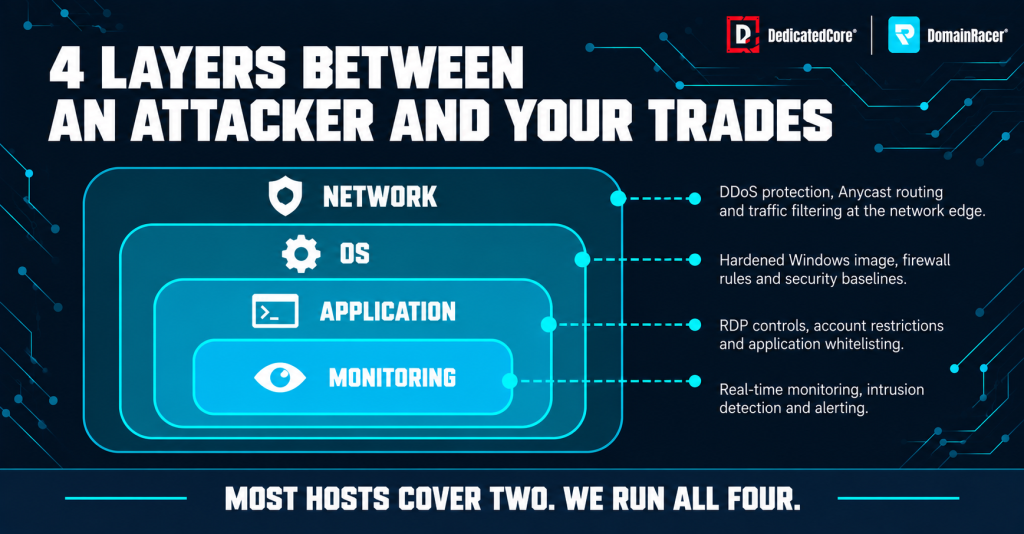
DedicatedCore’s four-layer Forex VPS security approach combines network protection, OS hardening, application controls, and continuous monitoring.
Security isn’t a single switch you flip once and forget about.
- Network layer — DDoS filtering, firewall rules, and route monitoring. A 50 Gbps flood needs no compromise; it saturates the path to your broker, and orders stop arriving. Our DDoS prevention guide covers the filtering architecture and the first hour of an attack.
- Operating system layer — patching, service hardening, and access control. A Windows server running fifty unnecessary services has fifty extra entry points. We harden at template level, so every build starts clean.
- Application layer — MetaTrader configuration, EA permissions, and DLL access. Here security and trading collide, because a locked-down server that won’t run your EA is no solution. It also means refusing cracked EAs and indicators from Telegram groups, which often carry remote access trojans (RATs).
- Monitoring layer — intrusion detection, log analysis, and change tracking. Without monitoring, that five-day dwell time becomes the best case, not the worst.
Most hosts stop at the first two layers — the third needs trading knowledge, and the fourth costs money to run. We cover all four, because a secure server that won’t trade is as useless as one that trades but isn’t secure.
Standard Hosting Security vs Forex VPS Requirements for Live Trading
A web server and a trading server face different threat models. A security setup built for one actively harms the other.
- Antivirus quarantining EAs. Scanners flag compiled EX4 and EX5 files, and a web host’s default policy then silently removes them. The strategy simply stops overnight, silently.
- Aggressive firewall rules blocking broker ports. A hardened web server blocks everything except 80 and 443. Traders have spent days chasing connection errors back to one such rule.
- Automatic updates rebooting mid-session. Windows default update behaviour was designed for an office PC switched off at night. An unannounced reboot during the Asian session leaves positions running unwatched.
- Rate limiting on RDP that locks traders out. Some hosts throttle remote desktop connections to fight brute force. We tune lockout to three bad passwords with a short timeout instead.
Each is a sensible measure in the wrong context, so we tune it for trading. The common issues guide documents these conflicts. Traders evaluating a security-focused setup can also review DedicatedCore Forex VPS and compare its suitability for their platform, EA requirements, and access needs.
RDP Hardening for Forex VPS to Reduce Unauthorized Access Risks
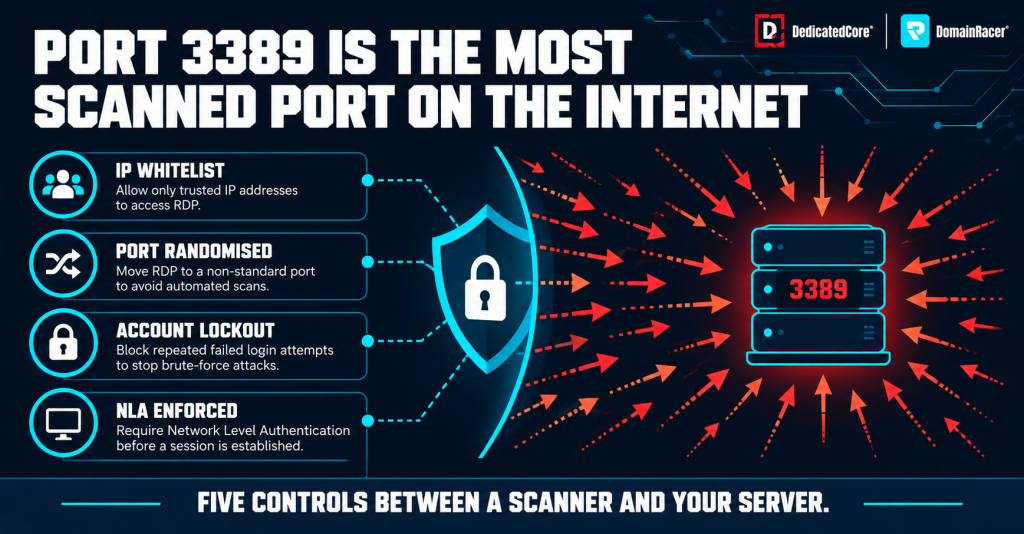
DedicatedCore’s RDP security controls help protect Forex VPS servers from automated scans and unauthorised access.
Remote Desktop is the most attacked surface on any Windows VPS. It is also the only way most traders reach their server.
- IP restriction is the first line. We lock RDP to the trader’s IPs, so a scanner hitting 3389 from a random country gets nothing. Travellers can update their whitelist in the control panel.
- The default Administrator account gets renamed before the server ships. Every scanner tries the default username first. Each server also runs on a dedicated IP, so its traffic baseline stays separate.
- Port randomisation as a secondary measure. Moving RDP off the default port stops automated scanners, because most attacks are scripts hitting 3389 on every IP in a range. The replacement sits in the high range, port 49152 or above.
- Account lockout tuned for trading, not IT policy. Three bad passwords trigger a short lockout, never a permanent one. A permanent lockout during market hours costs more than any brute-force attempt. Fifteen minutes kills automated attempts without stranding a trader who mistyped.
- Session timeout set by the trader, not the host. We never force a disconnect after a fixed idle period, because an EA keeps running when you disconnect; it stops when you log off. Forcing a disconnect is safe, but forcing a logoff risks open positions.
If your RDP session feels slow while EA latency reads fine, suspect resource contention, not security. Our CPU and RAM sizing guide covers the baseline a secure setup needs.
DDoS Protection for Forex VPS During High-Volume Market Events
A volumetric attack doesn’t need to compromise your server to hurt you. It floods the path between you and your broker, and your orders stop arriving.
- Always-on filtering rather than on-demand. An on-demand service needs 30 to 90 seconds to spin up, and by activation a scalper has missed the entry.
- Scrubbing that preserves broker connectivity. Some filters reroute all traffic through a cleaning centre, adding 5 to 15 milliseconds to every order even when no attack is running. Ours filters at the network edge and leaves clean traffic untouched, so you pay no latency tax.
- Alert-based escalation through a written process. A traffic spike during NFP Friday could be an attack or legitimate market data. Filter legitimate traffic by mistake, and your feed dies. Our signs of a DDoS attack guide explains how we tell the two apart.
A server without always-on protection bets that nobody will try, and that bet gets worse every year.
Forex VPS Security Updates Without Unplanned Trading Interruptions
Traders resist patching most, because every patch can force a reboot. A reboot during market hours leaves positions running unmanaged.
- Updates are tested on staging servers first, running the same MetaTrader build and EA set as production. A patch that breaks a terminal or DLL dependency on staging never reaches your server.
- We install patches inside a maintenance window. Group Policy (gpedit.msc) holds the setting on the server. It notifies before any download and install. It never restarts automatically while a user is logged on.
- Reboots are coordinated with the trader when a patch requires one. A forced reboot at 3 am UTC on a Monday catches Asian session traders mid-trade.
- We test AutoTrading recovery after every reboot. A terminal that restarts with AutoTrading off leaves positions unmanaged.
Critical patches move faster, because attackers are already exploiting them in the wild. They get the same staging test with a shorter wait.
Forex VPS Security Monitoring Across 5 Critical Detection Areas
A firewall stops what it knows about, while monitoring catches whatever got through.
| What we monitor | How we run it | What it catches |
| Failed login tracking | RDP alerts on patterns, not single events; response matched to the pattern | One IP, 3 tries = a typo; 30 IPs in 90 seconds = credential stuffing |
| File integrity monitoring | MetaTrader folders watched; every change time-stamped | Tampered EX4 files standard monitoring misses; proprietary EA traders feel it most |
| Process monitoring | New executables flagged against the known set (MetaTrader + OS services) | Unknown 2 am processes; a miner eating 80% of cores, seen in CPU steal time first |
| Network traffic baseline | Outbound traffic checked against the baseline (broker + update server) | Unknown addresses flagged; caught the proxy abuse in Case Study 1 |
| Backups and snapshots | Scheduled backups (profiles, EA configs, settings), snapshots, off-server copy | Ransomware: a bad day, not a lost account |
We don’t claim this catches everything, because no monitoring system does. Without it, an attacker sits for five full days without a single alert.
Forex VPS Compliance Risks From Server Location to Broker EA Policies
Security and compliance overlap far more than most traders realise. Data residency rules, broker KYC duties, and record-keeping laws shape how we build a VPS.
- Data residency — the FCA, ASIC, and MAS all have positions on where customer data can be stored and processed. A VPS in the wrong jurisdiction creates a compliance gap no encryption can close.
- Audit trails matter because regulated brokers must prove that automated systems run in a controlled setup. Our build documentation, change logs, and baseline snapshots provide that evidence.
- Broker EA policies — not all brokers allow automated trading, and not all that do allow every strategy. An EA-optimised VPS is useless if the broker agreement forbids it — traders have been disabled within a week for skipping the terms.
Our Forex VPS rules and regulations guide covers the key compliance requirements traders should understand before choosing a setup. Regulation applies to the trader, not the server, but the server’s configuration can support compliance or create additional risks.
Forex VPS Security Through Our Real-World Examples
Our case studies show how an exposed Remote Desktop Protocol (RDP) port lets a brute-force attack succeed. We examine the security gaps and how access was compromised. We also cover the measures that protect trading servers from unauthorised access.
Case Study 1 — A brute-force attack that succeeded because RDP was open.
Customer: A trader migrated from a budget host where RDP sat open on the default port, with no lockout policy or login monitoring. Our initial audit found an attacker had been logged in for three days.
Our solution: We rebuilt from a clean image and locked RDP to the trader’s home and office IPs. We moved the port off 3389 and enabled login alerting. We checked for broker account access, then advised a broker password change and 2FA.
The result: The attacker never wanted the trading account — they used the server as a proxy for other traffic. Three days of open access went unseen by everyone until we showed the trader the login history.
Case Study 2 — A security update that broke a DLL-dependent EA.
Customer: A trader ran a proprietary EA relying on a third-party DLL for licence validation. A Windows security update then changed how the system loads DLL files. The EA simply stopped placing orders, with no error in the MetaTrader Journal.
Our solution: We identified the update from the installation log first. Then we tested the EA on staging, with and without the patch, and confirmed the DLL change as the cause. We applied a targeted policy exception for that DLL path rather than rolling back the update.
The result: The EA resumed, and the security patch stayed applied. Rolling back fixes the symptom but reopens the vulnerability, and a blanket exception weakens the server, so the targeted fix preserved both.
DedicatedCore’s Expert Answers to Forex VPS Security Questions
We’re often asked whether a strong password alone can keep a Forex VPS secure. Based on our experience with Forex VPS security, a strong password alone is not enough to protect trading accounts and servers. We explain why multi-factor authentication, restricted RDP access, firewall rules, and regular security updates are also essential.
Is my Forex VPS safe with just a strong password?
We wouldn’t run a server on a password alone, however strong it is. Strong means sixteen characters or more, mixing cases, numbers, and symbols. A password protects against guessing. Credential stuffing, which reuses passwords leaked from other services, defeats it. Nor does it cover RDP vulnerabilities, which Microsoft has patched several times in five years.
We layer IP restriction, port randomisation, login monitoring and patching on top, because no single layer is enough on its own. Enable Two-Factor Authentication (2FA) on the control panel, and for RDP too, where your setup supports it. For phone checks, use the read-only investor password instead of the master password. A provider that headlines “strong password protection” has described one layer out of four.
Should I install my own antivirus on a Forex VPS?
We set up antivirus with trading-specific exclusions when the server ships. The shipped setup keeps Windows Defender active with those exclusions. It avoids heavy third-party suites, which spike CPU and add latency. Install a second scanner, and the two compete for disk and CPU until one quarantines an EA file the other allowed.
One scanner with proper exclusions beats two fighting each other. The exclusion list is documented and updated as MetaTrader changes.
How do I know if my Forex VPS has been compromised?
We monitor for the common signs, but you can spot several yourself. Watch for unexpected RDP sessions in Event Viewer and new accounts you never created. Unfamiliar processes in Task Manager and outbound connections you don’t recognise count too. If your EA stops without an error, investigate — malware often disrupts other processes to grab resources.
Use our Forex VPS troubleshooting guide to identify common issues and check your setup. It also includes security checks to help keep your trading VPS protected.
Secure Your Forex VPS Before Threats Disrupt Live Trading
Every incident we have handled shares one pattern. The right monitoring catches it earlier, or the right build prevents it. Neither case needed a sophisticated attacker or a zero-day exploit — only a provider who wasn’t paying attention.
Before trusting a VPS with live capital, check how it is secured, monitored, and managed when a threat is detected. DomainRacer offers a 30-day free trial with no setup fees, giving you time to assess your trading setup before making a long-term commitment. Review DomainRacer Forex VPS against your broker location, EA requirements, and security needs. Start your trial and test the setup under your own trading conditions.
