
Most traders search “best VPS for forex trading” and pick one advertised as “located in London.” But a London data center 30 miles from the broker’s matching engine is not close. Equinix’s 2023 Global Interconnection Index found that financial firms increased direct interconnections by 24% year over year. The reason is physics. Data travels through fibre at roughly 200 km per millisecond. Every unnecessary mile in the path adds delay that no hardware upgrade can remove.
So what actually decides whether your orders reach the broker in 1 ms or 40 ms? The answer is the difference between physical distance and network distance. DedicatedCore and DomainRacer build Forex VPS infrastructure around both. Servers sit in the right facilities. Traffic routes through the shortest network path.
Forex VPS Latency: Understanding Physical and Network Distance
The confusion between these two measurements is where most proximity mistakes start.
| Measure | Physical distance | Network distance |
| Definition | Straight-line distance between two points | The path data actually travels through fibre and switches |
| Unit | Kilometres or miles | Milliseconds (round-trip time) |
| What it affects | The theoretical minimum latency | The actual execution speed |
| Depends on | Fixed map location | Fibre routes, carrier quality, hops and congestion |
- Physical distance sets the floor. Two points 100 km apart cannot communicate faster than about 0.5 ms one-way through fibre
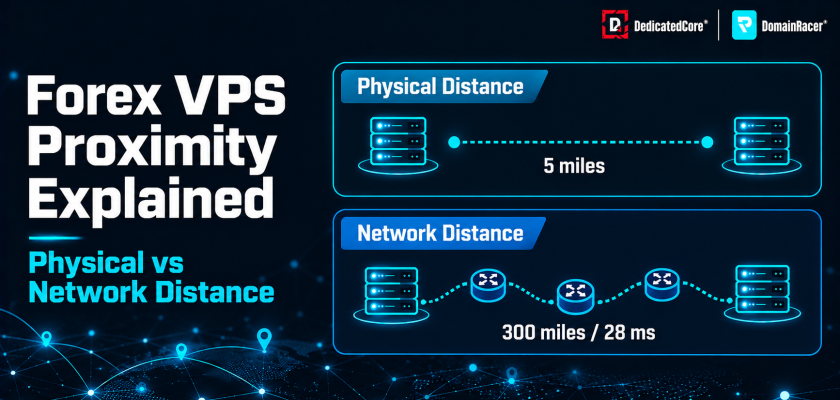
- Network distance decides the fill. A packet can travel 300 miles through 12 hops to reach a server 5 miles away. Indirect routing makes this common
- The highway example. Two data centers sit 5 miles apart. The network path loops through another city’s exchange point. Physical distance says 5 miles. Network distance says 300 miles and 28 ms
We choose VPS locations based on routing paths, not map pins. Which brokers sit in which facility is mapped in Forex VPS London Proximity — Equinix LD4 and LD5.
The Seven Dimensions of Forex VPS Proximity and Performance
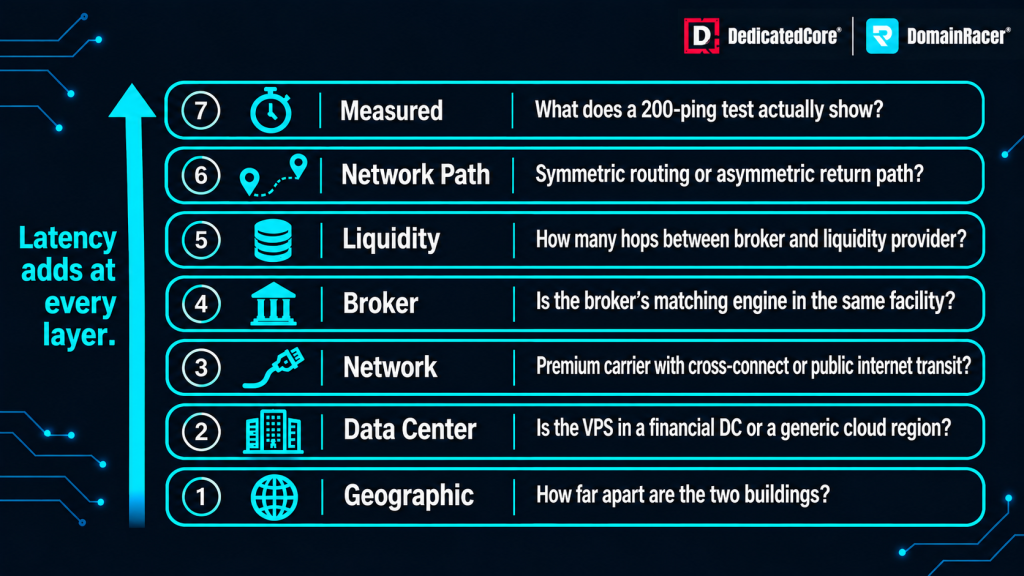
Forex VPS latency is shaped by seven layers, from physical distance to network paths and measured results.
Proximity is not a single number. Seven layers stack on top of each other. A weakness at any layer adds delay.
- Geographic proximity — straight-line distance between the VPS and the broker. This sets the theoretical minimum
- Data-center proximity — whether the VPS sits in the same facility as the broker’s matching engine. A different building across the city is not the same
- Network proximity — the actual routing distance through fibre, switches, and carrier networks
- Broker proximity — the distance to the specific trade server, not just the data center
- Liquidity proximity — the distance to the broker’s upstream liquidity providers and ECN pools
- Network-path proximity — the hops, carriers, and whether the path uses premium or public routing
- Measured proximity — round-trip time, jitter and packet loss recorded under live market conditions
We measure proximity at the network and measured layers under real conditions. The testing process is documented in How We Measure Proximity and Performance.
Forex VPS Network Distance: Understanding Fibre Speed and Routing Delays
Light in fibre travels at roughly 200,000 km per second. That is about 33% slower than in a vacuum. This speed sets a hard floor.
- Frankfurt to London is about 640 km. That gives roughly 3.2 ms one-way and 6.4 ms round trip on a direct cable
- The same trip badly routed through Berlin, Amsterdam, Paris and Dublin covers about 1,900 km. It takes 35 ms or more
- Each router adds delay. Serialization and queuing add about 0.5–2 ms per hop. Eight unnecessary hops turn 6 ms into 22–40 ms
- A VPS “in London” that routes through Amsterdam adds 10–20 ms. No hardware upgrade can remove routing delay
We use premium low-latency carriers with optimized BGP. The routing stays close to the fibre minimum. What “sub-1 ms” actually means is explained in Forex VPS 0.2ms Latency Exposed.
Forex VPS Proximity: Why Network Distance Matters More Than Physical Distance
Two scenarios show why the shorter route on a map can be the slower route on a network.
- Same city, 10 miles, direct private fibre — about 1.5 ms round trip. The VPS and broker sit in the same facility with a cross-connect
- Same building, 0 miles, public routing — about 45 ms. The packet leaves the building, routes through a public exchange in another city and comes back
The proximity range across hosting types makes the pattern clear:
- Home PC — 15+ hops over the public internet. Round-trip time is 80–200 ms. Wi-Fi and shared broadband add jitter. Public routes congest during news events
- Generic cloud VPS — about 5 hops and 20–40 ms. Often miles from the financial hub
- Co-located Forex VPS — 1 hop through an internal switch. Under 1–3 ms. Both distances approach zero
Physical proximity gets the VPS into the right building. Network proximity finishes the job. When the two conflict, choose the better route.
We verify both distances before deploying a trader’s VPS. We run traceroutes to the broker’s trade server and confirm the hop count stays under three. If the network path does not match the physical placement, we re-route or relocate the node before the trader goes live.
Forex VPS Network Proximity: Hops, BGP, Peering and Cross-Connects
Five factors decide how long the network path actually takes.
- Routing hops — each hop inspects headers and forwards the packet. Fewer hops mean less delay and fewer points where jitter enters
- Public BGP routing — BGP picks the cheapest or most stable path, not the fastest. A packet from a budget host can cross three countries to reach a server in the same city
- Peering agreements — private peering with ISPs and financial networks skips public congestion points
- Cross-connects — a direct fibre cable between the VPS rack and the broker’s rack. This delivers sub-1 ms with zero public internet transit
- Fixed static IPv4 — a static address keeps routes consistent. It prevents re-routing that shifts latency between sessions
Quick check: get the broker’s trade server IP from the platform settings. Run tracert [broker-ip]. If the path jumps to another city before reaching the broker, network distance is longer than it needs to be.
We operate our own ASN and maintain private peering with major financial networks at every hub. Our BGP configuration prioritizes the shortest path, not the cheapest. Cross-connects inside Equinix facilities give our traders direct fibre to the broker rack with zero public internet transit.
Forex VPS Network Proximity: Understanding Asymmetric Routing
The order goes to the broker on one path. The confirmation comes back on a different one. If the return path is slower, the trader does not know the fill happened until the delay is over.
- Outbound 2 ms, return 28 ms — the order reaches the broker fast. But MetaTrader waits for the confirmation before updating the position. Trailing stops and multi-leg exits depend on that confirmation
- One-way traceroute hides the problem — tracert shows only the outbound path. A clean 2 ms trace can mask a 28 ms return through different carriers
- The impact — the EA thinks the position is still open. During fast moves, the next order fires on stale state
DedicatedCore uses symmetric routing where both paths travel through the same carriers. Asymmetric paths show up as inconsistent round-trip times. The diagnosis steps are covered in Forex VPS Jitter Explained.
Forex Trading Execution: The Impact of VPS and Broker-Side Processing
A 1 ms ping does not mean 1 ms execution. Three stages sit between the EA and the fill.
- VPS processing — the EA calculates the signal. MetaTrader formats the order. The OS sends it. KVM-isolated servers with high single-core clock speeds handle this in microseconds. Shared hypervisors add micro-stalls
- Network transit — the packet travels to the broker. This is what ping measures
- Broker-side processing — the gateway receives the order. The order management system queues it. Bridge routing sends it to the LP. The LP’s last-look hold time adds a final delay
- High-capacity ports — 1–10 Gbps networking prevents tick loss during volatile periods
We run 4.5–5.7 GHz dedicated CPU cores with 1–10 Gbps networking. VPS resource sizing for different trading styles is covered in Forex VPS CPU, RAM and Disk Requirements.
Choosing the Right Forex VPS Location Based on Broker Proximity
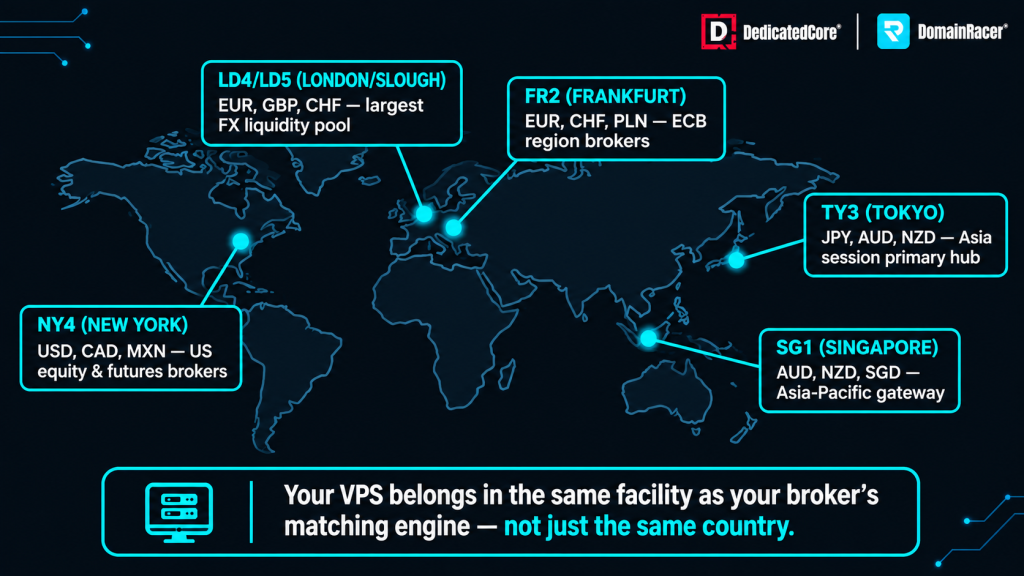
DedicatedCore’s Forex VPS proximity guide highlights major financial data centres and why hosting near a broker’s matching engine matters.
Every major currency pair routes through a specific execution hub. The VPS should be near the hub, not near the trader.
- NY4/NY5 Secaucus — USD pairs and gold. Most US-based brokers run matching engines here
- LD4/LD5 Slough — EUR, GBP and CHF pairs plus major ECN pools
- FR2 Frankfurt — European ECN trading and EUR crosses
- TY3 Tokyo — JPY pairs and the Asian session
- SG1 Singapore — Asian session coverage
Regional mapping for traders:
- UK and Europe → LD4/LD5 or FR2
- USA → NY4
- India → connect to LD4/LD5 or SG1 depending on the broker’s server location
- Asia-Pacific → SG1 or TY3
The rule is simple. Follow the broker’s execution server, not the trader’s desk.
DedicatedCore offers Forex VPS in London, New York, Frankfurt, Singapore, Tokyo, Mumbai, and Chennai. Infrastructure capacity across these hubs is managed through the process described in How We Maintain Infrastructure Standards.
Forex VPS Proximity: How Server Distance Affects Different Trading Strategies
The impact of proximity depends on how fast the strategy trades and how tight the pip target is.
Latency benchmark bands:
- Under 1 ms — cross-connect in the same facility. For HFT and ultra-low-latency scalping
- 1–5 ms — same city or neighbouring facility. For news trading and fast scalping EAs
- 5–20 ms — standard EAs, day trading and grid strategies
- 20–50 ms — noticeable slippage during news releases. Workable for swing trading
- Over 50 ms — not suitable for automated trading strategies
Impact by strategy type:
- HFT and arbitrage — extreme sensitivity. Requires cross-connects and co-location
- Scalping and news trading — high impact. Late orders fill at the top of the spike just before the price falls back
- Grid and martingale — slippage builds across layered positions. Proximity drift leads to margin calls earlier than backtests predicted
- Swing trading — low impact. Targets of 50–100 pips absorb a few milliseconds of delay
Slippage example: a 30 ms delay on a pair moving at 0.03 pips per millisecond gives 0.9 pips of slippage per trade. Over 200 trades per month, that is 180 pips lost to proximity alone. The full cost breakdown is in Forex VPS Slippage Explained.
We match every trader’s VPS to the right latency band for their strategy. Scalpers and news EAs go on cross-connected nodes inside the broker’s facility. Grid and day-trading setups sit in the same city on premium routing. We do not sell a single plan for every strategy because no single proximity tier fits all of them.
Comparing Forex VPS Providers on Routing, Cross-Connects and Latency
Not every provider measures proximity the same way.
| What to check | Typical budget host | Average managed host | DedicatedCore / DomainRacer |
| Data center | Generic cloud region | Named city, not facility | Equinix LD4/LD5, NY4, TY3, FR2, SG1 |
| Routing | Public ISP transit | Single premium carrier | Own ASN, premium BGP, cross-connects |
| Proximity measurement | ICMP ping average | Periodic speed test | TCP RTT with p50/p95/p99 and jitter |
| Network capacity | 100 Mbps shared | 1 Gbps standard | 1–10 Gbps with 5+ Gbps in UK/USA |
| Cross-connects | None | Available at extra cost | Included in facility routing |
| Hub coverage | 1–2 regions | 3–4 cities | London, NY, Frankfurt, Singapore, Tokyo, Mumbai, Chennai |
| Trial period | No trial | 7-day trial | 30-day trial with money-back guarantee |
A provider that measures proximity with ICMP ping averages misses the jitter and asymmetric routing that affect real execution. Providers on aging hardware with no Hardware Replacement SLA add internal delay on top of the network path.
We publish TCP round-trip time at the p50, p95, and p99 levels for every hub. We do not advertise a single best-case ping number. Our 30-day trial lets traders run their own sustained tests under live market conditions before committing. That is how we prove proximity rather than claim it.
Real-World Forex VPS Cases: Fixing Routing and Latency Problems
We trace proximity faults on live trading servers every week, and the pattern is almost always the same. These case studies show why a low ping on its own never proves that the network path is short. Most hosts stop at the map pin, call the server close, and move on. What decides the fill is the route the packets actually take, and both cases below prove exactly that.
Case Study 1 — Same city, wrong network path.
A news scalper picked a VPS advertised as “located in London.” Entries slipped 1.4 pips during NFP and ECB releases. The VPS sat in a London data center but not in the broker’s facility.
Our solution: A traceroute showed the path looping through Amsterdam before reaching the broker in Equinix LD4. We moved the trader to a Forex VPS inside LD4. Hop count dropped from 9 to 2.
The result: Round-trip time fell from 22 ms to 1.1 ms. Slippage dropped from 1.4 pips to under 0.2 pips. Entries lined up with the requested price. Network distance finally matched physical distance.
Case Study 2 — Asymmetric return path causing requotes on a grid EA.
A grid EA trader on DomainRacer reported requotes during the London/New York overlap. Outbound ping showed 3 ms. But MetaTrader logged fill confirmations arriving 25–40 ms after the order. The return path was routed through a different carrier with public transit hops.
Our solution: We identified the asymmetric return path through packet-level monitoring. We switched the VPS to a node with symmetric routing through the same premium carrier in both directions. We also applied Data Center Preventive Maintenance checks on the host NIC.
The result: Return path latency dropped from 25–40 ms to 3–5 ms. Requotes during the overlap session stopped. The trader’s grid EA filled all legs within the expected window.
Both cases show why a low outbound ping does not tell the full story. More infrastructure-level examples are in Forex VPS Failure Case Studies.
DedicatedCore Expert Answers: Common Questions About Physical vs Network Distance
We’re often asked whether placing a server in the right city is enough on its own to guarantee fast fills. The three questions below cover the points traders raise with us most often. They deal with same-city placement, cross-connects, and the return path that hides behind a clean ping reading.
Does picking a data center in the same city as the broker guarantee low latency?
We place every Forex VPS inside the broker’s actual facility, not just the same city. A data center “in London” can sit 30 miles from Equinix LD4, where the broker runs its matching engine. Same city alone guarantees nothing about the network path. Our onboarding team confirms the broker’s trade server location before assigning your node. If the broker moves servers later, the team re-maps the node for you.
Run tracert to the broker’s trade server IP and count the hops. Two to three hops with no city-to-city jumps means the VPS is genuinely close. Eight or more hops with detours means the right city but the wrong network, and round trips can still reach 20–45 ms. Public routes add one more risk during high-traffic events. They expose orders to DDoS Attack Detection triggers and filtering delays.
Do cross-connects matter for every trading strategy?
We include cross-connect routing in the facility setup at Equinix LD4, NY4, and other hubs, and we never charge it as an add-on. A cross-connect is a direct fibre cable from the VPS rack to the broker’s rack. It delivers sub-1 ms latency because the order never leaves the building. Proximity is the core product, not an upgrade.
For HFT and news scalping, the gap between 1 ms and 5 ms changes fill quality across hundreds of trades a week. Grid and day-trading EAs perform well at 1–5 ms without one. Swing traders working 50–100 pip targets feel no measurable difference at 5–20 ms. Free broker VPS plans often lack cross-connects entirely, as Broker Forex VPS Hidden Tradeoffs explains.
Can asymmetric routing make a good ping misleading?
We monitor both the outbound and the return path on every node we run. A standard ping measures only the round trip, so it hides any split between the two paths. Your order can reach the broker in 2 ms while the confirmation returns in 28 ms through a different carrier. The ping then shows a healthy 15 ms average while execution stays inconsistent.
That hidden delay throws off trailing stops and multi-leg exits first. Packet-level analysis from both ends is the only way to spot it, and most traders can only run the outbound trace. Rollover and news-window troubleshooting steps sit in Forex VPS Common Issues. When our systems detect asymmetric routing, support switches the carrier path before the trader ever reports an issue.
Close the Network Distance Gap with the Right Forex VPS
A Forex VPS “in London” means nothing if the network path loops through Amsterdam. Physical proximity puts the server in the right region. Network proximity decides whether the order reaches the broker in 1 ms or 40 ms. Traders moving from a home PC can verify both distances before and after the switch. The full migration process is in Migration: Indian Traders from Home PC to Forex VPS.
DedicatedCore Forex VPS and DomainRacer Forex VPS are built around network proximity. Own ASN, premium BGP, cross-connects inside Equinix facilities, and 1–10 Gbps networking across London, New York, Frankfurt, Singapore, Tokyo, Mumbai, and Chennai. Start with a 30-day trial backed by a money-back guarantee. Run your own traceroute to see where the path goes.
