
Data Center preventive maintenance is the scheduled, ongoing care that keeps a server healthy from the day it is racked to the day it is retired. The opposite of waiting for something to break and paying to fix it. It’s the ongoing care stage of hardware lifecycle management. This phase is crucial because it’s where most outages are quietly prevented or, conversely, quietly created.
Data from the US Department of Energy shows that a good preventive-maintenance program can extend equipment life by up to 40%. In contrast, reactive maintenance costs much more for the same repairs. Most serious downtime is not bad luck; it is a check nobody ran. DedicatedCore and DomainRacer build their infrastructure around this discipline. We believe it’s better to prevent outages than to send you the recovery bill.
Data Center Preventive Maintenance Across Reactive, Preventive, and Predictive Strategies
Maintenance runs at three maturity levels, and the gap between them is measured in dollars, not effort:
- Reactive fixes things after they break, which means unplanned downtime, the longest recovery, and the highest cost.
- Preventive works to a fixed schedule, so downtime is planned and minimal at a predictable cost.
- Predictive acts on live sensor data and pre-empts failure at the lowest cost over time.
Most hosts just run reactive maintenance and call it a strategy. We run preventive as the floor, and predictive wherever the sensors support it. That means we service what is actually drifting, not what the calendar guesses. The math is simple: an emergency repair costs up to five times the scheduled one.
Everything below is how we run that across four layers.
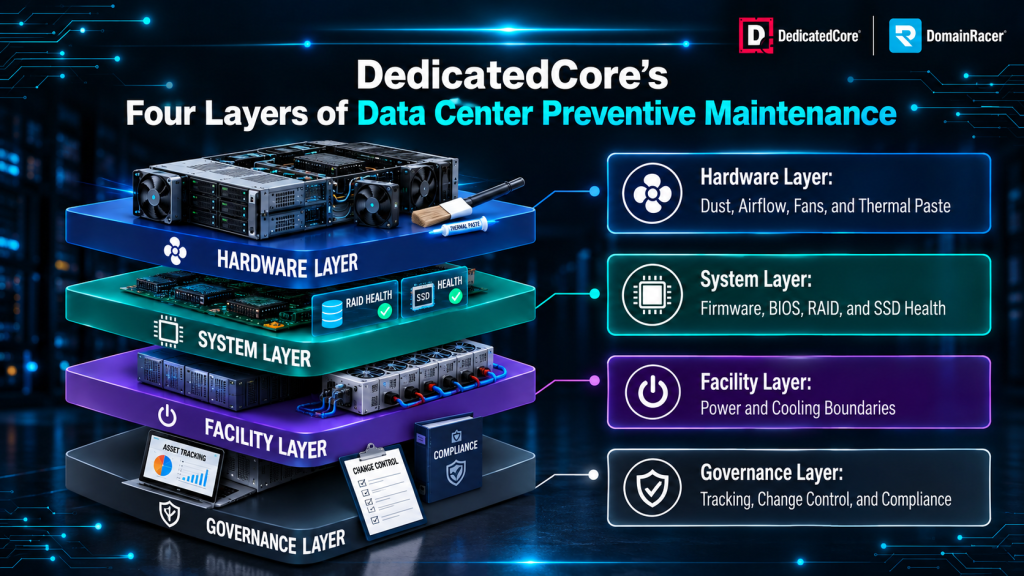
DedicatedCore’s Four Layers of Data Center Preventive Maintenance
Most maintenance fails for one reason: teams treat a data center as a single machine. Actually, it is four stacked layers that each fail differently: Hardware, System, Facility, and Governance. We build every task around that stack, because a check at the wrong layer catches nothing.
DedicatedCore’s Four Layers of Data Center Preventive Maintenance
Hardware Layer: Dust, Airflow, Fans, and Thermal Paste
Heat and dust gradually affect server performance and component lifespan. That is why preventive maintenance must address airflow restrictions, fan wear, and thermal paste degradation before they lead to hardware failure. For workloads that require dedicated computing resources, DedicatedCore dedicated servers provide an option to consider when planning infrastructure around long-term reliability.
- Dust and airflow. Clogged intakes starve servers of cool air, so we fit blanking panels in empty rack spaces to stop hot exhaust looping back to the cold side.
- Fan maintenance. A dying fan makes the rest spin to maximum, so we replace it at once with a new or reconditioned unit.
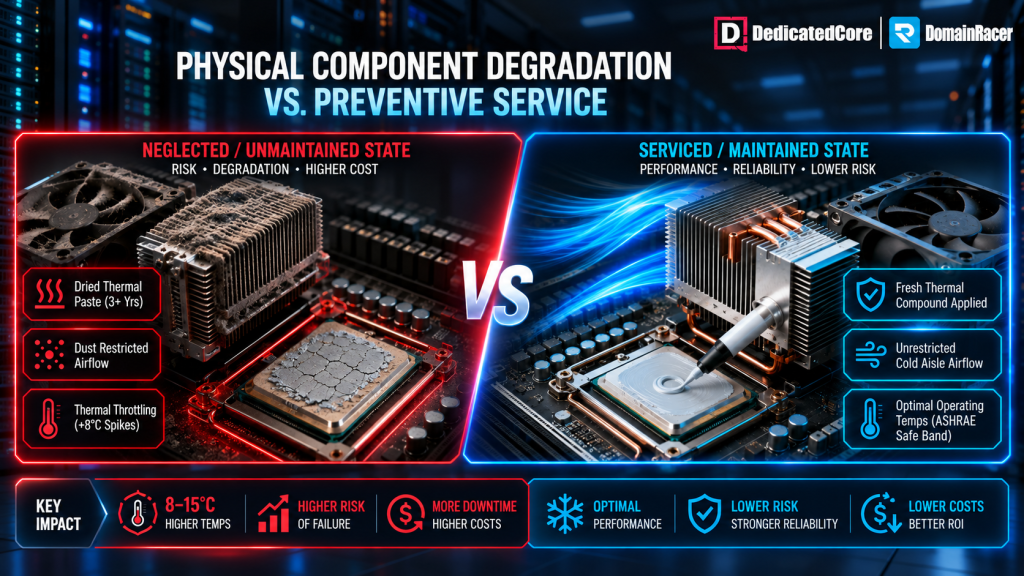
- Thermal paste. CPU grease dries out over three to five years. We refresh it in the annual deep clean, cutting temps up to 8°C under load.
- Heat control. At 25°C versus 20°C, ASHRAE puts annual failure rates jumping from 4% to 43%. Heat drives component degradation, so we hold inlets in the safe band, where the warning signs of failing hardware begin.
System Layer: Firmware, BIOS, RAID, and SSD Health
This layer keeps your bare-metal server reachable and its data intact. A skipped scrub or bad patch quietly becomes next month’s outage.
- SSD endurance. Flash has a finite write budget; spend it, and the drive turns read-only and drops out. We watch Host Writes via SMART and swap it early for a new or recertified unit. The used drive is wiped with full data sanitization, then resold or recycled, never binned with data intact. A clean maintenance record helps a pre-owned node sell as a refurbished unit. This boosts our asset value and guides depreciation.
- RAID consistency. A monthly scrub catches bit rot before a disk fails. Skip it, and a rebuild on a weak array hits unrecoverable errors.
- Firmware and BIOS. We patch on a tested schedule, checking BIOS and BMC/iDRAC compatibility first, since a bad flash locks you out of remote management for good.
Which drives we rotate ties into our spare parts inventory: a drive near its limit is swapped in a quiet window, never at 3 a.m.
Facility Layer: Power and Cooling Boundaries
If power or cooling fails and the whole room goes dark, which is why we run this layer to TIA-942 and Uptime Tier standards rather than a generic checklist.
- Cooling. We maintain cold aisles at 18°C to 27°C. Below 18°C protects nothing and just burns electricity.
- Liquid loops. AI and GPU racks generate so much heat that air cooling isn’t enough. So, their direct-to-chip cooling system undergoes a monthly chemistry audit. This checks for growth, pH drift, and harmful dissolved metals. It is the maintenance most hosts have not built, and the reason we run high-density workloads others turn away.
- UPS and generators. A hot room halves battery life, so monthly impedance tests catch a weak cell early. Every generator gets an annual load-bank test at 80% capacity for 30 minutes. This is what makes a hardware replacement SLA real: you cannot promise a fast fix on infrastructure you do not maintain.
- Fire and access. We check suppression to NFPA 75 and audit access regularly. Systems that seem perfect often get overlooked, but they can fail when least expected.
Governance Layer: Tracking, Change Control, and Compliance
Rules and logs separate maintenance from chaos, and auditors notice which you run. This layer is the paper trail that stops an incident becoming a breach.
- CMDB and spares. A shipped disk or a wrong-firmware spare is how a small fault becomes hours of downtime, so inventory stays exact. Assets nearing EOSL or out of warranty get flagged, and any outdated board still running is tracked before it strands a workload. A well-kept vintage server can run for years, but only when someone is watching its clocks.
- Change control. No firmware update or power test happens without a peer-reviewed SOP and a written rollback plan.
- Compliance. SOC 2, ISO 27001, HIPAA, and PCI-DSS demand clean logs of access, environment, and patches. We keep the trail audit-ready by default.
Data Center Preventive Maintenance Master Checklist for Continuous Uptime
The layers tell you what; the calendar tells you when. This is the master maintenance checklist we run on every managed rack. It puts the daily, monthly, quarterly, and annual inspections into a single grid. Read it top to bottom to audit an asset, left to right to plan a day. Read as a rhythm, it is four routines in one: a monthly hardware inspection, a quarterly server health audit, an annual server maintenance plan, and the daily checks beneath them all.
| Layer | Daily | Weekly / Monthly | Quarterly | Annual |
| Hardware | Visual and thermal checks | Dust, airflow, fan health | Thermal paste, deep clean | Full component audit |
| System | Log and alert review | SMART, RAID, backup verification | Firmware and BIOS updates | OS and security hardening |
| Facility | Environmental readings | UPS and PDU inspection | CRAC/CRAH service, generator test | Load-bank and infra audit |
| Governance | CMDB updates | Change-log review | Spares and vendor SLA review | Compliance and lifecycle audit |
Most hosts run the daily row and skip the rest, because the quarterly and annual work stays invisible right up until the moment it isn’t. We run every cell. A failure we notice turns into a scheduled task, not a 3 a.m. support ticket. This is how we achieve a 99.99% uptime in real life, not just on paper.
DedicatedCore vs In-House Data Center Preventive Maintenance
Any team can attempt this four-layer framework on paper. The real question is whether they can staff all four layers around the clock. That means the tooling, the licensing, and the trained hands, without the routine slipping.
| Factor | In-house maintenance | DedicatedCore / DomainRacer |
| Coverage | Limited by team size and hours | 24/7 across all four layers |
| Predictive tooling | Costly to build and staff | Included and pre-configured |
| Firmware and patching | Often deferred | Controlled, tested cadence |
| Response to failures | Reactive, higher cost | Proactive, spares on hand |
| Compliance support | Manual and time-heavy | Built into standard operations |
That table is the entire pitch in a single row. In-house PM is the first thing to slip when a team gets busy, and the row that slips is the one that becomes the outage. We run it as standing operations, never something left waiting until Friday.
Data Center Preventive Maintenance Beyond Fixed Maintenance Schedules
Physical Component Degradation vs Preventive Service
Preventive is the floor and predictive is the ceiling, where we stop servicing on fixed dates and act the moment live data shows a part drifting. The payoff is measured: McKinsey puts predictive programs at 18 to 25% lower cost and up to half the unplanned downtime. The tooling behind it:
- Out-of-band access. IPMI, iDRAC, iLO, and Redfish reach a server even when the OS is down.
- Telemetry. SNMP feeds metrics into central DCIM dashboards like Prometheus and Grafana.
- Drive health. SMART data flags failing storage long before it drops out of the pool.
None of it works without a baseline, so we capture healthy readings the day an asset goes live. A threshold means nothing without a known-good number to measure drift against. For traders comparing hosting options, DomainRacer Forex VPS is worth assessing alongside server stability, monitoring, and the infrastructure supporting their trading platform.
Data Center Preventive Maintenance Business Outcomes Through Real-World Examples
Our case studies show how preventive maintenance identifies hardware issues early and prevents performance problems. Each example highlights the real impact of timely action on server reliability.
Case Study 1: A trading firm beats thermal throttling.
A quantitative trading firm ran latency-sensitive workloads on a dedicated server. Summer load spikes kept pushing CPU temperatures toward the throttle point. Every throttling event risked missed trades during peak hours. Those reactive fixes cost real money each time.
Our Solution: DedicatedCore rebuilt the program around the hardware and facility layers. Thermal-paste refreshes, containment fixes, and IPMI baselining held inlets inside the ASHRAE band.
The Result: The firm moved from firefighting to a predictive rhythm. Thermal incidents dropped sharply, and the trading engine got its headroom back.
Case Study 2: An e-commerce platform ends backup roulette.
A growing platform trusted its nightly backups completely, and every job reported success. Then a RAID rebuild exposed the truth. Restores had been failing silently for weeks, right before peak season.
Our Solution: DomainRacer took over the system and governance layers. Scheduled RAID scrubs, TBW-based drive rotation, and mandatory restore tests replaced blind trust, with backup verification a signed-off step in every change.
The Result: The platform entered its busiest season with proof, not hope, and zero silent backup failures.
DedicatedCore’s Expert Answers to Preventive Maintenance Questions
At DedicatedCore, we answer common preventive maintenance questions based on our technical knowledge and experience. Here are our expert answers to help you understand the best practices for maintaining data center reliability.
How often should a data center run preventive maintenance?
We don’t run everything on one clock, and neither should you. Dashboards run daily. Airflow and RAID health checks happen weekly and monthly. Cooling service and full audits occur quarterly to annually. That layering stops a small fault from ever reaching your workload.
We also weight the schedule by risk, not just the calendar. A UPS carrying live customer traffic earns far tighter intervals than a spare test node, because its failure hurts far more. Risk-based scheduling sits at the center of how we run every rack.
Can you perform data center maintenance without downtime?
We do this every week without customers ever noticing, using redundancy and sequencing. We service one node while its failover partner carries the load, inside a low-traffic window with margin if the work runs long. Most maintenance lands with zero customer impact by design, not by luck.
What makes it reliable is discipline around the change itself. We prove every update on one isolated node first. We then confirm that the backup actually restores correctly. Finally, we stage a documented rollback before touching the entire fleet. Handled that way, a planned change rarely becomes an incident.
Is managed maintenance worth the cost?
It comes down to what an outage actually costs you, because a single serious one means lost revenue, emergency labour, and missed SLAs. That can outweigh a full year of managed fees. Emergency repairs run several times the scheduled cost, so proactive care is the cheaper path, not the pricier one.
The bigger value is coverage that most teams can’t handle alone. This includes round-the-clock monitoring, predictive tools, tested backups, and compliance support. These features are standard, not expensive add-ons you have to create yourself. Caring for a machine protects its secondary resale value. A well-maintained server sells for much more at retirement than a neglected one. Traders evaluating hosting options can also consider DedicatedCore Forex VPS alongside the maintenance practices and infrastructure reliability supporting their trading workloads.
Future-Proof Your Infrastructure with Preventive Maintenance
Preventive maintenance is the one stage that touches every other. It catches failing hardware early, keeps spare parts turning on schedule, and makes your replacement SLA real. Skip it, and every other stage speeds up. Run it well, and the machine reaches replacement on your terms with resale value intact. That is hardware lifecycle management working as one.
The decision is simple. Run this yourself and hope busy weeks stay quiet, or hand it to a host who runs every layer as standing operations. DedicatedCore and DomainRacer do just that. We’d rather prevent your outage than charge you for recovery. Pick the host that prevents the outage — the one who only fixes it charges you five times over.

