
A recent analysis of 1,000 live trades found that slippage alone cuts annual returns by 1–3% for high-frequency strategies. Negative slippage averages 0.8 to 1.2 ticks per trade. It spikes to 3–5 ticks during news events. Most of that damage traces back to the VPS, not the broker — wrong data center, undersized RAM or a shared CPU that throttles at the worst moment.
Most traders search for “how to choose a Forex VPS” and end up comparing prices. They skip the specs that actually decide execution quality. DedicatedCore and DomainRacer build Forex VPS plans around low latency, stable uptime, and dedicated resources, and the 10 checks below are the same ones we use when sizing a server for a new trader. Every check has a target, a red flag, and a clear way to test it.
DedicatedCore Guide: 10 Essential Checks for Choosing a Forex VPS
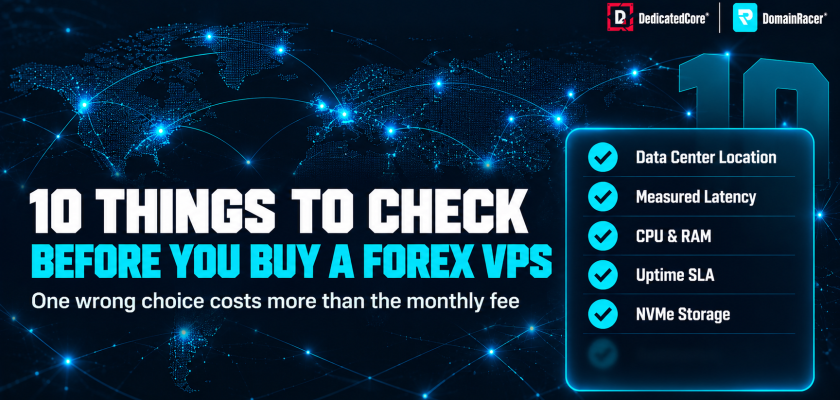
Every check below has a target, a red flag, and a clear way to test it. We use the same list when sizing a Forex VPS for a new trader — if a provider fails on any of these, the gap shows up in your fills, not on their sales page.
1. Data Center Location
Where the VPS sits decides your floor latency, and no amount of tuning can fix a server on the wrong continent.
- Match the VPS to your broker’s server. Most major brokers run matching engines in Equinix LD4/LD5 (London), NY4/NY5 (New York), TY3 (Tokyo), FR2 (Frankfurt), or SG1 (Singapore). Ask your broker which facility they use before picking a location
- Same city is not the same facility. A VPS in London but outside Equinix still adds 2–5 ms of cross-city routing. Same data center means sub-1 ms
- Red flag — a provider that lists generic cloud regions like “Europe” or “US East” without naming the actual data center or facility
DedicatedCore Forex VPS servers inside Equinix LD4 and LD5, where most London-based brokers operate. Our Equinix LD4 and LD5 proximity guide maps which brokers sit in which facility so you can verify the match before you commit.
2. Measured Latency
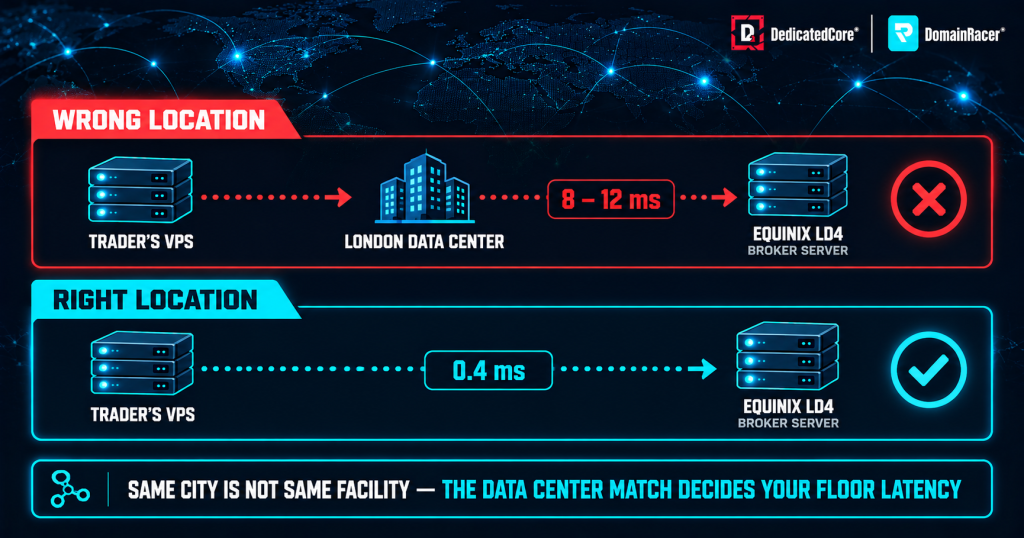
Forex VPS latency depends on the actual data centre connection to the broker server, not just choosing the same city.
A provider claiming “low latency” without publishing test results is making a marketing statement, not a technical one.
- Target latency — under 5 ms within the same metro area, under 1 ms within the same data center. Anything above 10 ms sustained means the VPS is too far from the broker
- Test with TCP, not ICMP — many brokers block ICMP ping, so the result can mislead. Run PsPing to the broker’s trade server IP and port for an accurate reading
- Check during peak hours — latency at 2 AM means nothing if it spikes to 40 ms at the London open. Test during your actual trading session, not off-peak
We measure broker latency with TCP connect tests and record p50, p95, and p99 readings across the full trading day. Our ping, latency, jitter and execution speed guide breaks down each metric and how to run the tests yourself.
3. RAM and vCPU
An undersized VPS freezes when you need it most — during news spikes and session opens when every tick counts.
- RAM sizing — each MT4 terminal needs 512 MB to 1 GB, each MT5 needs 1–2 GB, and Windows Server takes 1.5–2 GB on its own. Stay below 80% total usage to avoid paging
- Light setup — 1–2 terminals with simple EAs need 1–2 vCPU and 2–4 GB RAM. Medium setups with 2–4 terminals need 4–8 GB. Heavy setups with 5+ terminals need 8–16 GB
- Dedicated vs shared CPU — a dedicated vCPU gives guaranteed cycles. A shared or burstable plan can throttle during high-load moments, which is exactly when a trading EA needs full power
- Scalability without migration — choose a provider that lets you add RAM, vCPU, or storage to the same VPS without rebuilding or moving to a new server. Traders who start with one terminal often scale to three or four within months. A plan that forces a full migration to upgrade wastes a weekend and resets EA activations
DomainRacer Forex VPS plans use a fully dedicated vCPU with DDR5 RAM up to 8200 MHz, and every tier scales up without server migration. Our CPU, RAM, and disk sizing guide walks through the full calculation with examples for each setup type.
4. CPU Clock Speed
MetaTrader and most EAs run on a single thread, which means clock speed matters more than core count for trading workloads.
- Higher GHz means faster tick processing — a 4.5 GHz+ CPU handles tick bursts faster than a 3.0 GHz chip with more cores. During NFP or rate decisions, the difference shows up as freezes or missed entries
- Published specs — the provider should list the actual CPU model and clock speed on the plan page. “Latest generation” without a model number is a red flag
- Red flag — CPU throttling during news events that freezes MetaTrader for 2–3 seconds while the price moves past your entry
We publish the CPU model on every plan page — 4.5–5.7 GHz sustained boost across all Forex VPS tiers. Our CPU cores vs clock speed guide explains why a 16-core server at 4.5 GHz outperforms a 40-core server at 2.1 GHz for trading.
5. NVMe Storage and RAID Protection
The disk decides how fast charts load, how fast logs write, and how fast backtests read tick data.
- NVMe vs SATA vs HDD — NVMe reads and writes 5–10× faster than SATA. HDD has no place on a trading VPS. Chart loading, journal writes, and Strategy Tester runs all hit the disk constantly
- RAID 10 on the host — the host server should run RAID 10 across its NVMe drives. Without RAID, one drive failure can wipe the OS and your trading logs
- Size the disk — 40 GB handles most setups. If you run backtests or keep months of logs, plan for 60–80 GB
- Red flag — a provider that lists “SSD” without saying whether it is NVMe or SATA, or that offers no RAID at all
We run enterprise NVMe with RAID protection on every Forex VPS plan. Our latency claims guide explains how disk speed affects order timing even when your network ping looks fine.
6. Uptime SLA and Data Center Tier
A VPS that goes offline during a news spike leaves open positions unmanaged and pending orders unfired.
- Target 99.95% or higher — that allows roughly 4.4 hours of downtime per year. Anything below 99.9% means up to 8.7 hours of possible outage, which can span an entire trading session
- Service credits — the SLA should back its promise with credits if the provider misses the target. A number on a sales page without a credit policy is marketing, not a guarantee
- Tier 3 vs Tier 4 — Tier 3 has redundant power and cooling with 99.982% uptime. Tier 4 adds a second independent power path and hits 99.995%
- Red flag — vague “maintenance windows” with no schedule and no SLA document at all
DedicatedCore operates from Tier IV data centers with a 15–45 minute hardware replacement SLA. Our proximity and performance testing methods cover how we measure and report uptime across all Forex VPS nodes.
7. Windows Server and RDP Access
The wrong Windows setup adds hidden costs and leaves your EAs exposed to missing dependencies.
- Windows licence included — the plan should include a Windows Server 2019 or 2022 licence. A separate fee of $15–25/month is a hidden cost that changes the real price
- Full Administrator access — you need admin rights through RDP to install custom DLLs and indicators. Third-party risk managers need the same rights to install
- Platform support — MT4, MT5, cTrader, and NinjaTrader should all run without missing .NET or Visual C++ files. Pre-installed MetaTrader saves setup time
- 24/7 background processes — confirm the provider allows EAs to run around the clock. Some shared hosts kill long-running processes after a timeout
Our Windows Forex VPS plans include the licence and full RDP access at every tier. MetaTrader comes pre-installed on every plan as well. Our Windows Server 2019 vs 2022 vs 2025 guide covers which version works best for trading.
8. Reboot Handling and Auto-Restart
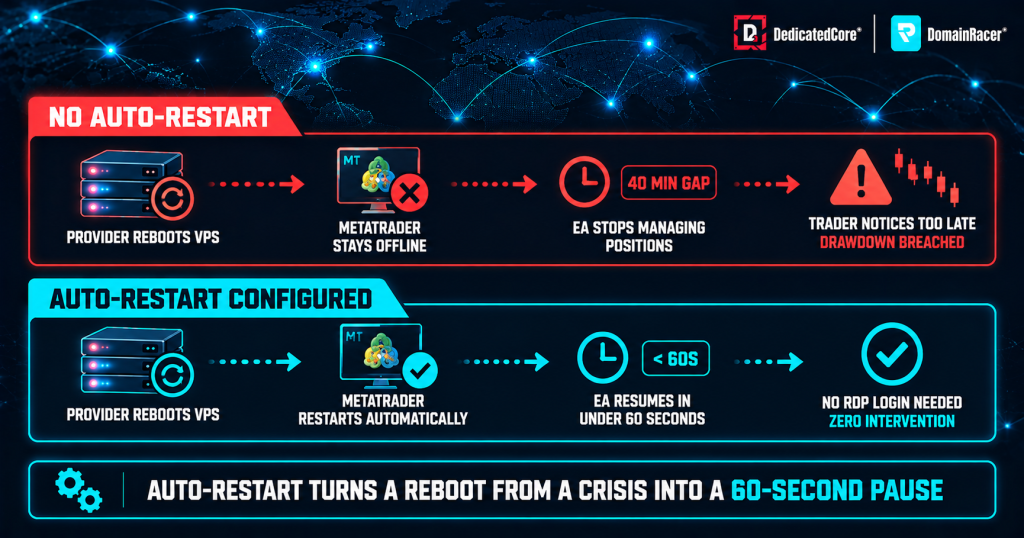
DedicatedCore’s Forex VPS auto-restart configuration helps restore MetaTrader and Expert Advisor activity after a server reboot without requiring manual intervention.
A weekend reboot that leaves your terminals offline until Monday morning can cost more than the plan saves.
- Advance notice. The provider should notify you before any planned reboot and never restart your server midweek during live trading
- Auto-restart after reboot. MetaTrader should relaunch on its own after a reboot, and EAs should resume without an RDP login. Without this, a Sunday patch leaves everything offline
- Red flag. Unscheduled reboots that leave terminals logged out for hours with no alert sent to the trader
We configure MetaTrader auto-start and session persistence on every Forex VPS during setup.
9. Network, Security and Workload Fit
A fast server on a slow or exposed network still loses trades.
- 1 Gbps port minimum — with unmetered bandwidth and low-latency routing through premium carriers. For heavy setups, look for 5–10 Gbps
- DDoS protection — the mitigation layer should stop attacks without adding ping delay. A DDoS scrubber that adds 20 ms to every packet defeats the purpose of a low-latency VPS
- RDP security — IP whitelisting, a custom RDP port, and Network Level Authentication. Default port 3389 gets hit by brute-force bots within hours of going live
- Tenant isolation — dedicated KVM keeps your VPS separate from other users. On a shared hypervisor, a noisy neighbour running a backtest can steal your CPU during a tick burst
DedicatedCore offers 1–10 Gbps networking with 5+ Gbps in the UK and USA, plus DDoS protection at the network edge. Our Forex VPS security guide details the full baseline we apply before handover.
10. Support, Trials and Billing Terms
A Forex VPS provider should understand trading, not just hosting.
- 24/7/365 support. Covering the Friday close and Sunday open, from staff who can read MetaTrader logs, troubleshoot broker links, and spot EA memory leaks
- Trial or money-back guarantee. You need to live-test ping, stability, and resource usage before locking in. A 7-day trial at minimum, ideally 30 days
- Monthly billing. No long-term lock-in. If the VPS does not perform, you should be able to leave after 30 days without paying a cancellation fee
- Broker-sponsored VPS. Some brokers offer a free VPS if you meet a deposit or volume threshold. Check the specs — many run on shared resources with no SLA
DedicatedCore and DomainRacer offer a 30-day trial and a 30-day money-back guarantee with no setup fees. Our broker VPS hidden trade-offs guide explains the conditions that come with sponsored and budget plans.
Forex VPS Selection Standards Compared Across Hosting Providers
Not every provider covers all 10. Here’s what separates a trading-ready VPS from a generic one.
| What to check | Typical budget host | Average managed host | DedicatedCore / DomainRacer |
| Data center location | Generic cloud region | Named city, not facility | Equinix LD4/LD5 with sub-1 ms to brokers |
| Latency testing | No tools offered | ICMP ping only | TCP connect, p50/p95/p99, jitter |
| RAM and CPU | Shared, burstable | Shared with soft limits | Dedicated vCPU, DDR5, 4.5–5.7 GHz |
| Storage | SATA SSD | NVMe, no RAID info | Enterprise NVMe with RAID 10 |
| Uptime SLA | 99.9% or none | 99.95% | 99.99% with service credits |
| Windows and RDP | Extra licence fee | Included, limited access | Included, full admin, MetaTrader pre-installed |
| Reboot handling | No notice | Scheduled window | Advance notice, auto-restart, trader alerted |
| Network and security | 100 Mbps shared | 1 Gbps, basic firewall | 1–10 Gbps, DDoS, NLA, custom RDP port |
| Support | Ticket only | 24/7 general | 24/7 trading-aware, MetaTrader support |
| Trial and billing | No trial | 7-day trial | 30-day trial, 30-day money-back, no lock-in |
The bottom three rows matter more than most traders expect. A fast server with no trial, no reboot notice, and no trading-aware support creates problems that only show up after you’ve paid. The comparison also shows why price alone misleads — a budget host at half the cost can double your slippage if it skips half the checks.
Step-by-Step Guide to Choosing the Right Forex VPS
Choosing a Forex VPS takes less than ten minutes when you follow a clear sequence instead of comparing dozens of features at once.
- Find your broker’s data center first. Open a support ticket or check your broker’s FAQ for the exact facility name, such as Equinix LD4 for London or NY4 for New York, because every other decision depends on matching this location
- Pick a provider co-located in that facility. Shortlist only hosts that name the same data center, not just the same city. A VPS in London but outside Equinix still adds 2–5 ms of avoidable routing delay
- Confirm Windows, RDP, and pricing. Verify that the plan includes a Windows Server licence and full Administrator RDP access in the base price, then check that monthly billing has no lock-in so you can leave after 30 days if the performance falls short
- Test latency on the live server. Log in via RDP, run PsPing to your broker’s trade server IP and port during your actual trading session, and confirm the reading stays under 5 ms. If it does not, the location match is wrong, and no amount of hardware will fix it
DedicatedCore and DomainRacer offer a 30-day trial with a money-back guarantee, which gives enough time to run this full verification before committing.
Common Forex VPS Buying Mistakes That Can Affect Trading Performance
Most VPS problems start at checkout, not after the setup is done. Traders focus on price instead of checking the specs that actually affect execution.
- Buying a generic web hosting VPS. Standard Linux or shared hosting plans are built for websites, not trading. They run low clock-speed CPUs, share resources across dozens of tenants, and often lack Windows Server or RDP access entirely, which means MetaTrader cannot even install
- Picking a server location by country instead of by facility. A VPS listed as “London” or “New York” can sit 20 km from the broker’s matching engine. The only location that matters is the exact data center, such as Equinix LD4 or NY4, not the city name on the sales page
- Overloading a starter plan. Running three or four terminals with heavy EAs on a 1 vCPU and 2 GB RAM plan pushes CPU usage past 90% during news spikes. The platform freezes at the worst possible moment, and the trader blames the broker instead of the undersized server
- Skipping the trial period. Committing to a quarterly or annual plan without testing auto-restart behaviour, real broker latency, and peak-hour stability first means discovering problems during a live session instead of during a risk-free trial window
We publish the exact CPU model, data center facility, and resource allocation on every plan page so traders can verify before signing up.
How to Choose a Forex VPS: Practical Lessons Through Our Real-World Examples
Our Forex VPS case study shows how traders can evaluate different hosting options before they decide. It highlights the factors that decide whether a VPS fits the job. These are CPU and RAM capacity, broker proximity, network stability, uptime, and security. Remote access matters too, for MT4, MT5, and Expert Advisor requirements.
Case Study 1 — A scalping EA missing entries because the VPS sat in the wrong data center.
A scalper running an EA on a budget VPS advertised as “London located.” The server was in a London data center but not inside Equinix LD4 where the broker operated. Latency sat at 8–12 ms instead of under 1 ms, and the EA missed three to five entries per week during fast-moving sessions.
Our solution: We moved the setup to a DedicatedCore VPS inside Equinix LD4, matching the broker’s facility. We ran PsPing tests during the London-New York overlap to confirm sub-1 ms readings.
The result: Latency dropped from 8–12 ms to 0.4 ms. Entry slippage fell from 1.2 pips average to 0.1 pips, and the EA’s weekly hit rate recovered within the first five trading days.
Case Study 2 — A trader locked out after a provider rebooted midweek with no warning.
A prop-firm trader running two funded accounts with a trade copier. The VPS provider applied a kernel patch on a Wednesday afternoon and rebooted; MetaTrader did not auto-restart after the provider rebooted the server. Both accounts breached their daily drawdown limit before the trader noticed, 40 minutes later.
Our solution: We migrated the setup to DedicatedCore and set auto-start on both terminals. Session persistence was enabled at the same time. Planned maintenance runs only during the weekend market close with 48-hour advance notice.
The result: No midweek reboots in four months. The auto-start setup meant a scheduled weekend reboot still brought both terminals back online. Neither terminal needed an RDP login to restart.
Both cases started with a provider that looked adequate on paper but failed on the details that matter during live trading. Our Forex VPS failure case studies cover more examples across different trading setups.
DedicatedCore’s Expert Answers to Choosing a Forex VPS
We’re often asked what traders should consider when choosing a Forex VPS for MT4 or MT5. Based on our experience with trading workloads, the right choice depends on several factors. These include server performance, broker proximity, network stability, and uptime. Security, scalability, and reliable remote access matter as well.
How do I find out which data center my broker uses?
We get this question on almost every setup call because brokers rarely advertise the facility name on their website. Open MT4 or MT5, click File → Open an Account, and look at the server address — it usually contains a city or facility hint like “LD4” or “NY4.” If it does not, open a support ticket with your broker and ask for the data center name and city. That one answer decides which VPS location to pick.
Our Equinix LD4 and LD5 proximity guide lists common brokers and the facilities they operate from. This saves the support ticket for most London-based setups.
Should I choose a provider that offers a free trial or a money-back guarantee?
We recommend both. A trial lets you test real broker latency before paying anything. You can also test auto-restart behaviour and peak-hour CPU stability. A money-back guarantee protects you if a problem shows up after the trial. Some issues only appear during a full NFP or rate decision cycle. That cycle may fall outside a short trial window.
Avoid providers that lock you into quarterly or annual billing with no refund clause. If the VPS cannot hold sub-5 ms latency to your broker during live sessions, you need the option to leave.
What is the first thing I should test after logging into a new Forex VPS?
We tell every new trader to test broker latency before installing anything else. Open Command Prompt and run PsPing to your broker’s trade server IP and port. Check the reading during your actual trading session, not at 2 AM when the network is quiet. If the p95 reading stays under 5 ms, the location match is correct. If it does not, raise a ticket immediately because no amount of RAM or CPU will fix a location mismatch.
After latency, confirm that MetaTrader auto-starts after a reboot. Restart the VPS and check whether the terminal comes back on its own, without an RDP login.
Location First, Hardware Second, Support Always
Choosing a Forex VPS starts with one question — where is your broker’s trade server? Everything else follows from that. The best hardware in the wrong data center still adds latency, and the lowest ping with not enough RAM still freezes during news. Our jitter and execution guide shows how even small setup mistakes add up to real slippage over hundreds of trades.
DedicatedCore and DomainRacer cover all 10 checks — from Equinix LD4/LD5 proximity and dedicated vCPU to 24/7 trading-aware support and a 30-day trial with a money-back guarantee. Start with the trial and test every check on this list before you pay.

