
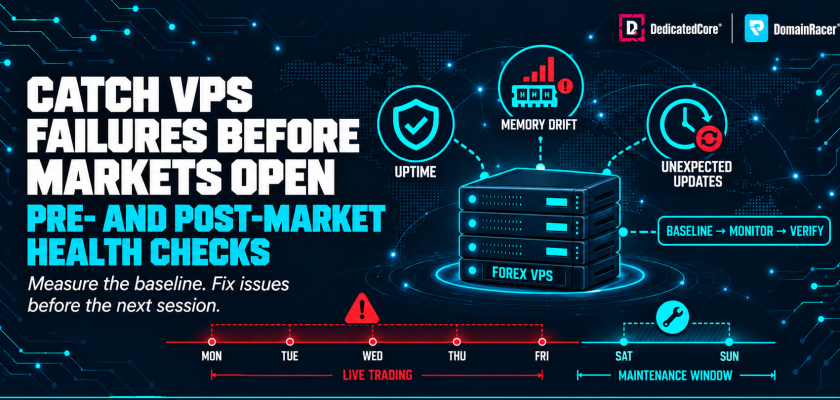
Frozen terminals, disconnected EAs, surprise reboots, and full disks never announce themselves during a trade. They show up as missed entries, slipped exits, and orders that never fired. A 2023 Finance Magnates survey found that 38% of retail algo traders hit at least one unplanned VPS outage per quarter. Most only found out after the damage was done. The weekend close gives you roughly 48 hours between Friday’s New York session and Sunday’s Sydney open. It is the only safe window for reboots, updates, and heavy work.
DedicatedCore and DomainRacer build a timed health routine into every Forex VPS. Not a generic checklist, but a set of thresholds, actions, and clear ownership that runs before the market opens and after it closes. This guide covers the full routine with the exact metrics, triggers, and steps we use on live trading servers.
Forex VPS Health Check: 7 Metrics, Thresholds and Actions
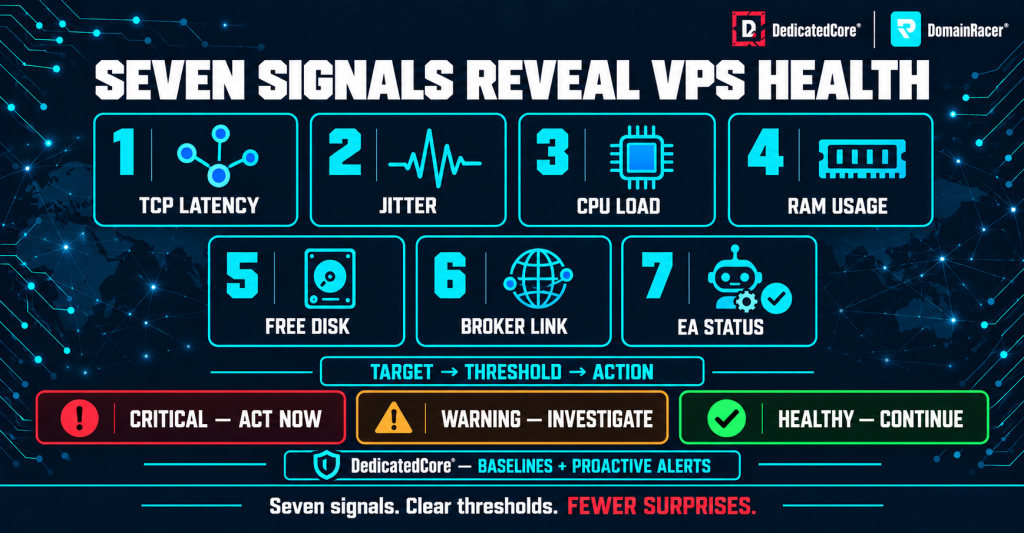
DedicatedCore’s seven-point Forex VPS health checklist tracks latency, jitter, CPU, RAM, disk space, broker connectivity, and EA status to identify issues early.
Every check in this routine starts from a threshold — a number that tells you whether to act or move on.
| Metric | Healthy target | Action trigger | What to do |
| Broker latency (TCP) | Below 5 ms to same-facility broker | Stays above 10 ms | Run PsPing, check routing, contact provider |
| Jitter (high – low ping) | Below 2 ms | Stays above 5 ms | Trace route for packet loss, switch access point |
| CPU load | Below 70% at session opens | Stays above 85% | Check per-process usage, pin affinity or upgrade |
| RAM usage | Below 80% of total | Above 90% | Clear logs, restart terminals, check for leaks |
| Free disk space | At least 15–20% free | Below 15% | Delete old logs and Tester cache |
| Broker connection | Connected, prices moving | “No connection” or frozen prices | Restart terminal, check firewall, verify server |
| EA status | Green button, active on chart | Grey button or EA removed | Re-enable, check licence, review Journal |
DedicatedCore sets these thresholds on every Forex VPS during setup and tracks them around the clock. These numbers are starting points — our MT4 and MT5 tuning guide shows how to build a baseline for your own workload before changing anything.
Pre-Market Forex VPS Checks: Terminal Status, Broker Ping and System Time
Run this 60–90 minutes before your trading session, and every Sunday before the Sydney/Tokyo open.
- VPS status — check that the server is online in the control panel and RDP connects. If you rebooted over the weekend, make sure Windows came back cleanly
- Terminal check — MT4, MT5, or cTrader should be open with live prices moving. Each terminal should show it reconnected to the right broker server
- Algo Trading on — the button should be green, every EA active on its chart, and no licence warnings or login errors in the Experts tab
- Journal and Experts tabs — look for start-up errors, outdated-build alerts, and timeouts. One “common error” line is noise. Three in a row is a real problem
- Broker ping and spreads — spreads should have settled after the rollover. If they’re still 3–4× wider than normal 30 minutes before the session, it’s likely a broker-side issue
- Clock sync — run w32tm /resync if your EAs trade at set times. Even a 2-second drift can trigger entries a bar early on lower timeframes
- WebRequest and history data — check the allowed-URL list for EAs that use licence checks or Telegram alerts. Also refresh history data for each timeframe your EA reads
DedicatedCore’s Forex VPS plans ship with MetaTrader set to auto-start after a reboot. It reconnects to the last broker server and restores the EA workspace on its own. The Sunday check confirms what already happened on its own, rather than rebuilding from scratch. Our common Forex VPS issues guide covers the startup problems traders hit most often after a weekend reboot.
Forex VPS Health Routine Compared Across Providers
Who checks what — and whether anyone checks at all — shapes how your VPS runs over months, not just day one.
| Health routine element | Typical budget host | Average managed host | DedicatedCore / DomainRacer |
| Pre-handover baseline | Not measured | Not measured | Five-metric baseline recorded before handover |
| Pre-market checks | Left to trader | Left to trader | MetaTrader auto-start set up, trader verifies |
| Weekend patching | Automatic, no trader input | Scheduled window, not verified | Manual Saturday, verified Sunday, trader told |
| Log and disk tracking | None | Disk space alerts only | Disk, RAM trends, CPU, proactive alerts |
| Latency checks | ICMP ping only | ICMP average | TCP connect, p50/p95/p99, jitter, packet loss |
| Security baseline | Default Windows install | Firewall only | NLA, custom RDP port, Defender rules, brute-force block |
| Crash recovery | Left to trader | Uptime watch only | Watchdog scripts, auto-start, session persistence |
The row that matters most is weekend patching. An update that reboots your server at 3 AM on a Wednesday costs more than any hosting plan saves.
Forex VPS Latency Monitoring: Find Routing Delays Before They Affect Trading
A ping test tells you the connection is alive. It does not tell you the connection is fast enough to trade on.
- Find the broker’s trade server IP — open Resource Monitor → Network → TCP Connections. Filter by terminal.exe or terminal64.exe to see the actual IP your terminal uses
- Use TCP, not ICMP — many brokers block ICMP ping. Run psping -n 60 [broker-ip]:[port] for a 60-sample TCP test with min, avg, max, and standard deviation
- Record jitter — the gap between the lowest and highest reading matters more than the average. A 2 ms average with a 15 ms spike during news means your EA saw that spike
- Trace the route — run tracert [broker-ip] and look for hops with jumps above 10 ms. A routing change upstream can add 20–30 ms overnight
- Switch access points — in MT4/MT5, File → Open an Account shows all servers for your broker. The one with the lowest ping is not always the default
DedicatedCore measures broker latency with TCP tests, not ICMP ping, and records p50, p95, and p99 readings across the trading day. Our jitter and Forex execution guide explains why the p99 number matters more than the average for scalping and news strategies.
Forex VPS Weekend Health Check: Prepare MT4 and MT5 for the Next Session
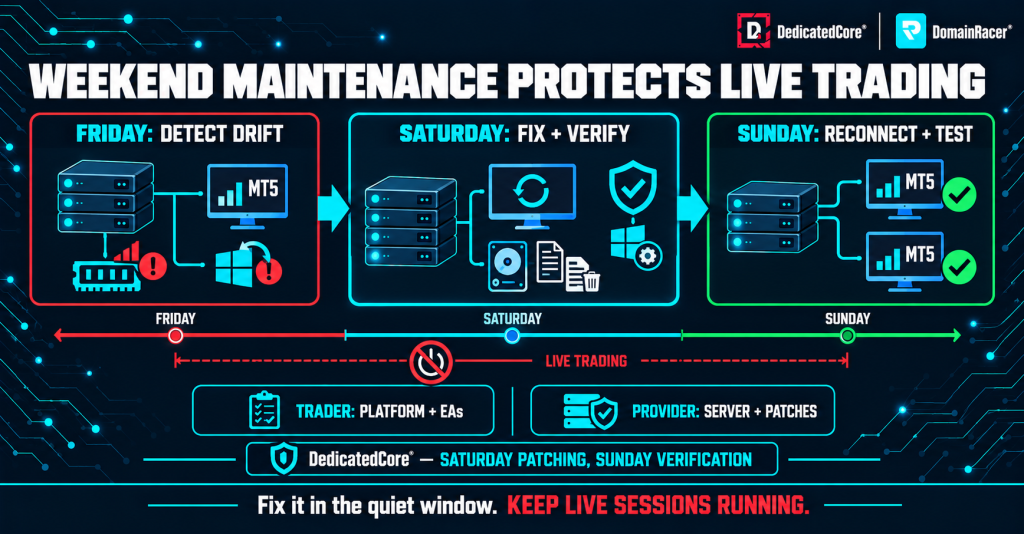
DedicatedCore’s weekend maintenance routine detects issues on Friday, applies fixes and patches on Saturday, and verifies MT4 and MT5 trading platforms on Sunday.
Friday after the New York close is when the real upkeep happens — the kind that’s too risky to run during live trading.
- Review logs before clearing — open the Journal and Experts tabs. Look for order failures, dropped connections, loop errors, and licence warnings. Export the week’s logs before deleting
- Clear old logs and cache — delete files older than 14 days from MQL4/Logs, MQL5/Logs, and the Strategy Tester cache. Left alone, these logs can eat 5–10 GB on a 40 GB drive within months
- Check resources at rest — with no ticks flowing, RAM, CPU, and disk show their true idle state. RAM above 60% at rest usually means a memory leak or a stuck script
- Restart terminals cleanly — use File → Exit to save profiles and settings before shutdown. Then relaunch and check that everything loads right
- Review open positions — check pending orders, stop-losses, and take-profits. SL/TP orders stored on the broker’s server stay active even when your VPS is offline
- Export the weekly statement — save from Account History. Record any slippage or order errors against your baseline
DedicatedCore runs weekend upkeep on the server side — hypervisor patches, NVMe health checks, and snapshot checks — while the trader handles platform and EA work. Our server maintenance standards spell out exactly what we check and when.
Windows Update Management for Forex VPS: Prevent Mid-Trade Restarts
The most common cause of surprise mid-trade reboots is a Windows update that ran without permission.
- Group Policy — run gpedit.msc and set updates to “Notify for download and notify for install.” Turn on “No auto-restart with logged on users”
- Active hours — set Sunday 22:00 through Friday 22:00 UTC to cover all major sessions. Apply updates by hand on Saturday, reboot, then verify on Sunday
- Event Viewer audit — check Event ID 1074 (planned restart) and 6008 (surprise shutdown). If 6008 shows up midweek, something forced a reboot you did not plan
- Power plan — set to High Performance with powercfg /setactive 8c5e7fda-e8bf-4a96-9a85-a6e23a8c635c and check that it sticks after reboots
- Turn off telemetry and audio — DiagTrack, Windows Audio, and Connected User Experiences use CPU cycles your EA needs during tick bursts
DedicatedCore and DomainRacer ship Windows Server 2022 with Group Policy, active hours, and the power plan already set for Forex trading. Our Windows Server 2019 vs 2022 vs 2025 guide covers how update rules differ across versions.
Forex VPS Health Checks: Verify RDP Security and Trading Continuity
A secure VPS setup means your EAs survive disconnects, crashes, and login attempts without you stepping in.
- RDP security — turn on Network Level Authentication. Change the default RDP port from 3389 to a custom port and allow it through Windows Firewall. Check Event ID 4625 for failed logins each week
- Disconnect, never log off — the X button on your RDP client keeps all programs running. Logging off shuts down every terminal and EA on the server
- Antivirus — make sure Windows Defender is running with MT4/MT5 folders excluded. This stops real-time scanning on every DLL load without leaving the server open
- Watchdog script — a short PowerShell script that checks if terminal.exe is running every 60 seconds and relaunches it after a crash. Set it to run at startup via Task Scheduler
- Auto-start terminals — drop MT4/MT5 shortcuts into the Windows Startup folder so they launch after a reboot without an RDP login
- Uptime monitor — use an outside service to ping your VPS every 60 seconds and alert you by email or Telegram if it goes down
DomainRacer’s Windows VPS plans include RDP access with session persistence and DDoS protection at the network edge. Our Forex VPS security guide covers the full baseline we apply before handover, from firewall rules to brute-force blocking. (forex-vps-how-we-secure-trading-servers)
Forex VPS Health Checks: Warning Signs That Require Immediate Action
Some signals mean stop trading and look into it before the next session.
- Repeated “No connection” or “Common error” in the Journal — one is a blip; three in a row means the broker server or your network path has a real issue
- Windows Update prompt midweek — if Group Policy is set right, this should not happen. If it does, a policy reset or servicing change overrode your settings
- CPU stuck at 100% with no backtest running — usually a stuck EA loop or a Windows process eating all cores. Open Task Manager right away
- Sudden ping jump — a baseline of 2 ms that jumps to 40 ms and stays there points to a routing change upstream. Run tracert and compare with your last saved trace
DedicatedCore tracks CPU, RAM, and network metrics across all Forex VPS servers and flags problems before they grow. When a warning fires, our Forex VPS troubleshooting guide walks through each scenario so you know whether to fix it or call support. (forex-vps-troubleshooting)
Forex VPS Health Routine Through Our Real-World Example
Our Forex VPS health case study shows how routine weekend maintenance can uncover issues before they affect trading sessions. It highlights the importance of checking system resources, Windows updates, disk health, logs, and connectivity to keep MT4 and MT5 environments reliable.
Case Study 1 — Based on a typical weekend maintenance discovery.
Customer: A trader running two MT5 terminals with three EAs on an 8 GB VPS. Performance had held steady for six weeks. During the Friday post-market check, RAM at rest showed 5.8 GB — up from 3.2 GB at the original baseline, with no new EAs added.
Our solution: We traced the leak to a custom indicator that grabbed memory on every tick but never freed it. Restarting the terminal dropped RAM to 3.4 GB. We added a weekly restart to the Saturday routine and set a RAM alert at 6 GB. Event Viewer showed no surprise reboots, but a Windows update was set to install Monday morning. We applied it Saturday instead and checked the reboot.
The result: RAM stayed between 3.2–3.8 GB for the next four weeks. The Monday update that would have rebooted during the London open ran safely on Saturday instead. The trader now logs RAM readings each week and catches drift before it hits execution.
Case Study 2 — A Windows update rebooting the VPS during the London-New York overlap.
Customer: A scalping EA trader running two MT5 terminals. On a Wednesday at 2:15 PM UTC, both terminals went offline for 12 minutes after a queued cumulative update triggered a restart. A trailing stop on GBP/USD was lost.
Our solution: We found Event ID 1074 in Event Viewer — a planned restart. A servicing stack update had silently reset Group Policy to defaults. We reapplied the update policy, locked active hours to cover all sessions, and added a startup task to verify the policy after every reboot.
The result: No midweek reboots in the following eight weeks. The problem was not the update but the servicing stack resetting the policy without warning. The trader now checks Event ID 1074 and 6008 each weekend.
DedicatedCore Expert Answers to Common Forex VPS Health Check Questions
We’re often asked how frequently a Forex VPS should be checked for potential issues. Based on our experience with MT4 and MT5 environments, we recommend routine checks during quiet periods, weekly maintenance reviews, and additional checks after major updates, performance changes, or unexpected trading interruptions.
When should I run a Forex VPS health check?
Twice — before the market opens and after it closes. The pre-market check runs 60–90 minutes before your session and takes about 10 minutes if nothing is wrong. It confirms the VPS is online, terminals are connected, EAs are active, and broker latency is within range. On Sundays, allow an extra 15 minutes to make sure everything came back after the weekend reboot.
The post-market check runs Friday after the New York close and takes 20–30 minutes. This is when you review logs, clear old files, check resource usage at rest, and save the week’s trading statement. Our CPU, RAM and disk sizing guide helps you set the thresholds that tell you if the numbers you’re seeing are normal for your setup.
What are healthy RAM and disk levels on a Forex VPS?
RAM should stay below 80% during active trading and below 60% at rest with the market closed. If RAM at rest climbs above 60% week after week with no new EAs added, something is leaking memory. The usual cause is a custom indicator or script that grabs memory on every tick without freeing it. A terminal restart clears it for now, but the root cause needs fixing.
Disk space should stay above 15–20% free at all times. On a 40 GB NVMe drive, MetaTrader logs alone can use 5–10 GB over a few months if nobody clears them. Once free space drops below 15%, Windows pages more often, services compete for writes, and journal logging falls behind live ticks. Our Forex VPS latency claims exposed explains why a full disk adds delay even when your ping looks fine.
Should I automate the health check or run it by hand?
Both — automate what a script can measure, and do the rest yourself. A watchdog script can check if terminal.exe is running, watch RAM and disk levels, and send a Telegram alert when something crosses the line. But reading the Journal tab for order errors, checking if spreads settled after a rollover, and testing EA logic after an update needs a human eye.
The weekend routine stays manual because it involves choices — whether to apply a certain update, whether a pending order needs changing, whether an EA behaves differently after a platform patch.
Choose a Forex VPS With Measured Baselines and Ongoing Monitoring
A Forex VPS health check is not a one-time setup. It’s a weekly routine that catches problems while they’re still warnings, not failures. The traders who lose money to VPS issues are not the ones with bad hardware. They’re the ones who never checked their server between Friday and Monday. Our Forex VPS failure case studies show what happens when the routine gets skipped, and nobody notices until the market opens.
DedicatedCore and DomainRacer come with baselines already measured, thresholds already set, and monitoring already running. The health routine starts from real numbers, not guesswork. Start with a 30-day trial backed by a 30-day money-back guarantee and see how the numbers hold up week after week.
