
Server decommissioning is the controlled process of retiring a machine so its data gets destroyed and its disposal can be proven. A server that leaves the floor without a record isn’t a solved problem — it’s an open liability with your name on it.
The average cost of a data breach in 2024 was $4.88 million. A large share of this cost was traced back to retired drives that were sold, donated, or scrapped, yet still contained readable data. One study bought used enterprise drives and found live business data on more than 40% of them. That’s why DedicatedCore and DomainRacer document every retirement as a full chain. It runs from the live rack to a certificate of destruction. The last clock in a server’s life is the one most likely to cost you.
The Server Decommissioning Process: 6 Steps to Secure Hardware Retirement
A server earns retirement when several signals line up: repeated part swaps, climbing SMART or ECC errors, an expired warranty, power and maintenance costs rivaling new gear, or hardware that can’t run modern AI workloads at usable speed. Our rule is simple — once yearly support and power costs pass 40% of a replacement’s price, retirement wins on the math. This is the same logic behind our server replacement framework, which runs one stage earlier.
A retired server touches finance, security, operations, and compliance at once — so we run it as ordered stages, each signed off before the next:
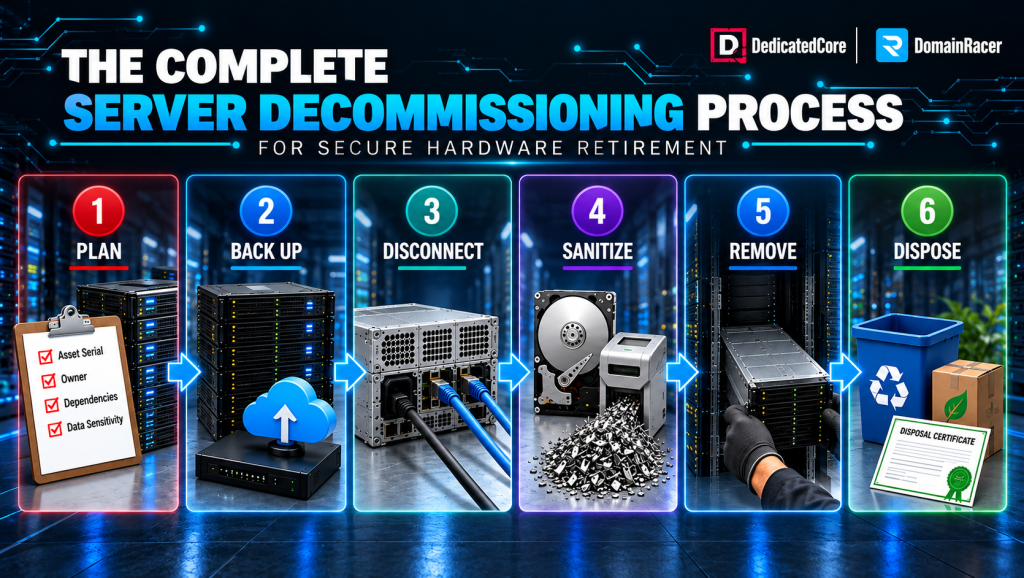
6 Steps Server Decommissioning Process
- Plan — log the asset’s serial, owner, dependencies, and data sensitivity before anything moves.
- Back up — capture a restorable copy and test it, because the next stage erases the original for good.
- Disconnect — take the workload offline in a scheduled window, once no live service depends on it.
- Sanitize — erase or physically destroy every storage device to a named standard, not a quick format.
- Remove — physically pull the hardware under chain of custody, each handler and movement recorded.
- Dispose — resell, recycle, or destroy, with documentation closing out each route.
Skip a stage, and that’s exactly where a breach happens — a server pulled from the rack before its data is sanitized, or scrapped before its disposal is logged. Decommissioning follows a replacement decision, so ours runs in a planned window, not during the rush of a hasty teardown. For workloads moving away from aging physical infrastructure, DedicatedCore Cloud Dedicated Server offers dedicated resources in an isolated environment.
Server Decommissioning Best Practices and Security Standards
Every host will “wipe and remove” a server. The difference is whether anyone can prove it afterward.
| What decides a safe retirement | Typical budget host | Average managed host | DedicatedCore / DomainRacer |
| Process | Ad hoc, undocumented | Basic checklist | Signed, staged runbook |
| Backup before wipe | Your responsibility | On request | Verified by test restore |
| Sanitization | Quick format | Single-pass wipe | NIST 800-88 tier per drive |
| Chain of custody | None | Partial log | Every handler and move recorded |
| Proof of destruction | None | Verbal | Certificate per drive serial |
| Old hardware | Landfill or resold raw | Basic recycle | Resold, recertified, or R2-recycled |
| What you are left with | Hope | An assurance | Auditable evidence |
That bottom row is the whole product. A budget host leaves you hoping the drive was clean. We provide you with signed proof, which makes a key difference between a closed audit finding and an open liability.
Server Decommissioning Checklist for Enterprise Infrastructure
A retirement checklist isn’t just paperwork for its own sake. It acts as a record that proves each stage occurred in order. This checklist is also the first thing an auditor will ask for during their review.
- Asset identified — serial, location, owner, and data classification logged.
- Dependencies mapped — every service checked, so nothing live still points at the node.
- Backup verified — a test restore proves the copy works before the original is erased.
- Sanitization method chosen — matched to data sensitivity, so a regulated drive is never trusted to a light wipe.
- Chain of custody opened — every handler and movement recorded.
- Disposal route set — resale, recycle, or destroy, with a named vendor for each.
We sign off every retirement on this list before a drive moves. This careful process also helps our preventive maintenance program. Most hosts keep no such record, which is exactly how a “wiped” EOSL drive resurfaces on a resale market two years later with your data still on it.
Data Backup and Verification Before Server Decommissioning
Sanitization is permanent, so the backup before it is the most unforgiving step. A retirement that destroys the only copy of something is not a decommission — it is data loss with a checklist.
- Capture all important items. This includes application data, configs, logs, and software licenses. The business may need to reclaim or transfer these.
- Verify by restore. We restore a sample to a live target before signing off — most “backups” go untested until the day the drives are already gone, which is the day they fail.
- Set retention. Some records must be kept for years under law even after the hardware is gone.
Only once the backup is verified and retention is set are the drives cleared for sanitization — the one gate we never move without a signature.
DedicatedCore’s Disk Sanitization Methods and Secure Erasure Standards
This is where a decommission is won or lost. Deleting or quick-formatting leaves data fully recoverable — the pointers change, the bits do not. The right method depends on whether the drive lives again:
| Method | How it works | Drive survives? | When we use it |
| Cryptographic erase | Destroys the encryption key; data unreadable | Yes | Self-encrypting drives bound for fast reuse |
| Overwrite (purge) | Overwrites every sector to a verified pattern | Yes | Resale-bound drives we recertify |
| Degaussing | Magnetic field wipes the platter | No | Bulk HDD destruction, never SSDs |
| Shredding | Physically destroys the media | No | Regulated data leaving your control |
We map every drive to a NIST SP 800-88 tier—Clear, Purge, or Destroy—before it is touched, based on its sensitivity. Each erasure is logged against the serial number. This ensures that an unverified wipe is indistinguishable from no wipe at all.
Server Decommissioning Chain of Custody for Secure Data Disposal
Sanitizing the data is half the obligation. Proving it — to a regulator, auditor, or court — is the other half. It rests on an unbroken chain of custody: the signed, timestamped log of who handled each drive and where it went.
The rules vary by sector, but the exposure does not:
- Data-privacy law — GDPR fines can hit 4% of global revenue for recoverable personal data. Also, a single discarded HIPAA drive is a reportable breach itself.
- Audit standards — PCI-DSS requires a documented and verifiable destruction method. In contrast, SOX and ISO 27001 mandate an auditable asset trail that extends through the entire lifecycle, right up to the end of life.
A certificate of destruction, issued per drive and tied to its serial, turns “we wiped it” into evidence — and we issue one for every unit. It is also where the failed-part path from our spare parts inventory lands: a dead drive pulled during a swap retires exactly like a whole server.
Post-Decommissioning Server Lifecycle: Resale, Refurbishment, and Recycling
Once data is gone and documented, the hardware still has a destination — and often, value. Condition and remaining life pick the route, not convenience:
- Resale. A healthy bare-metal server has real resale value, especially if it’s a recent model still under warranty.
- Refurbishment. Recertified and reconditioned units re-enter service — internally as spares, or externally to a buyer — at a fraction of the new cost.
- Recycling. Outdated, pre-owned boards that are past EOSL and unwanted by second-hand buyers go to a certified R2 or e-Stewards recycler. They never go to a landfill.
Preparing a server for resale means fully wiping it, restoring clean firmware, fixing it up, and giving the buyer documented proof of the wipe. The money recovered helps cover the cost of the new machine — details in our guide to server asset value and depreciation. When the retired hardware no longer needs to be replaced with another dedicated server, DomainRacer VPS hosting can provide a different infrastructure model for suitable workloads.
Improper Server Decommissioning: Business Risks and Environmental Impact
Improper disposal is the most common way old hardware becomes a live breach. Three fronts, each already a headline somewhere:
- Data exposure. A drive scrapped with recoverable data is a breach waiting to be found — and the finder, not you, sets the timeline.
- Regulatory penalty. Fines land whether the exposure was malicious or careless; regulators do not grade on intent.
- Environmental liability. Dumped e-waste carries its own fines — over 60 million tonnes generated in one recent year, under a quarter recycled.
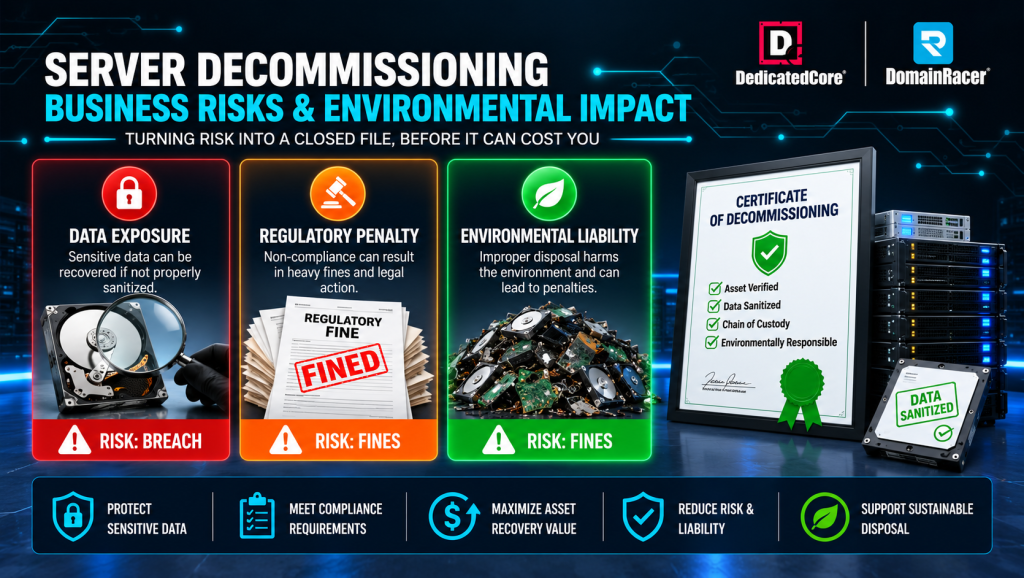
Server Decommissioning Business Risks
Every one of these is a documentation failure, not a technology one — which is exactly why we retire hardware as an evidence trail, not a favour at the dock. A signed chain of custody and a certificate per drive convert all three from live exposure into a closed file before it can cost you.
Server Decommissioning Business Outcomes Through Our Real-World Examples
Case Study 1 — A hospital retires 200 drives without a reportable breach.
A healthcare provider was replacing an aging storage fleet holding years of patient records. Under HIPAA, one unaccounted drive is a reportable breach — and the old vendor planned to “wipe and pallet them” with no per-drive record.
Our Solution: DedicatedCore managed the retirement process as a documented chain. Each drive was serial-logged and sanitized to NIST 800-88 Purge standards. High-sensitivity units were shredded on-site. A certificate of destruction was issued for each unit.
The Result: All 200 drives accounted for with signed evidence; the audit closed with zero findings, not one platter left readable.
Case Study 2 — A SaaS firm turns a refresh into recovered budget.
A growing company was retiring three racks of dedicated servers after a refresh. The default plan was to scrap them — writing off hardware only three years old and still in demand.
Our solution: DomainRacer sanitized each drive to resale grade, ensuring quality. We restored a clean firmware baseline. Then, we routed the healthy nodes to resale, providing per-unit wipe certificates for the buyer.
The Result: The recovered resale value covered a significant part of the refresh cost. R The few dead units were sent to a certified recycler with complete documentation.
DedicatedCore’s Expert Answers to Server Decommissioning Questions
Is deleting the data or formatting the drive enough before disposal?
We treat a simple delete or quick format as doing almost nothing. The file names disappear, but the data stays on the drive and can be recovered with free tools. This is how used drives leak data when sold.
We perform real sanitization instead. Every sector is overwritten, the encryption key is destroyed, or the drive is shredded — always to a standard like NIST 800-88. Every wipe is logged against the drive serial number, because an unverified erase counts as no erase in an audit.
What happens to a drive that fails during its working life — is that decommissioned too?
We retire a failed drive the same way we retire a whole server — a step most operations skip. A drive pulled during a swap still holds live data, but because it failed, it often goes straight into a bin instead of a wipe queue. This is one of the quietest ways data leaks.
Ours comes off the floor under the same chain of custody, sanitized to standard before it goes anywhere. It is the direct handoff from our spare-parts process: the shelf swaps the part fast; this discipline destroys the old one properly. A failure never lowers the bar on data handling — it just triggers retirement early.
Do I get proof that my data was actually destroyed?
We issue a certificate of destruction for every drive, linked to its serial number and the wipe method used. You receive verifiable proof, not just a verbal assurance — the exact document a GDPR, HIPAA, or PCI-DSS auditor asks for.
The reason is simple: in a compliance review, simply saying the data is gone counts for nothing. Proving it with per-serial evidence is the only thing that actually closes the finding. Without the certificate, “it was wiped” is just a claim, not proof.
Retire It Like It Still Holds Your Data — Because It Does
Decommissioning goes wrong precisely because it feels finished — the server is off the floor, and everyone has stopped looking. It is where server replacement ends and a failed part from your spare parts inventory lands, yet more than 40% of used drives sold on the open market still carry readable data. The machine is gone; the liability is not.
So, the decision is clear: retire with a host that offers a named sanitization standard, chain of custody, and certificate of destruction for each drive. Or retire with one who leaves you holding the risk instead. DedicatedCore and DomainRacer close the loop and give you the proof. Pick the records that hold up in an audit, because the drive you forget is the one that causes problems later.
