
A hardware upgrade means adding the right capacity at the right time. Done well, it can make a server last longer for a fraction of what a full replacement would cost. A 1 Gbps network moves about 118 MB/s, but a modern NVMe SSD reads about twenty times faster. So today, storage is usually waiting on the network, not the other way around. Buy the wrong part, and it won’t fix anything.
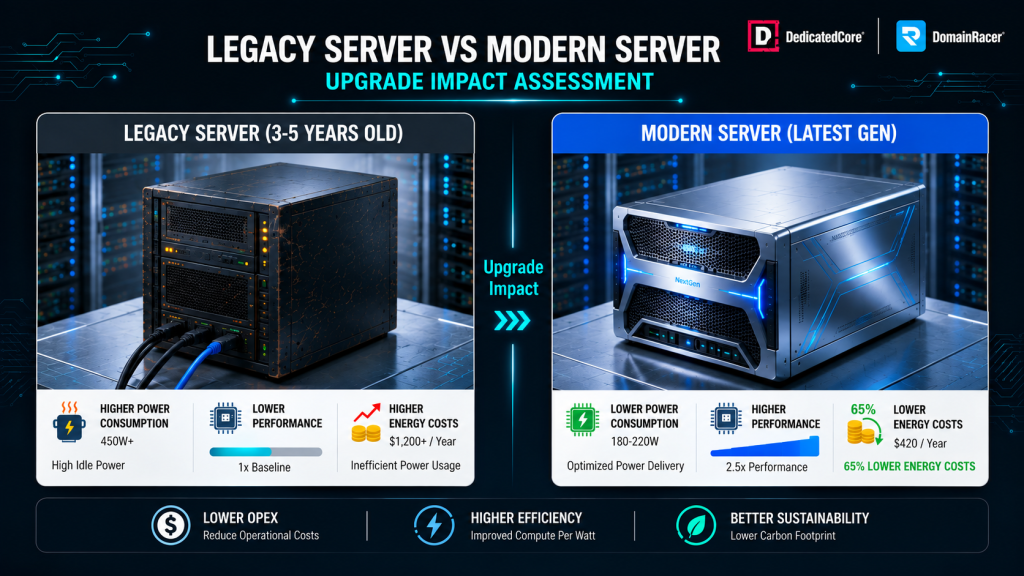
Hardware upgrades are the decision stage of hardware lifecycle management, where performance data decides whether to add capacity, replace a component, or spend nothing at all. One modern server can replace two or three old ones and cut CPU energy costs by up to 65%, but only when the upgrade targets the real bottleneck. DedicatedCore and DomainRacer read your usage before quoting, and say so when the honest answer is to spend nothing.
Legacy Server vs Modern Server
Making the Right Hardware Upgrade Through Capacity and Health Analysis
Slow is a symptom, not a diagnosis. The same slowdown has two causes, and buying for the wrong one fixes nothing.
- Failing hardware trends against its own past. It was fast; now it isn’t — component degradation, reallocated sectors, ECC errors, thermal throttling. Capacity does not help a dying drive.
- Outgrown hardware trends against demand. Nothing is broken. The workload got bigger than the box, and capacity is the entire fix.
One question separates them: did the server get slower, or did the job get bigger? Traffic doubled, and latency followed means capacity. Traffic flat and latency crept up anyway means health — start with the warning signs of failing server hardware.
Most quotes start with a part number. A diagnosis starts with a graph — which is why about a third of upgrade requests turn out to be health problems in disguise.
DedicatedCore’s 15 Proven Signs Your Dedicated Server Needs a Hardware Upgrade
One warning light is okay, but three in the same area signal a real bottleneck. We call this the Three-Group Test — the first check we run on any upgrade request. It shows exactly what to buy and what to skip.
Compute pressure
- Sustained CPU above 75–85% during normal load — no headroom left for a busy day.
- Load average above your core count — processes queuing for CPU time that does not exist.
- Work piling up in the queue — requests arriving faster than your application finishes them.
- Batch jobs overrunning their window — the work no longer fits the quiet hours.
- Compilation or reports timing out — CPU-bound tasks are maxing out an old processor generation.
Cores are the first thing most hosts quote because they are the easiest line item to add. This is the one group where they are actually the answer.
Memory pressure
- Utilisation above 85–90% with no cache headroom to absorb a spike.
- Swap active in normal operation — the working set no longer fits, and every swap is a disk hit.
- Page faults climbing week over week on unchanged workloads.
- Database cache hit ratio falling — the buffer pool has outgrown RAM, turning cached reads into disk reads.
- The OOM killer terminating processes — the system choosing what to sacrifice, which should never be its job.
Cheapest to fix, and the most common across the fleets we manage.
I/O and network pressure
- Disk I/O wait climbing while CPU idles — the processor is fast enough and waiting on storage.
- Storage above 80% capacity — most filesystems slow measurably past this line.
- Network interface saturating, flatlining at ceiling rather than spiking.
- Backup windows stretching into business hours — the data outgrew the pipe.
- Connection limits hit before CPU or RAM tops out — the network stack is the limit.
Misdiagnosed as a CPU problem more than any other, because disk wait and network saturation look identical from a dashboard. We separate the two before recommending either. A server pegged on I/O gains nothing from more cores, and we would rather say so than sell them.
Send us a week of usage graphs. We will name the bottleneck before anyone quotes you.
Understanding RAM Requirements for a Hardware Upgrade
RAM is the cheapest performance you can buy and the easiest to over-buy. The signal is not the utilisation number. It is what the system does when it runs short.
- Swap activity under normal load. Sustained swapping means the working set no longer fits. The clearest indicator is.
- Falling cache hit ratio. Once the buffer pool outgrows memory, every miss becomes a slow disk read.
- Rising page faults on unchanged workloads. Snapshots miss this — only the weekly trend shows it, which is why it sits in our data center preventive maintenance checks.
- High I/O wait with idle CPU — often memory pressure in disguise.
High memory usage alone is not a problem. Linux uses free RAM for cache, so 90% used with no swapping is normal and healthy.
Two things matter when adding memory:
- The board has a max capacity and limited slots — a full server needs modules swapped, not just added.
- Older memory for legacy hardware is often more expensive per GB than new systems.
Every module we install (new or refurbished) is fully tested and matched first.
Network Throughput Optimization with a 1G to 10G Hardware Upgrade
Years ago, storage drives were slower than the network. Today, the network often reaches its limit before modern NVMe storage does.
Upgrade to 10G when:
- Backups miss their window. Moving 1TB across a saturated 1G link takes over two hours. On 10G, it is minutes.
- Your interface flatlines at the ceiling while CPU and disk stay comfortable.
- You run storage over the network — NFS, iSCSI, or Ceph — where 1G throttles fast storage.
- You move large files constantly: media, datasets, replicas, container images.
- Latency-sensitive traffic shares the link with bulk transfer and loses.
For workloads where network responsiveness is especially important, the hosting environment matters as much as the network upgrade itself. For traders, DedicatedCore Forex VPS is one option designed around trading workloads.
Vertical and Horizontal Scaling Strategies for Hardware Upgrades
Vertical Scaling vs Horizontal Scaling
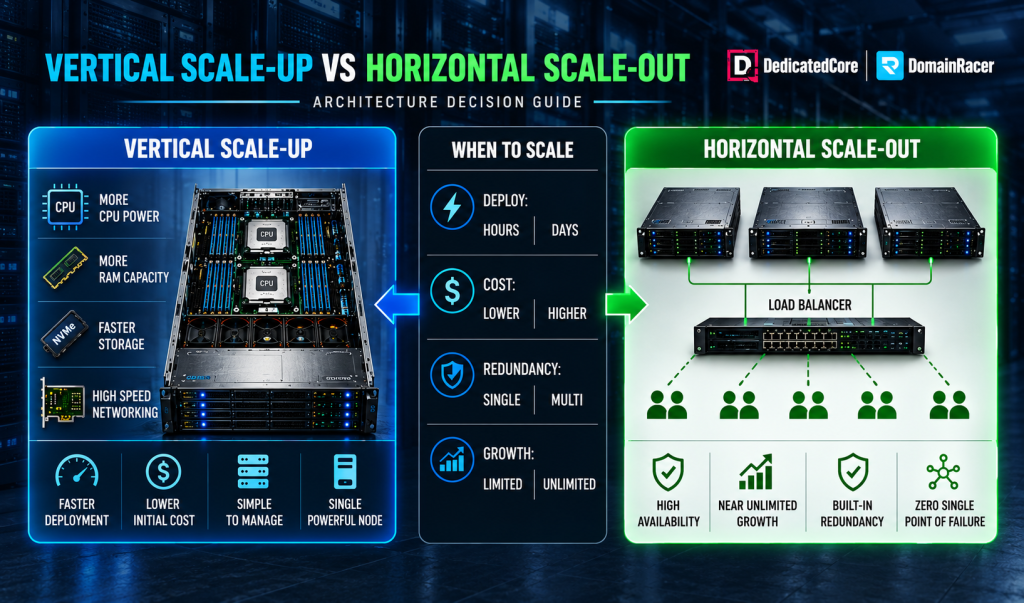
Vertical means a bigger server. Horizontal means more servers. Your architecture decides, not your traffic.
| Factor | Vertical (scale up) | Horizontal (scale out) |
| What changes | More CPU, RAM, or storage in one node | More nodes behind a load balancer |
| Application changes | None; works with any stack | Needs stateless design |
| Speed to deploy | Hours, often one window | Days to weeks, plus architecture work |
| Redundancy gained | None; still one point of failure | High; lose a node, keep serving |
| Ceiling | Hard limit at the biggest box | Effectively unlimited |
| Cost curve | Cheap early, expensive at the top | Higher entry, better at scale |
| Licensing | Per-socket costs drop with consolidation | Per-node costs multiply |
| Best fit | Databases, monoliths, single-writer | Web tiers, APIs, stateless services |
| How we deploy it | One planned window, rollback staged | Matched pairs, balancer tuned with you |
| What we handle | Slot checks, part sourcing, benchmarking | Capacity forecast, imaging, cutover |
We model both options against your actual workload. The rule is simple: scale up one server until you hit its limit or redundancy becomes more important. Then scale out. If scaling up is the right fit for your workload, consider DedicatedCore dedicated servers for additional CPU, RAM, storage, and network capacity.
Hardware Upgrade Comparison: Engineering vs. Sales-Driven Approaches
Every host offers upgrades. The difference is whether the recommendation starts with your bottleneck or their margin.
| Situation | Typical budget host | Average managed host | DedicatedCore / DomainRacer |
| Diagnosis before quote | None; pick from a menu | Ticket-based guess | Usage review, bottleneck named first |
| RAM at capacity | Sells a new plan | Sells a new plan | Adds modules if slots allow |
| I/O bound, CPU idle | Upsells more cores | Upsells more cores | Moves you to NVMe, keeps the cores |
| 1G saturating | Bundled tier upgrade | Bundled tier upgrade | 10G uplink on the existing node |
| Upgrade downtime | Whatever it takes | Scheduled window | Planned window, rollback ready |
| Platform past EOSL | Sells the upgrade anyway | Sells the upgrade anyway | We tell you to migrate instead |
| Your old hardware | Your problem | Your problem | Valued for secondary resale value |
Past EOSL, we don’t sell upgrades — the hardware will never get new firmware patches. We check support dates first and decline such orders.
Old parts are tracked, fully wiped, then recycled or reconditioned for stock. Used servers drop in value fastest after new models launch, so we check your hardware’s value before you commit.
Hardware Upgrade Case Studies and Business Outcomes
Case Study 1 — The database that did not need a new server.
A B2B SaaS platform watched query latency triple in six months. Traffic had grown steadily, and the team had already priced a full replacement.
Our solution: Our review found CPU idling at 30%. Meanwhile, I/O wait increased, and the cache hit ratio dropped. This indicates a working set that has outgrown RAM, not a server that’s exceeded its capacity. We doubled memory in one window.
The result: Latency back to baseline that night, at a fifth of the replacement quote. The server ran another two years.
Case Study 2 — The upgrade we refused to sell.
An e-commerce operator asked DomainRacer to add cores and storage to an aging node before peak season. The hardware worked. The order was ours to take.
Our solution: The platform sat three months from EOSL, so new parts would never receive another firmware update. We recommended migrating to the current hardware and moved the workload during a scheduled window.
The result: The client entered peak season supported and with headroom, and recovered part of the cost by reselling the old node.
DedicatedCore’s Expert Answers to Hardware Upgrade Questions
Is it cheaper to upgrade a server or replace it?
Upgrading is often the better choice, more than the quote you’re given suggests. We often see clients quoted for a full replacement when just adding a memory module would have given them two or three more years. Also, the difference between CPU generations is much smaller now than it was five years ago.
Three things flip it: the platform is past EOSL, the board has no slots left, or power and licence costs have overtaken consolidation. Nobody calls a production server vintage, but past support is effectively what you are running. Below that line, we add the part. Above it, we move you — consolidating cuts CPU energy costs by up to 65% and pulls Total Cost of Ownership (TCO) down with it.
Can you upgrade a dedicated server without downtime?
Yes, some parts can be. Drives and power supplies are hot-swappable, meaning we can replace them while the server keeps running. This is the same method used in our hardware replacement SLA when a drive fails instead of being upgraded.
Anything inside the case needs the machine powered off. RAM, CPU, and controller work goes in your quietest window; rollback staged first. When a workload cannot pause at all, we build a second node ahead of time and cut over once it is warm.
How do I know if I need more RAM or faster storage?
Watch which one the server waits on. Swap activity and rising page faults mean the working set no longer fits, so memory is your answer. Steady memory with climbing I/O wait and an idle CPU points at storage instead.
Both at once is the case that trips people up, and it usually means memory pressure is driving the extra disk reads. We start with RAM there, because buying storage fast enough to hide a memory problem costs far more than fixing the memory.
Hardware Upgrades That Solve the Right Performance Problem
A good hardware upgrade starts with making the right choice. Picking the correct part at the right time makes a server last longer, work better, save money, and often puts off the need for a full replacement. That’s why hardware upgrades work best when they’re supported by preventive maintenance, hardware risk analysis, and long-term lifecycle planning—not assumptions.
Before buying new hardware, let DedicatedCore and DomainRacer find out what’s really slowing you down. The best upgrade isn’t the biggest one — it’s the one backed by real data on your workload, hardware health, and business value.

