

Forex VPS latency numbers are everywhere, but almost nobody says how they were measured. That matters more than it sounds. According to the Bank of International Settlements, monthly FX trading around the globe hit $9.6 trillion in April 2025, a 28% increase from 2022. Profit-making desks in just four locations, the UK, USA, Singapore, and Hong Kong- accounted for 75% of the daily total. Where your server sits, and how the path to your broker is measured, decides how close you really are to that activity.
RFC 2330, which is an official guide on measurement of network performance, states that a good test should be reproducible. Run it again under the same conditions, and you should get the same result. DedicatedCore and DomainRacer publish the method first and the results second. That order is what makes the results worth trusting.
The Principles Behind Our Public Testing Commitment
Writing a method down in public is a promise, not a marketing page. Four things come with it.
- You can check us. Anyone with the address and the tool can repeat our tests.
- We cannot quietly change the rules. A public method is one we have to keep.
- We publish the bad numbers too. Worst-case results go out next to the typical ones.
- We fix mistakes in public. A corrected number replaces the old one, with the date.
Most providers share results with no method behind them, which is backwards. Ask any host for their method before their numbers. Their answers tell you a lot.
Forex VPS Latency Testing: Our Method Versus Typical Provider Methods
Every host shows latency figures. The difference is whether a written process sits behind them.
| What decides the measurement | Typical budget host | Average managed host | DedicatedCore / DomainRacer |
| Written method | None | None | This page |
| What they measure to | Not stated | A data centre gateway | Your broker’s trading server |
| Test tool | Ping | Ping | TCP connect test |
| How often | Once | Now and then | All the time |
| Numbers shared | Best result | Average | Typical, bad day, worst day, jitter, loss |
| Tested at busy hours | No | No | Yes, by trading session |
| History kept | None | Days | 30, 90 and 365 days |
| Fixes mistakes publicly | No | No | Yes, dated |
That first row is what the rest of this page is. A method you can read is one you can hold a provider to.
Defining the Boundaries of Our Forex VPS Performance Claims
What we refuse to say matters as much as what we measure, because it shows where our control ends.
We measure and share:
- How long a message takes to reach your broker’s trading server and come back
- Jitter, meaning how much that time jumps around
- Packet loss, meaning how many messages never arrive
- The route your traffic takes, including how many stops it makes
We will not claim:
- How fast your broker fills your orders, because that happens on their side
- Slippage or fill quality, which depend on the market as well as speed
- Any number measured to a nearby building instead of your broker
- A “best” latency figure, ever
That last one is on purpose. The best-ever number is the most flattering one available. It shows one lucky moment, not the service you actually get.
Refusing to promise faster trade execution costs us sales. Traders ask about fills. The honest answer is that we control the road to the broker, not what happens after your order arrives.
Measuring to the Right Destination: Our Forex VPS Endpoint Criteria
This is where most latency claims quietly go wrong, so we keep it simple.
We measure your broker’s actual trading server, and we name it in every result. Not a gateway in our own building, and not a random website.
This matters because the numbers can be very different. Your VPS might reach a gateway next door almost instantly. Your broker’s server could still be in another country. Both numbers are true. Only one tells you anything about your trades. We explain this further in our guide to what a latency claim really means.
Our Approach to Selecting and Applying Forex VPS Test Tools
The tool changes the answer, so we tell you which one we used.
| What we check | Main tool | Why |
| Round-trip time | TCP connect to the broker | Works the same way MT4, MT5, cTrader and NinjaTrader do |
| Whether a server responds | Ping | Fine for a yes or no, nothing more |
| The route | Traceroute | Shows each stop and which network runs it |
| Lost messages | Ping and TCP together | Checked both ways, since they can disagree |
We rely on TCP because your trading platform uses TCP. Ping is only a backup, because network equipment often slows ping on purpose to protect itself. So a ping result can look better or worse than your real orders. The reason has nothing to do with your connection.
Forex VPS Performance Testing: Continuous Monitoring and 30-Day Validation
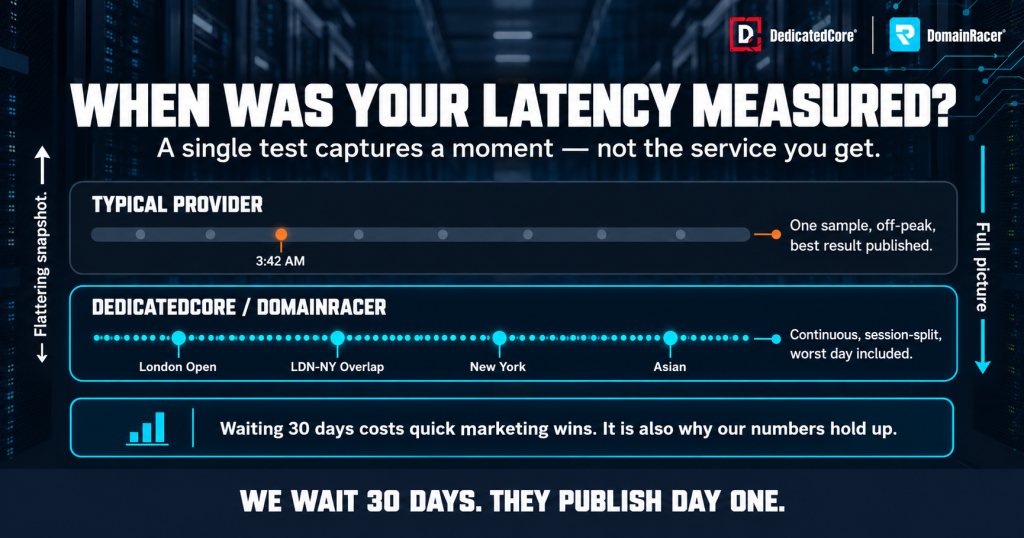
Reliable Forex VPS latency measurements require continuous 30-day testing across trading sessions, not a single off-peak result.
A test is only repeatable if you run it long enough to see a pattern.
- We test all the time, not once in a while, because one test only shows one moment.
- We wait at least 30 days before publishing any number for a broker and location.
- We never publish half-finished data. If a test has run for a week, we say so and publish nothing.
- We start again when a route changes, because the old results describe a road that no longer exists.
Waiting 30 days costs us quick marketing wins. It is also why our published numbers mean something.
Forex VPS Testing: Which Results We Exclude and Why
We throw out some results instead of publishing them, and we tell you when.
- The route changed during testing. The results mix two different roads, so we start over.
- The broker was doing maintenance. Their server was down, which says nothing about our network.
- Our test machine was overloaded. A result from a busy machine measures the machine, so our test servers follow the same preventive maintenance schedule as customer servers.
- Less than 30 days of data. Not enough to show a pattern.
- One strange result with no explanation. We flag it and look into it before publishing anything.
Throwing data away is where a method can be quietly abused. So every removed result is logged with the reason. A provider who cannot tell you what they left out has not really told you what they measured.
Forex VPS Performance: Testing Across Different Market Sessions
Averaging a whole day hides the hours you actually trade, so we split results by session.
- London opens — the busiest time for European markets.
- London and New York overlap — the busiest part of the whole trading day.
- New York session — for brokers whose servers sit at NY4.
- Asian session — for brokers in Tokyo and Singapore.
- Quiet hours — measured for comparison, never published alone.
A provider quoting one number for the whole day is mixing your busiest hours with 3 am. Those feel like different networks, and the difference is exactly where scalping strategies win or lose.
From Network Tests to Trading Platforms: Our Testing Approach
Network tests show the road. They do not show what happens inside your trading software, so we test that separately.
- MT4 and MT5 with a real workload, running several charts and EAs, not an empty screen.
- cTrader and NinjaTrader, because they use computer resources differently.
- Order timing from inside the platform, not just from the network.
- A simulated news spike, when memory, processor, and network all get busy at once.
A clean network test and a struggling platform can look the same to a trader. Low memory can delay orders before they leave the server. DedicatedCore Forex VPS is worth assessing alongside CPU, RAM, and network performance.
Forex VPS Resource Benchmarks: How We Test and Compare Performance
A fast network is wasted if the server behind it slows down. So we test the hardware with the same care as the network.
| What we test | Tool | What we look for | When we act |
| Processor speed | sysbench and stress-ng | Speed on one core and on all cores | More than 10% below the server’s own starting score |
| Memory | stress-ng and memtester | Speed and any errors | Any uncorrected error, or a steady rise in corrected ones |
| NVMe storage | fio | Read and write speed, and delay per request | Delay rising more than 10% above the starting score |
| Sustained load | All three together for 60 minutes | Whether speed holds or drops | Speed that falls as the test goes on |
- Every server gets a starting score when it is first built. We compare it against itself, not against a brochure.
- We test for a full hour, not a few seconds. Many problems only show up when a server stays busy.
- We test again every month, and after any hardware change.
- Heat is watched during the test. A server that slows down when hot has a cooling problem.
Short tests flatter hardware. A driver can look fast for ten seconds and slow down badly after ten minutes. That is why the hour-long test matters most. When a server keeps falling below its starting score, that becomes an upgrade decision rather than a tuning job.
Detecting Noisy Neighbours: The Signals We Monitor
A VPS shares a physical server with other customers. If one of them uses too much, everyone else slows down. We call that a noisy neighbour, and a clean network means nothing if it is happening to you.
- Steal time shows how long your VPS waited while another customer used the processor. We check it for every customer, every minute.
- Memory pressure shows when the server is running short and starting to swap to disk.
- Storage wait shows how long requests queue for the drive.
- Busy-hour checks compare these readings during trading sessions against quiet hours.
| Reading | Warning level | What we do |
| Steal time | Above 5% for 15 minutes | Look into it straight away |
| Steal time | Above 5% during two sessions in a week | Move the noisy workload or move you |
| Memory swapping | Any sustained swapping on the host | Add capacity or rebalance customers |
| Storage wait | Rising above the server’s normal level | Find the cause before customers feel it |
Noisy neighbours hurt traders more than most customers. During a news release, everyone’s EAs get busy at the same moment. You can check steal time on your own VPS too, and our CPU allocation guide shows how.
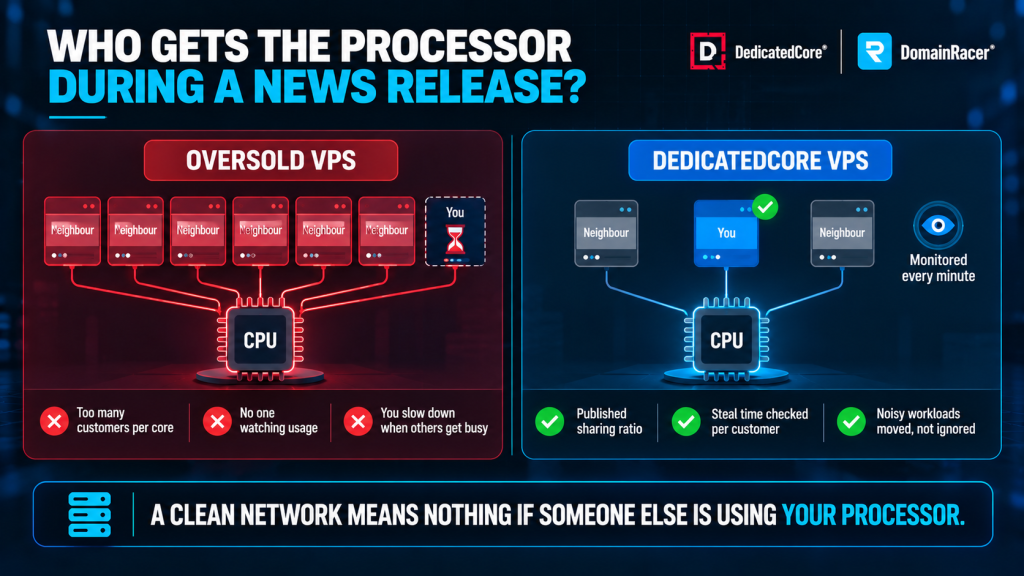
Forex VPS performance depends on CPU resource allocation, steal-time monitoring, and how providers manage competing workloads during high-demand trading periods.
Forex VPS Network Infrastructure: How We Select Providers and Routes
A good network is chosen on purpose, not picked because it was cheapest.
- More than one upstream provider at every location, so losing one does not take you offline.
- Direct connections when possible, allows traffic to be routed straight to the broker’s network without being sent through third parties.
- Automatic failover: if one route fails, then traffic transfers onto another route automatically without anyone having to intervene.
- We name the networks we work with, and each network has a public identifier called an ASN, which we have also published.
- We reject providers who cannot show where their traffic goes or how it recovers from a failure.
Most hosts use whichever provider the data centre offers. We choose routes by how they perform to real brokers. We also test the backup route as often as the main one. An untested backup is just a hope.
Monitoring Forex VPS Routes: How We Detect and Investigate Changes
Routes change without warning, which is the most common reason a latency number quietly goes out of date.
- We track the route all the time and compare it to a saved normal path.
- We watch which networks carry your traffic, so a change of provider shows up straight away.
- We alert on changes to the route itself, not only when latency goes up.
- Any change triggers a fresh test, and we keep the old results for comparison.
Most hosts only discover a route change when a customer complains about fills. We treat it as an event. Your speed changed the moment the route did, and your trading screen gave no warning. An attack on the network can look the same. That is why our DDoS filtering is always switched on.
Inside Our Forex VPS Incident Monitoring and Response Process
Problems are handled by a written process, not by whoever happens to be awake.
| How serious | What it means | How fast we respond |
| Critical | Customers cannot trade | Straight away, named person in charge |
| Major | Service is slow but running | Within 15 minutes |
| Minor | One customer affected | Same business day |
| Planned | Scheduled work | Next maintenance window |
- Problems are spotted automatically, usually before a customer notices.
- One named person runs every serious incident, so nobody wastes time deciding who is in charge.
- Customers get a status update within 15 minutes of a serious problem.
- Every serious incident gets a written report, explaining what happened and what changes.
The full step-by-step process for network attacks is in our incident response SOP.
Choosing a Forex VPS Location: Our Broker-Matching Process
Location follows your broker, not where you live. This is the process we follow.
| Step | What we use | How we decide |
| 1. Find | Your broker’s trading server address | Taken from your platform, not guessed |
| 2. Locate | Where that server lives | LD4, LD5, NY4, TY3, SG1 or FR2 |
| 3. Shortlist | Our servers in that area | Same campus beats same city |
| 4. Test | TCP tests for 30 days | Split by trading session |
| 5. Compare | Our options side by side | By route quality, not just distance |
| 6. Recommend | The best everyday and worst-case result | Never the best-ever number |
Step six is where we differ. We choose based on the bad days, not the best day, because that is what your EA faces during a news release. Traders comparing providers can assess DomainRacer Forex VPS using broker location, route quality, and measured latency.
Forex VPS Performance Reporting: Updates, Data History and Transparency
A method is only half the job. The other half is the data, so here is exactly where it goes.
- The results live on our Forex VPS benchmark page, linked from this document. Nothing is hidden behind a login.
- Each broker and location gets its own row, showing typical, bad-day, and worst-day latency, plus jitter and lost messages.
- Weekly updates on numbers are reflected, with the date of earlier updates provided in each row.
- Historical data can be accessed on 30-, 90-, and 365-day charts to see whether the route is improving or declining.
- You can download the raw test report and check our calculations on your own.
Before the data is ready: the row says “testing, results after 30 days” and shows the start date. We do not fill empty rows with estimates.
What you see when a number gets worse: the new number, not an old better one. A route that slowed down shows as slowed down.
Keeping history is also what makes proper incident reports possible. A provider with only a few days of data cannot tell you what happened last month. That is also why we watch for lost messages all the time, not only when asked.
Forex VPS Low Latency: The Performance Measures We Use
The phrase means nothing without a clear rule, so here is ours. A route counts as low-latency only when it meets all four of these, measured to a named broker:
- The bad-day result stays close to the physical limit for that distance.
- Jitter stays small compared to the typical result.
- Lost messages stay below our published limit.
- The route stays stable for the whole test period.
None of these is a single number. A route with a great average but lots of jumping around still fails. Your strategy feels the jumps, not the average. We explain the four measurements in our latency and jitter guide.
The rule also depends on distance. Four milliseconds from London to Frankfurt is close to the physical limit and genuinely good. Four milliseconds from London to New York is impossible, because thirty is the floor. A number means nothing without knowing how far it travelled.
Our Hardware Operations: From Server Deployment to Secure Decommissioning
Network results only mean something if the servers behind them are healthy. Our hardware standards and quality methodology cover component selection, monitoring, and replacement.
- Hardware buying and build: Only use current-generation processors, NVMe storage, and error-checking memory. All components should be built to one standard setup.
- UK data centres: Tier IV facilities with backup power, backup cooling, and multiple network providers.
- No overselling: we publish how many virtual processors share each physical one, and we keep to it.
- Health monitoring: drives, memory, temperature, and power supplies are watched all the time.
- NVMe drives: Replace them if the drive’s health report shows low spare capacity, as stated in our hardware replacement SLA.
- Hardware age: servers are replaced on a fixed schedule (server-replacement), not when they finally break.
- Retiring old drives: wiped to a recognised standard before they leave the building, as set out in our decommissioning process.
We keep this part short here on purpose. We explain each point in full in the infrastructure methodology. The two pages work together instead of repeating each other. For workloads needing greater control over physical resources, DedicatedCore dedicated servers are another option to evaluate.
Managing Our Forex VPS Tests: Change Logs, Retesting and Corrections
A method that can be quietly edited is not a real commitment.
- Every change to our network or hardware is logged, with the date and the reason.
- Big changes are planned and happen outside trading hours, with notice given.
- Every published number shows its method: where it was measured to, the tool, the time period, and which number it is.
- Corrections replace the original figure, dated, not hidden in small print.
- Disputed numbers get retested, and we publish the result either way.
- Test IP addresses are available, so you can run the checks yourself.
That last point is what makes the rest believable. Anyone can write a method. Giving you the address to test it is what turns words into a promise.
Start with Our Testing Method, Then Explore the Results
The internet’s measurement standard was set in 1998. It is a low bar, and most of this industry still does not clear it. A test should be repeatable, and a number nobody can check is not really a measurement. Everything on this page exists so our numbers can be tested, including by people hoping to prove them wrong.
Our guide to checking a latency figure explains what to verify before choosing a provider. A clean network test and a struggling platform can look the same to a trader. A server running low on memory can delay orders before they leave the server, while an aging network card can cause similar problems under pressure. DedicatedCore and DomainRacer share their testing approach and provide a test address, with a 30-day trial and no setup fees. Compare their testing methods and check the latency for your own trading setup before making a decision.
