
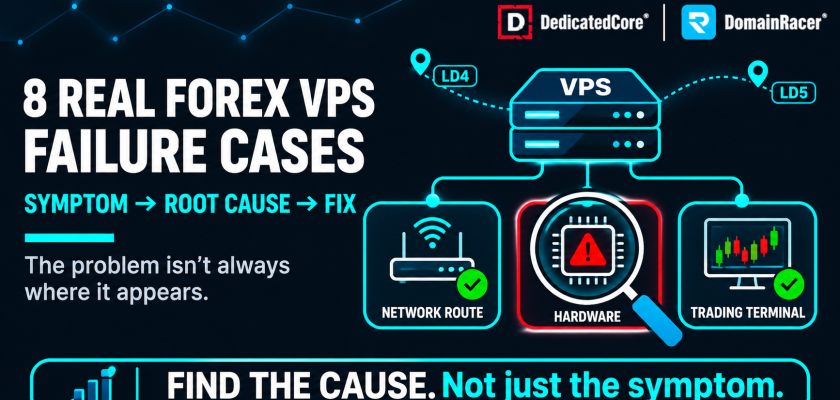
Forex VPS problems can happen even when the server hardware is working properly, as human error and network faults can also cause outages. The Uptime Institute’s global outage data shows that human error contributes to nine out of ten incidents, even though it is not listed as a primary cause. Its 2026 report points to a rise in fibre and connectivity problems, which often take longer to resolve than other faults.
Forex VPS problems are not always caused by the hardware itself. Network faults, configuration changes, software behavior, and resource contention can produce similar symptoms. As a result, identifying the underlying cause can be quite difficult. These cases demonstrate how to trace problems from the trader’s first symptom to the actual root cause. They also illustrate how the right fix can prevent the same issue from recurring
DedicatedCore’s Approach to Identifying and Resolving Forex VPS Failures
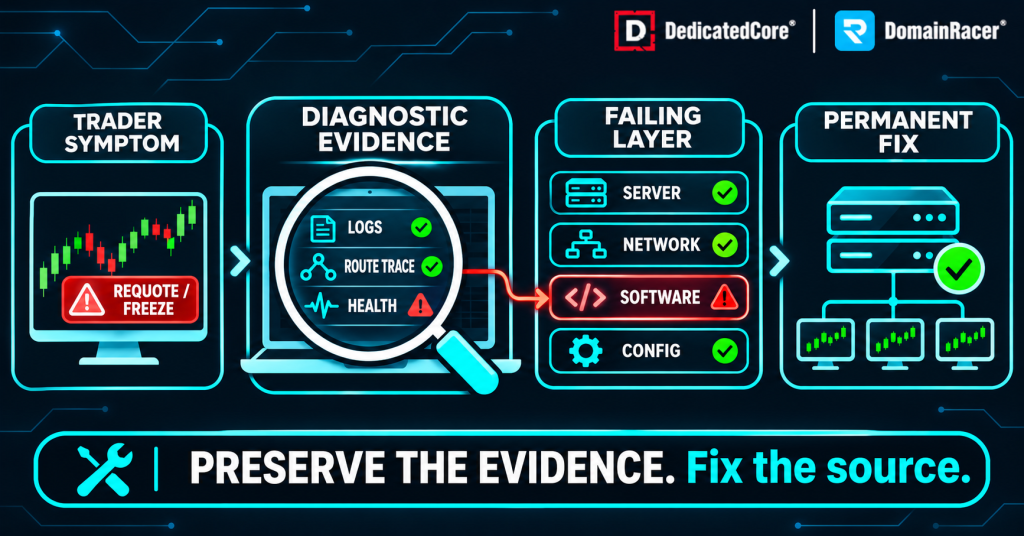
DedicatedCore identifies the failing layer by preserving diagnostic evidence and fixing the root cause of Forex VPS issues.
Every case below was worked through the same way, in the same order, because the order is what saves time.
- Identify the layer first. Is the issue originating from the server, the network, the broker, or the trading software?
- Prior to any modifications, collect evidence; rebuilding erases the evidence necessary for troubleshooting.
- Repair the source of the malfunction, rather than addressing the customer’s problem.
- Make a record, including following up on every unsuccessful attempt made.
Rebuilding a server can restore service, but it may also erase evidence needed to identify the root cause. Before taking that step, Forex VPS diagnostic and troubleshooting steps explain how to investigate the issue and preserve critical evidence. This helps ensure the underlying problem is understood before the server is rebuilt.
Eight Real Forex VPS Cases: From Trader Symptoms to Permanent Fixes
Traders came to us with issues. They faced performance and reliability problems with their previous Forex VPS setups. Once we investigated their setups, the symptoms often turned out to have a different underlying cause than expected. For traders in India comparing hosting options, our India-based trading VPS service at DomainRacer provides another option to consider for their trading environment.
We found the failing layer and fixed it. We used what we learned to improve monitoring, routing, configuration, and infrastructure management.
Case Study 1 — How We Detected and Resolved an NVMe Drive Failure
What the trader saw. Charts took longer to load, and backtests that used to finish in minutes started dragging. A few days later, the server stopped responding during a busy session.
What we found. The drive’s own health report had been raising a warning for weeks. Its spare capacity had fallen below 10 percent, which is the level the NVMe standard treats as a warning.
Why it happened. Trading writes to disk all the time. Tick history downloads, log files, and backtests all wear a drive down. A worn NVMe drive does not stop cleanly. It slows first, which looks convincingly like a software problem.
What we did. We moved the customer to a healthy server, then replaced the drive.
What changed afterwards. Drive health is now checked automatically every day rather than during a support call. When a drive crosses the warning threshold, the replacement timeline and completion window outline the scheduled replacement process and the time allowed to complete the swap. Our hardware risk guide explains why a slowly failing drive should be treated as an impending failure rather than reliable hardware.
Case Study 2: Following a Hardware Fault from Detection to Permanent Fix
What the trader saw. The VPS went offline suddenly during the London session, with no warning at all.
What we found. A memory module had failed, and correctable memory errors had been climbing for several days beforehand.
Why it happened: Memory rarely dies without warning. It usually produces small correctable errors first, and those show up clearly in monitoring if anyone is watching for them.
What we did. We moved the customer to another server within minutes and swapped the module. The replacement part was already on site.
What changed afterwards. Rising correctable errors now trigger a planned swap before the module fails outright. Recovery speed depends heavily on whether the part is already in the building, which is the job of our spare parts stock. Older servers now leave service on a fixed replacement schedule rather than running until they break. Every drive is wiped under our decommissioning process before it leaves the floor.
Case Study 3: Diagnosing Packet Loss and Restoring Reliable Order Execution
What the trader saw. A cluster of requotes inside a two-minute window during a news release, with everything else looking normal. They were preparing to change brokers.
What we found. A burst of packet loss on one upstream route, and the requoted orders lined up exactly with the lost packets.
Why it happened. When a packet carrying an order goes missing, the connection has to send it again. That retry delays one order while every other order in the same second goes through normally. This is why requotes arrive in clusters rather than spreading evenly across a session.
What we did. We moved traffic to a different route, and the requotes stopped immediately.
What changed afterwards. Packet loss is now monitored continuously instead of being checked when someone complains. An attack on the same path produces identical symptoms. So we treat lost packets as an attack warning signal and keep our filtering switched on rather than waiting to trigger it. If it is an attack, our incident response SOP covers the first hour. You can also see the scale of past attacks in our DDoS case study collection.
Case Study 4: Tracing a Network Route Change from Latency to Corrective Action
What the trader saw. Latency to their broker rose noticeably and stayed there, even though nothing had changed on their server.
What we found. An upstream provider had altered the path. Traffic that used to stay near the broker’s LD4 gateway now travelled further to reach it.
Why it happened. Routes change without notice, and providers rarely announce it. Your trading platform gives no warning when it happens. The latency figure you were quoted at signup simply stopped being true.
What we did. Our route monitoring caught the change, so we moved traffic to a better path and re-measured to the broker’s trading server. Traders can also use a broker connection latency test to organize measurements to their broker and compare the results when evaluating VPS connectivity.
What changed afterwards. We now compare the live route against a saved baseline continuously and alert on the route itself rather than only on latency. Because broker proximity depends on the actual network location, not an assumed postcode, how the Slough facilities connect brokers explains the role of these facilities in broker connectivity. To make those comparisons meaningful, published infrastructure thresholds and tests describe the testing process and metrics used to evaluate route quality.
Case Study 5: A Shared Processor Issue Traced from Symptoms to Permanent Fix
What the trader saw. A scalping EA froze briefly at roughly the same time each day, while network speed and memory both looked fine.
What we found. Steal time was high during European morning hours and normal overnight. It measures how long your VPS waits while another customer uses the processor. To assess whether shared CPU resources may be affecting performance, a shared-CPU steal-time test helps traders evaluate potential resource contention.
Why it happened. Trading customers all get busy at the same moment. When a news release lands, every EA on that physical server needs processor time in the same second.
What we did. We moved the workload onto dedicated cores. The advertised core count was lower than before, but nothing else was competing for it.
What changed afterwards. We measure steal time for every customer and act on it before a support ticket arrives. When resource contention shows that the server itself is the bottleneck, rather than the current plan, it signals an upgrade decision that should be based on measured performance. The way processor scheduling and resource allocation can make a server with fewer cores perform faster is set out in a CPU allocation breakdown for trading workloads.
Case Study 6: Diagnosing an EA Failure Caused by Antivirus Quarantine
What the trader saw. The EA disappeared from the chart overnight, with no error, no log entry, and nothing in the Journal tab.
What we found. Antivirus software had flagged the compiled EA file and moved it quietly to quarantine. Compiled EX4 and EX5 files trigger this often, because a scanner has no way of recognising them.
Why it happened: the security software was doing exactly what it was designed to do. It cannot tell the difference between a trading strategy and something genuinely harmful.
What we did. We restored the file and added the MetaTrader folders to the scanner’s exclusion list.
What changed afterwards. These exclusions are now set when the server is built rather than after the problem appears. For additional protection against security-related interruptions, practical safeguards for trading servers set out the hardening steps for trading environments. If an EA disappears with no error message anywhere, the quarantine folder is the first place to look.
Case Study 7: Diagnosing an MT4 Failure Caused by Windows Update
What the trader saw. Positions ran unmanaged across a weekend. The EA had not crashed; it simply was not running.
What we found. Windows had installed an update and restarted the server. The terminal came back, but AutoTrading did not switch itself on again, so the EA loaded and sat idle.
Why it happened. Windows default update settings, which how Windows versions handle updates across releases, are built for an office computer rather than a trading server. No maintenance window had been set to control when restarts happen.
What we did. We moved updates outside market hours, switched on terminal auto-start, and saved a profile so charts and EAs come back after a restart. For a more complete recovery process, an outage recovery procedure covers backup, restoration, and security practices that help maintain trading continuity.
What changed afterwards. These four settings are now applied when the server is built. We test them by restarting the server on purpose, because a recovery setting nobody has tested cannot be trusted. Update timing follows the same rule as our scheduled inspection and servicing cycle for preventive maintenance, which means outside the hours that cost you money.
Case Study 8: DNS Resolution Problems Delayed Order Requests
What the trader saw. Orders took longer than usual to go through, intermittently, with no pattern anyone could identify.
What we found. The server was using a slow DNS resolver. Every new connection to the broker had to look up the address first, adding delay before the order started travelling.
Why it happened. DNS problems never show up in a standard latency test. Most tests connect straight to an IP address and skip the lookup entirely.
What we did. We pointed the server at fast, backed-up resolvers and turned on local caching, so repeated lookups are now instant.
What changed afterwards. DNS settings are now part of our standard build and monitored like any other part of the path. It is a small detail that stays invisible until it costs you a fill.
Common Failure Patterns Across Eight Forex VPS Incidents
Read together, the pattern is clearer than any single incident.
- Six of the eight gave warning signs first, whether rising error counts, slowly declining speed, or a changed network route.
- Only two were genuine hardware failures. The rest came down to settings, monitoring gaps, or the network.
- Every one looked like something else at first. A worn drive resembles slow software, and processor contention resembles a badly written EA.
- Rebuilding would have hidden five of them, leaving a server that worked again and a cause nobody identified.
This is what the Uptime Institute means when it attributes nine out of ten outages partly to human error. It rarely means someone pressing the wrong button. It usually means a check nobody set up, and a warning reading nobody owned. For forex VPS stability, a workload and continuity check organizes those performance readings so a warning has an owner before it becomes an outage.
DomainRacer’s Step-by-Step Process for Identifying Forex VPS Faults
Most of these you can check yourself in a few minutes, without any special tools. For ongoing server care beyond troubleshooting individual incidents, a long-term maintenance routine outlines the maintenance practices that help keep trading infrastructure reliable over time.
| Warning sign | Likely cause | Where to look |
| Slower over weeks, not suddenly | Drive wearing out | Drive health report |
| Freezes at the same time daily | Another customer on your processor | Steal time reading |
| Requotes arriving in clusters | Packet loss | Sustained ping test |
| Latency rose and stayed up | Route changed | Traceroute, compared to before |
| EA gone with no error | Antivirus or a restart | Quarantine folder, update history |
| Orders slow, network fine | DNS lookups | DNS settings, test a lookup |
These symptoms can point to problems beyond a single server component, from network instability and resource contention to configuration errors. Understanding how jitter affects connection consistency can help narrow down the cause, and the notes on what jitter reveals about a connection explain what to look for. Identifying the cause first helps avoid unnecessary restarts or rebuilds.
The Infrastructure and Process Changes We Made After These Cases
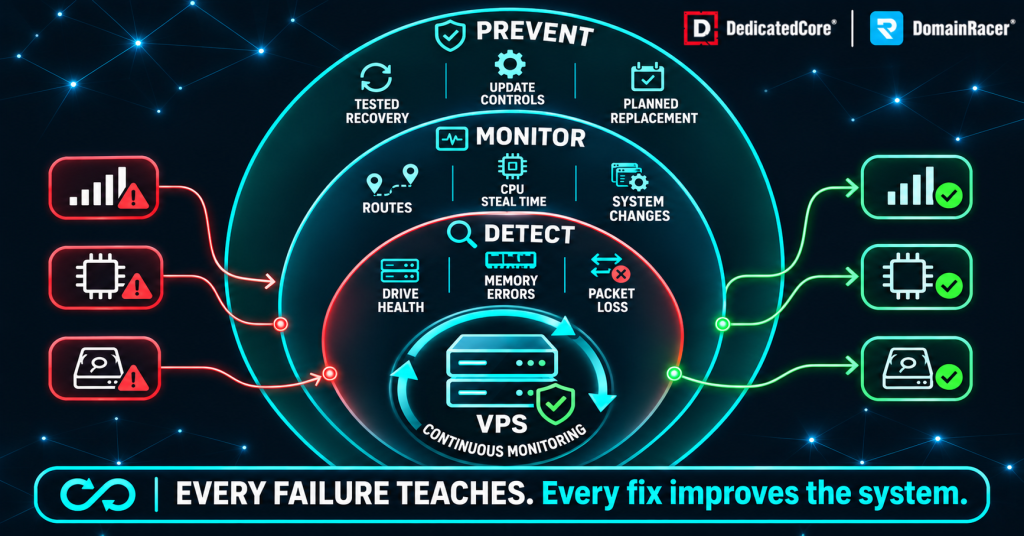
DedicatedCore’s troubleshooting approach identifies the failure source and helps restore reliable trading.
Each case produced a permanent change rather than a one-off fix, which is the only real difference between an incident and a lesson.
- Drive health, memory errors, and network card errors are watched all the time, with set action levels.
- Steal time is measured per customer and acted on before a ticket arrives.
- Routes are compared against a saved normal path, with alerts on the route itself.
- Update windows, terminal auto-start, and antivirus exclusions are set when the server is built.
- Restart recovery is tested, not assumed to work.
- Server age is tracked, because an old server slows down long before it fails. That is why we treat asset value and depreciation as an operations question, not an accounting one.
The action levels behind these recommendations are published in our infrastructure methodology, giving you a clear basis to evaluate how incidents are handled. These standards work alongside the four areas of support coverage, which cover monitoring, downtime response, and maintenance. Together, they help make our published commitments measurable and accountable.
Expert Answers to Common Forex VPS Failure Questions
We’re often asked why Forex VPS servers fail, what causes Expert Advisors or trading platforms to stop unexpectedly, and how these issues can be prevented. Based on our experience, we explain the root causes behind real incidents and the practical fixes that help traders maintain stable, reliable trading environments.
Why did my EA stop with no error message?
We check three things in order, because this kind of failure rarely leaves a log entry. First, whether AutoTrading switched itself off after a restart. Second, whether antivirus moved the EA file to quarantine. Third, whether a licence check failed because the server’s IP address changed.
None of those three produces an error, which is what makes them frustrating to diagnose. A genuine crash leaves a trail in the logs, whereas a configuration change leaves nothing at all. Alongside these recovery settings, MT4 platform tuning practices offer practical ways to improve trading platform performance. That is why we apply update windows, auto-start, and antivirus exclusions at build rather than after a customer has lost a weekend.
Should my host rebuild the server when something breaks?
We consider the rebuilding solution at the end of the process rather than at its beginning. At least five of the cases mentioned above could have been resolved using the rebuilding solution. In those situations, the problems would only return over time.
At the same time, restarting the server is an acceptable option once the Journal entry has been saved. First, confirm the layer is correctly identified and that the issue is an accidental fault that needs a clean installation.
How do I know whether the problem is my host or my broker?
Let’s look at the simplest test first, i.e., logging in from a different device over a different internet connection. If you can access your trading account there but not via the VPS, then the problem may lie with the server or its connectivity issues. If you can’t access your account from either location, the problem likely lies with the trading company or your account.
Then try a second broker from the same VPS. If every broker fails, it is the server or its IP range, and if only one fails, the problem is on their side. Both tests take about five minutes and tell you which support team to contact, which is usually the slowest part of the whole process.
Learn From Real Forex VPS Incidents Before They Become Your Problem
Six of these eight cases gave warning before anything broke. A drive slowed over several weeks, memory errors climbed over several days, and a route changed with no notification at all. In every case, the failure was not the first event, only the first one anybody noticed, and a five-minute fault-finding routine helps trace it back to the start.
Ask your provider what they monitor and what happens when a warning appears. DedicatedCore and DomainRacer monitor key infrastructure signals and act before they disrupt trading. Traders looking for a setup built around reliable connectivity and consistent performance can compare the outage-aware hosting plans before choosing a configuration. Try the service with a 30-day trial and no setup fees.

